


Your workspace speaks to your brain before you sit down.
Walk into a disorganized, dirty desk and your brain instantly becomes heavy. Step into a tidy, organized space and something changes — you feel ready, focused, in control.
That’s not just a feeling. That’s science.
One study, out of Princeton University, concluded that physical clutter competes for your attention and limits your capacity to focus. A tidy home office isn’t just aesthetically pleasing. It’s perhaps the most powerful productivity tool you have but never realize — if only you knew how to use it.
This post outlines 10 clean home office productivity setups for the maximum amount of work done — each to minimize noise, eliminate distractions, and help you do your best work every day. Whether you’ve got a whole spare room to dedicate, or simply a quiet corner of an existing space, there’s a configuration in here for you.
Let’s get into it.
What a “Clean” Home Office Looks Like — And Why It’s Important
Before jumping into the setup details, it may help to have an idea of what “clean” means in a workspace context.
Your home office won’t be clean just because it’s neat. It’s about intentional design. It means:
- Every object on your desktop serves a function
- Wires are hidden and tidy
- Surfaces are mostly clear
- The color palette is soft and muted
- Light source is uniform and comfortable on the eyes
- Storage is built into the space, not stacked on top of it
When the different elements work in concert, your brain stops using energy on background noise and instead directs it toward actual work.
Here’s a brief overview of the impact clutter has on performance:
| Environment | Focus Level | Stress Level | Daily Output |
|---|---|---|---|
| Cluttered desk | Low | High | Decreased |
| Partially organized | Medium | Medium | Average |
| Fully clean setup | High | Low | Maximized |
Now let us explore the setups that make this happen.
Setup 1 — The Minimal All-White Desk Station
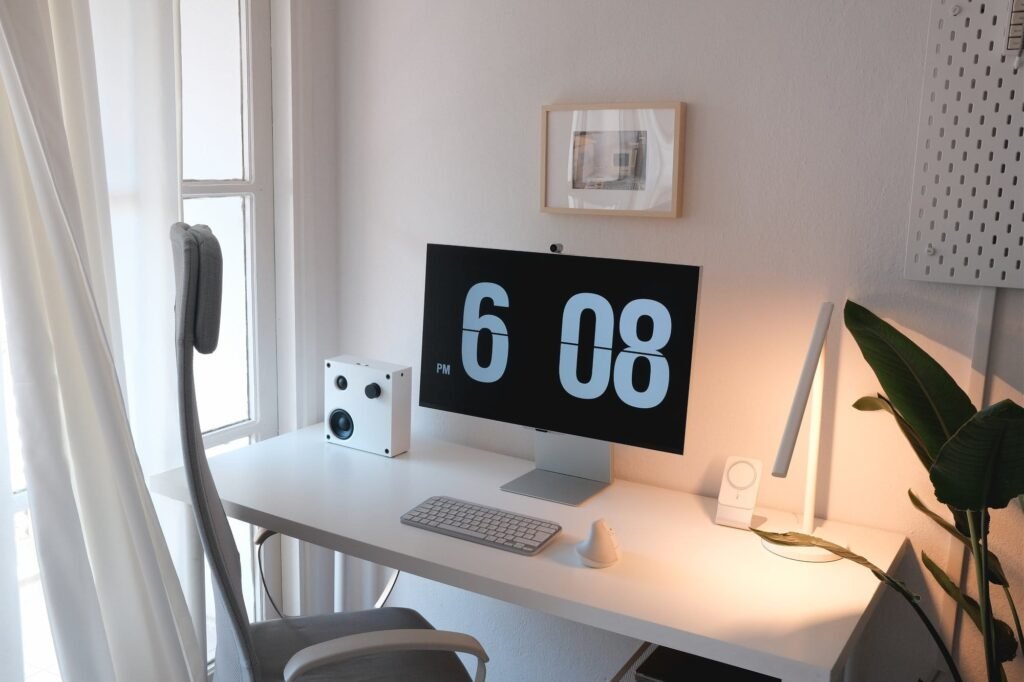
Best for: Deep-focus workers, writers, remote employees
White isn’t merely a color preference. It’s a productivity strategy.
An all-white desk setup — a white desk, white shelves and white accessories — creates visual calmness and lessens mental stimulation. When there’s nothing else fighting for your visual attention, your brain locks in more quickly.
How to Build It
Begin with a desk surface that is white or light wood. Keep fewer items on your desk — only your monitor or laptop, one notebook, and one pen holder. For anything that you don’t want out in the open, add white or light grey storage boxes on shelves.
Key items for this setup:
- White desk (IKEA ALEX or something similar)
- White monitor riser or arm
- Wireless white keyboard and mouse
- White or light grey cable management box
- Small potted plant (just one green plant adds richness without chaos)
The One Rule That Ties It All Together
Nothing stays on the desk for long unless you use it every day. The rest gets put away in a drawer, on a shelf, or into a storage box.
This one rule prevents the all-white setup from becoming an all-white mess in under a week.
Setup 2 — The Power Station with Dual Monitors
Best for: Coders, designers, project managers, and video editors
Two screens. One clean setup. Maximum output.
A dual monitor setup feels like it would be cluttered — but when done correctly, it’s one of the cleanest and most productive setups out there. According to research from the University of Utah, dual monitors can increase productivity for tasks involving multiple windows or documents by as much as 44 percent.
Making Dual Monitors Look Clean
The key is a dual monitor arm. Rather than two separate stands consuming desk space, a single arm supports both displays and lifts them off the desk altogether. Your surface stays open and usable.
What You’ll Need
| Item | Purpose | Approx. Cost |
|---|---|---|
| Dual monitor arm | Frees up desk surface | $40–$120 |
| Cable raceway or spine | Hides all monitor cables | $10–$30 |
| Under-desk cable tray | Sorts power strips and cords | $15–$35 |
| Desk pad / mat | Anchors the look, protects surface | $20–$50 |
| Wireless peripherals | Eliminates keyboard/mouse cables | $30–$100 |
With all cables hidden and screens suspended from an arm, a dual monitor setup looks sharp, intentional, and clean.
Setup 3 — The Biophilic Desk (Dress It Up With Some Nature)
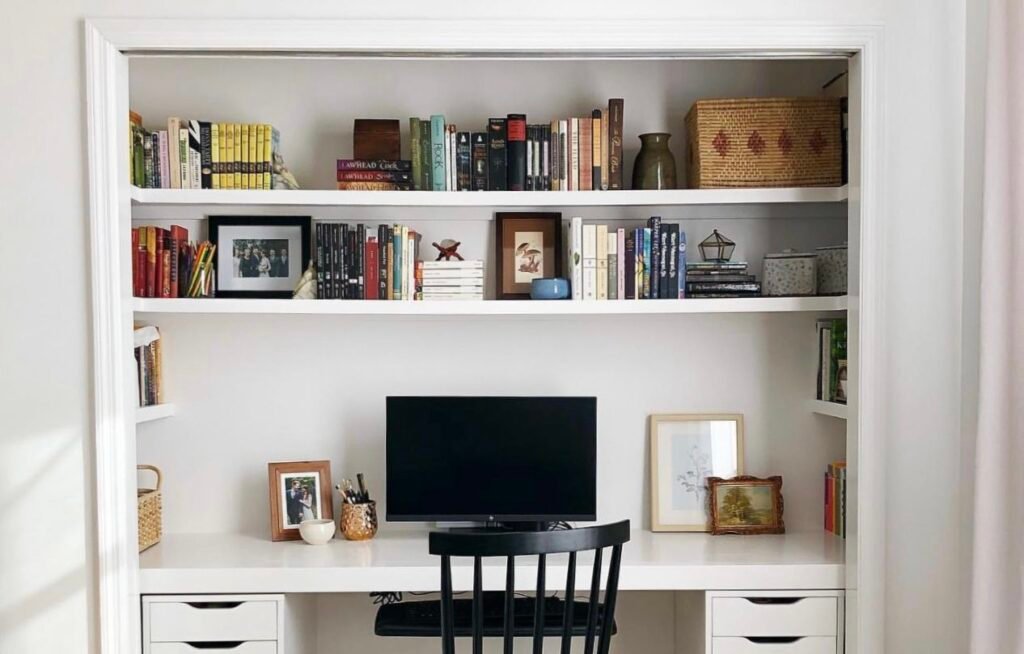
Best for: Creative professionals, everyone who finds sterile spaces draining
Biophilic design works to integrate nature into your environment. In a home office, it means bringing natural elements — plants, wood textures, natural light — into your workspace.
It works pretty well for productivity, surprisingly.
Research published in the Journal of Experimental Psychology found workers reporting 15 percent more wellbeing and 6 percent more productivity when working in environments with natural elements, compared to lean, minimal spaces void of nature.
Building Your Biophilic Desk
You don’t have to make your office a greenhouse. A handful of intentional choices make a world of difference.
What to add:
- 2–3 small desk plants (pothos, succulents or snake plants are low maintenance)
- A wooden desk surface or a wood-toned desk mat
- Storage made of natural fiber (woven baskets or wooden trays)
- If you can, put your desk by a window for actual daylight
- Use warm-toned lighting in the evenings
Keep It Clean, Not Crowded
The key is balance. Plants bring life, but too many become clutter. Keep 2–3 max on or near the desk. Keep them small and well-maintained.
A biophilic setup feels warm, creative and grounded — a far cry from cold, sterile workspaces that drain energy by noon.
Setup 4 — The Clean Build Standing Desk
Best for: Health-conscious workers, back pain sufferers, long-hour employees
Sitting down for eight hours in a row isn’t just uncomfortable — it’s genuinely bad for your health and your ability to concentrate. A clean standing desk setup kills two birds with one stone.
Electric standing desks allow you to transition between sitting and standing during the day at the press of a button. The movement helps keep your energy high, your back happy and your mind engaged.
How to Set Up the Cleanest Standing Desk
Cable management is the greatest enemy of a tidy standing desk. As the desk moves up and down, cables have to move with it — and if they’re not managed properly, you get a tangled mess every time you adjust heights.
The solution:
- Use a cable spine or cable sleeve that runs down the desk leg
- Leave a short, flexible cable between the monitor arm and the desk
- Use a Velcro cable tie bundle under the desktop for power strips and adapters
Recommended Additions
| Item | Why It Helps |
|---|---|
| Anti-fatigue mat | Reduces leg fatigue when standing |
| Monitor arm | Adjusts height with the desk |
| Laptop stand with riser | Keeps screen at eye level while standing |
| Foot rest bar | Supports posture while sitting |
| Drawer unit on wheels | Moves with you, keeps supplies organized |
A clean standing desk setup is one of the best long-term investments for productivity. Both your body and your output improve.
Setup 5 — The Dark Mode Desk (Dark & Dramatic)
Best for: Night owls, programmers and gamers working from home
A bright, white workspace isn’t for everyone. Some people work better in a darker, moodier environment — and that is perfectly valid.
A dark mode desk setup relies on deep tones — black, charcoal, dark wood, navy — to provide a focused, dramatic atmosphere. Done right, it looks gorgeous and performs even better.
How to Achieve a Clean Dark Setup
Dark setups can quickly turn chaotic if not handled well. The secret is keeping surfaces just as clear as any light setup — the dark tones only make it feel more intense.
Core elements:
- Black or dark walnut desk surface
- Dark grey or black monitor setup
- Subtle RGB or warm amber lighting (so it doesn’t feel like a cave)
- Black cable management accessories (they blend into dark surfaces)
- Minimal decor — one or two intentional items only
Lighting Is Everything
In a dark setup, lighting does much of the heavy lifting. A warm bias light behind the monitor reduces eye strain and lends a polished, professional look to the setup.
Steer clear of cool blue overhead lights — they don’t work with darker tones and feel harsh. Use warm or amber LEDs at low brightness only.
Setup 6 — The L-Shaped Clean Command Center
Best for: Entrepreneurs, managers and multi-taskers with multiple active projects
An L-shaped desk offers two different work zones in one setup. One side for your main computer work, one side for notes, planning, calls or creative work.
This is one of the most functional and impressive clean home office productivity setups you can build, once kept tidy.
Keeping an L-Shaped Setup Clean
The more surface area you have, the more room there is for clutter to creep in. The solution is zones — each leg of the L has a clear, defined purpose and only holds things related to that function.
Zone breakdown:
| Zone | Purpose | What Goes Here |
|---|---|---|
| Main side | Computer work | Monitor, keyboard, mouse, notepad |
| Secondary side | Planning & calls | Planner, headset, notebook |
| Shared corner | Storage access | Small drawer unit or file tray |
What to Avoid
- Letting the secondary side become a dumping ground
- Piling things in the corner junction
- Using the surface as a docking station for personal devices
When both sides are intentional, the L-shaped setup becomes a genuine productivity powerhouse.
Setup 7 — The Floating Shelf Workspace
Best for: Small rooms, renters, minimalists seeking more vertical storage
When you’re low on floor space or desk surface, you go up.
A floating shelf workspace uses wall-mounted shelves to build your storage and organization upward — above your desk. The desk itself remains almost empty while everything you need sits at eye level or just above it.
How to Layer Your Floating Shelf Setup
Consider your workspace in levels:
- Top shelf: Books, binders, rarely used items
- Middle shelf: Speakers, small plants, calendar, frequently used items
- Desk surface: Screen, keyboard, mouse, and one notebook
- Under-desk: Cable tray and small drawer unit
Clean Shelf Styling Tips
Mix functional items with a few simple decor objects — a small plant, a candle, a framed photo. Odd numbers are more visually appealing on shelves (style in threes).
Avoid packing shelves too tightly. Negative space — the empty spots on the shelf — really helps the overall display feel organized and purposeful.
Setup 8 — The Dedicated Zoom-Ready Office
Best for: Remote workers, consultants, coaches and anyone on video calls every day
If you are on video calls every single day, your background is part of your professional brand. A tidy, well-lit, uncluttered background tells clients and colleagues you’re serious before you’ve said a word.
Building a Zoom-Ready Clean Office
The three most important things:
- Lighting — A ring light or key light in front of you goes a long way. You want your face brightly lit and the background a little softer.
- Background — Make it clean and deliberate. Stick with a simple bookshelf, a neutral wall or a minimalist arrangement with one or two decorative items.
- Camera position — Your camera should be at eye level. Prop your laptop up on a riser or use a monitor with an integrated or clip-on camera. Looking down into a camera is unflattering and unprofessional.
Zoom-Ready Desk Checklist
| Element | Ideal Setup |
|---|---|
| Lighting | Key light or ring light in front, bias light behind monitor |
| Background | Tidy shelf, neutral wall, subtle decor |
| Camera height | Eye level |
| Audio | External mic or good headset |
| Cable visibility | Zero — none visible on camera |
A tidy, Zoom-ready office makes every call feel confident and polished.
Setup 9 — The Paperless Digital Office
Best for: Organized professionals, anyone drowning in paper clutter
Paper is the enemy of a clean home office. Stacks of documents, notebooks, sticky notes and printed emails doom any desk to chaos within days.
The paperless digital office does away with this entirely.
Going Paperless Without Losing Anything
The switch may sound intimidating, but it’s more straightforward than it sounds.
Tools that replace paper:
- Notion or Obsidian — Substitutes for notebooks and to-do lists
- Google Drive or Dropbox — Replaces physical file folders
- DocuSign or Adobe Sign — Eliminates printed contracts
- Remarkable 2 or iPad with Apple Pencil — Replaces handwritten notes digitally
- Scanner app (e.g. Adobe Scan) — Digitizes any paper that does come in
What the Desk Looks Like
Without paper on the desk, the surface opens up dramatically. Your setup becomes: screen, keyboard, mouse and perhaps a digital notepad. That’s it.
Clean, fast, and completely functional.
Setup 10 — The Creative Corner Studio
Best for: Graphic designers, content creators, artists, photographers
Creative workers have specific needs — they may want reference materials, color tools, drawing surfaces and inspiration boards close at hand. But keeping all of that organized is not straightforward.
A clean creative corner studio arranges all of these tools deliberately, so inspiration is always close by without chaos taking over.
Structuring a Clean Creative Setup
Split the area into three zones:
- Digital zone — Your screen, tablet or drawing pad
- Reference zone — Mood board, inspiration images, color swatches (on a wall-mounted board, not scattered on the desk)
- Supply zone — Pens, markers, tools stored in a clean organizer rather than lying around
The Inspiration Wall
Instead of pinning things above your desk randomly, create a dedicated inspiration wall using a corkboard, pegboard or magnetic board. Everything visual lives there — not on your desk.
This keeps your creative energy accessible without crowding the workspace.
The Clean Home Office Productivity Setup Cheatsheet
Here’s a complete side-by-side comparison of all 10 setups:
| Setup | Best For | Key Feature | Difficulty to Build |
|---|---|---|---|
| All-White Minimalist | Deep focus | Calm visual environment | Easy |
| Dual Monitor Power Station | Multi-taskers | 44% productivity boost | Medium |
| Biophilic Desk | Creatives, energy boost | Nature elements | Easy |
| Standing Desk Clean Build | Health-focused | Sit-stand flexibility | Medium |
| Dark Mode Desk | Night owls, programmers | Dramatic focus atmosphere | Medium |
| L-Shaped Command Center | Entrepreneurs | Two dedicated work zones | Medium |
| Floating Shelf Workspace | Small spaces | Vertical storage | Easy |
| Zoom-Ready Office | Video call workers | Professional background | Easy |
| Paperless Digital Office | Paper haters | Zero clutter | Medium |
| Creative Corner Studio | Designers, creators | Organized inspiration | Medium |
5 Habits That Keep Any Setup Clean Long-Term
Building a clean setup is only the first part of the work. Most people fail at keeping it clean.
1. The Daily 5-Minute Reset At the close of each workday, take five minutes to put everything back in its place. It keeps little messes from becoming big ones.
2. Inbox Zero on Your Desk Treat your desk like your email inbox. Nothing remains on it without justification. Process items and put them away the same day.
3. One In, One Out Whenever you add something new to your office — a new mug, a new book, a new gadget — let something old go. This avoids slow accumulation over time.
4. Weekly Cable Check Cables migrate. Once a week, take two minutes to ensure all cables are tucked, clipped and out of sight.
5. Monthly Deep Clean Once a month, remove everything from your desk entirely, wipe it down, and return only what belongs there. This resets the space and your mindset.
For more ideas on building and maintaining a productive workspace, visit Remote Work Desk Setup — a dedicated resource for home office inspiration and desk configuration tips.
FAQs About Clean Home Office Productivity Setups
Q: What is the best clean home office setup for small spaces?
For small spaces, the floating shelf workspace or all-white minimal workstation works best. Both leave the desktop nearly completely clear, using wall and vertical space for storage.
Q: How can I stay tidy when my home office is full of supplies?
Put supplies out of sight with closed storage — drawers, boxes and cabinets. Only leave out what you use every day on or near the desk. Label storage bins so everything has its rightful home.
Q: Does desk color actually affect productivity?
Yes. Studies in color psychology have indicated that white and light neutrals encourage calm focus, greens foster creativity and minimize eye strain, and darker tones can heighten intensity and concentration for certain personality types.
Q: What’s the best way to manage cables in a clean home office?
Use a combination of cable raceways (adhesive trunking that runs along walls or the edges of desks), under-desk cable trays and Velcro cable ties. Wireless peripherals also eliminate a significant source of desk cable clutter. According to Wirecutter’s home office guide, cable management is one of the highest-impact, lowest-cost upgrades you can make to any workspace.
Q: Is a clean desk truly more productive, or is it just for show?
It’s genuinely about performance. Research from Princeton and the University of Minnesota found that organized workspaces lower cognitive load, enhance decision-making and increase output — not just aesthetics.
Q: How long does it take to set up a clean home office?
A basic clean setup can be done in a weekend. More elaborate setups — such as an L-shaped command center or a standing desk build — could take a full weekend plus a few evenings for cable management and organization.
Q: What should I spend money on first when building a clean home office?
Prioritize in this order: a good chair, proper lighting, cable management, and then a proper desk surface. Many people pay for aesthetics first and forget the fundamentals that actually drive productivity.
The Bottom Line — A Clean Space for a Clearer Mind
A tidy home office is not a luxury. It’s a competitive advantage.
Your brain works differently when your space is organized, intentional and free of visual noise. You start quickly, concentrate longer and finish strong.
Each of the 10 setups in this guide takes a different approach — some are minimal and white, others dark and bold, some built for video calls and some for creative output. But they all have one thing in common: they are purposeful.
Choose the setup that suits how you work and your space. Then begin with one or two changes — better cable management, a cleared desk, a monitor arm. Let the small victories build momentum.
You don’t need a perfect office to work productively. You just need a clean one.








