


Less is more. That’s the basic concept behind minimalism — and, as it turns out, one of the most potent productivity principles you’ll ever use in your home office.
If your desk is cluttered with cables, random objects, and visual noise, your brain has to work that much harder just to filter it all out. That mental effort adds up. It saps your energy before you’ve even begun your first task.
A minimalist home office turns that equation on its head. Clean surfaces. Intentional tools. A space that screams “let’s get to work” as soon as you sit down.
This article covers 7 practical and stylish minimalist home office productivity setups genuinely designed to help you do your best work. Whether you’re working in a small apartment or a dedicated room, there’s a setup here to fit your life.
The Ideal Pair: Minimalism and Productivity
Before diving into the setups, let’s talk about why minimalism works based on science.
Clutter in your physical environment competes for attention, according to a Princeton University study. The more stuff you can see, the more your brain has to work — even if you’re trying to concentrate on something else entirely.
Minimalist workspaces lower that cognitive load. They help your brain remain in “work mode” without constantly getting hijacked by distractions.
Here’s the simple version: a cleaner desk = a clearer mind = better output.
And the best part? You don’t have to go broke or redecorate your entire home. Small, deliberate adjustments to your workspace can pay off big.
What Makes a Home Office Truly “Minimalist”?
Minimalism isn’t about an empty white room with absolutely nothing in it. That’s a common myth.
A true minimalist home office has:
- Only what you need — no extra clutter on the desk or shelves
- A neutral, soothing color palette — whites, grays, beiges, or natural wood tones
- Clever storage — items are hidden away, not exposed on the surface
- Clean cable management — no wires in sight
- A single point of focus — the monitor or a piece of wall art
It is a space that feels deliberate. Every object earns its spot.
Setup 1: The Bare-Bones Desk Setup
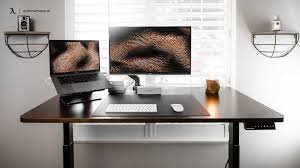
Best for: Deep focus workers, writers, and coders
This is the most minimalist setup on this list. And it’s also the most potent for pure, uninterrupted focus.
The rule here is straightforward: if you don’t use it every single day, it doesn’t live on the desk.
What the Bare-Bones Setup Includes
- One laptop or monitor (no dual screens unless absolutely necessary)
- A wireless keyboard and mouse (no cables on the surface)
- One notebook and one pen
- One small plant — or nothing at all
That’s it. Nothing at all on the surface of the desk.
The Psychology Behind It
With nothing to look at except your work, your brain must confront it. There’s no phone to glance at, no clutter to fidget with, no visual stimuli pulling your eye elsewhere.
Writers, programmers, and deep thinkers alike consistently report that the bare-bones setup gets them into a flow state faster than any other configuration.
Best desk: A simple solid wood or matte white surface without any shelves or built-in organizers. Keep it flat, clean, and wide.
Setup 2: The Monochrome Minimalist Station
Best for: Design professionals, remote workers, and creatives
Monochrome doesn’t mean boring. It means intentional.
This setup employs a single consistent color palette throughout all components of the workspace — desk, chair, accessories, even the wall behind it. Everything matches. Everything feels deliberate.
Building a Monochrome Setup
Pick one palette and commit to it. Your monitor stand, mouse, keyboard, cable organizer, and even your notebook cover should all live within that palette.
| Color Palette | Mood It Creates | Best Suited For |
|---|---|---|
| All white | Clean, clinical, focused | Writers, researchers |
| Black + charcoal | Bold, serious, powerful | Developers, executives |
| Warm beige + wood | Calm, organic, grounded | Creatives, coaches |
| Cool gray + silver | Modern, efficient, sleek | Tech workers, analysts |
Why This Works for Productivity
Visual harmony reduces mental friction. When everything in your workspace is uniform, your eye doesn’t snag on anything. You just… work.
It also adds a professional and curated feel to the space, which can help increase motivation. You feel like you’re in a legitimate workspace — even if that’s just a corner of your bedroom.
Setup 3: The Floating Shelf Minimalist Office
Best for: Small rooms and apartments where floor space is limited
Floor space is precious. Wall space is free. This setup makes the most of that.
The design uses a series of wall-mounted shelves paired with a fold-down or wall-mounted desk surface, creating an entire workstation while taking up no additional floor space beyond the chair.
The Layout Breakdown
[WALL SHELF — TOP]    One plant + one small speaker
[WALL SHELF — MID]    A few books stacked neatly (3–5 maximum)
[DESK SURFACE]        Laptop + wireless keyboard only
[BELOW DESK]          Chair tucks fully underneath
Everything sits on the wall. The space under the desk remains uncluttered. This makes the room feel open and airy even when it isn’t.
The Minimalist Rule for Shelf Styling
Keep shelves intentional. Everything on a visible shelf should be one of the following:
- Functional — a book you actually use
- Meaningful — an object that truly inspires you
- Natural — a plant, a stone, or a wooden object
If it doesn’t meet one of those three criteria, it goes in a drawer or a cabinet — not on display.
Setup 4: The Single-Monitor Productivity Powerhouse
Best for: Focus-driven professionals who want maximum output
There’s a popular belief that more monitors = more productivity. But research offers a more nuanced story.
A study published in the Journal of Experimental Psychology found that task-switching — something dual monitors encourage — can cut productivity by as much as 40%. Each time you glance at a second screen, your brain has to reorient itself.
A single, strategically placed monitor makes you focus on one task at a time. That single-tasking leads to deeper work, fewer mistakes, and better output.
How to Create the Ultimate Single-Monitor Setup
- Use a 27-inch monitor at eye level (with a monitor arm, not a stand)
- Position it an arm’s length away from your face
- Place it so a window behind or beside it doesn’t create glare
- Keep the area around it completely clear
Add a Monitor Arm — It Changes Everything
A monitor arm raises your screen above the desk surface, freeing up the space beneath it. That empty space underneath your monitor is now usable for your keyboard, notebook, or simply left clear. It also makes the desk look dramatically cleaner.
For more inspiration on building a distraction-free, ergonomic desk station, visit Remote Work Desk Setup — a dedicated resource for remote workers who want a smarter, cleaner workspace.
Setup 5: The Paper-Free Digital Minimalist Setup
Best for: Professionals who want a fully digital, clutter-free workflow
Paper is one of the biggest enemies of a minimalist desk. Sticky notes, printed documents, notebooks, receipts — they accumulate quickly and can transform a tidy workspace into a cluttered one within days.
The paper-free setup eliminates all of it. Every note, task, document, and idea lives digitally.
The Digital Minimalist Toolkit
| Tool Type | Recommended Options | Purpose |
|---|---|---|
| Note-taking | Notion, Obsidian, Apple Notes | Replace notebooks and sticky notes |
| Task management | Todoist, Things 3, TickTick | Replace paper to-do lists |
| Document storage | Google Drive, Dropbox | Replace printed files |
| Digital writing | iPad + Apple Pencil | Replace physical writing entirely |
| Password management | 1Password, Bitwarden | Replace sticky note passwords |
What Stays on the Desk
Your desk requires very little when you go paper-free:
- A laptop or monitor + keyboard
- A wireless charger (for your phone and earbuds)
- One small tray for a single daily item (your glasses, a lip balm — one thing)
No notebooks. No pens. No paper. Just a screen, keyboard, and clear space.
The Mental Shift Required
Going paper-free feels strange at first. We are wired to write things down physically. But after a week or two, most people find that digital note-taking is faster, more searchable, and far less cluttered.
The transition pays off in desk clarity — and mental clarity.
Setup 6: The Natural + Biophilic Minimalist Setup
Best for: Anyone who feels stressed, anxious, or burned out at their desk
Biophilic design is the practice of bringing nature into your environment. It sounds fancy, but it’s really very simple: bring wood, plants, natural light, and organic textures into your workspace.
The research on this is striking. A study from the University of Exeter found that workers with natural elements in their office reported 15% higher productivity and significantly lower stress compared to those in plain, featureless spaces.
So this setup takes minimalism and adds one powerful ingredient: nature.
The Four Elements of a Biophilic Minimalist Desk
1. A Wood Desk Surface Natural wood grain (even a wood-look laminate) is warmer and more calming than glass or metal. It gives the space a sense of life without adding visual clutter.
2. One or Two Small Plants A pothos, snake plant, or small succulent on the corner of the desk adds organic color without becoming a distraction. Keep it small. One or two maximum.
3. Natural Light Arrange your desk to face or be near a window. If natural light isn’t available, a full-spectrum LED lamp simulates daylight effectively.
4. Neutral, Earthy Tones Swap stark white accessories for warm cream, sand, or terracotta tones. These colors are visually soothing and reduce eye strain during long work sessions.
What to Avoid
Don’t go overboard. Once you have five plants, driftwood, pebble trays, and woven baskets scattered across your desk, minimalism is out the window. Two or three natural touches are more than enough.
Setup 7: The Capsule Home Office Setup
Best for: Minimalist thinkers who want a complete, curated system
The “capsule wardrobe” concept — owning fewer, higher-quality clothes that all work together — has a perfect equivalent in the home office world.
A capsule home office means owning fewer, better-quality tools that all work seamlessly together. No redundancy. No extras. Just a tight, intentional set of items that covers every work need.
The Capsule Office Inventory
| Category | Item | Why This and Nothing Else |
|---|---|---|
| Computer | Laptop (MacBook or equivalent) | Portable, powerful, no tower needed |
| Display | One external monitor (27″) | Larger screen when needed |
| Input | One wireless keyboard + mouse | Clean desk, zero cable clutter |
| Audio | Noise-canceling headphones (1 pair) | Focus + calls all in one place |
| Lighting | One LED desk lamp | Task lighting, no overhead needed |
| Storage | One small drawer unit | Everything hidden, nothing displayed |
| Connectivity | One docking station | One cable connects everything |
| Seating | One ergonomic chair | Back health = work endurance |
Eight categories. One item each. That’s the whole office.
Why Fewer, Better Items Win Every Time
Cheap, low-quality tools fail more often, frustrate you more, and end up being replaced — which costs more in the long run. The capsule office is rooted in the belief that quality beats quantity every single time.
When every tool you own is reliable and enjoyable to use, your workspace becomes a place you genuinely want to spend time in.
The Minimalist Setup Decision Guide
Not sure which setup is right for you? Use this quick guide:
| Your Situation | Best Setup to Try |
|---|---|
| You get distracted easily | Setup 1: Bare-Bones Desk |
| You care about how your space looks | Setup 2: Monochrome Station |
| You live in a small apartment | Setup 3: Floating Shelf Office |
| You want to do deeper, focused work | Setup 4: Single-Monitor Powerhouse |
| Your desk is always covered in paper | Setup 5: Paper-Free Digital Setup |
| You feel stressed or burned out | Setup 6: Natural + Biophilic Setup |
| You want a complete, curated system | Setup 7: Capsule Home Office |
6 Minimalist Habits That Keep Your Setup Clean Long-Term
A great setup means nothing if it descends back into clutter within two weeks. These six habits will keep your minimalist home office looking — and performing — at its best.
1. The Daily Clear Spend two minutes at the end of every workday clearing your desk back to zero. Nothing on the surface except what permanently belongs there.
2. One In, One Out Every time you bring a new item into your workspace, remove something else. This keeps the total item count stable over time.
3. Weekly Cable Check Cables tend to multiply. Once a week, spend five minutes re-routing and re-tucking any cables that have crept out of place.
4. Monthly Shelf Edit Once a month, look at every item on your shelves and ask: “Do I actually use or need this?” If the answer is no, it moves out.
5. Digital Declutter Fridays At the end of every Friday, clear your desktop folders, delete files you no longer need, and organize downloads. A clean digital space supports a clean physical one.
6. Buy Intentionally Before buying any new desk accessory or tool, ask: “Does this replace something I already have, or is it just adding more?” If it’s just adding more, leave it.
Real Numbers: What Minimalist Workspaces Actually Do for Output
Here’s a snapshot of what research and workplace studies have found about clean, purposeful workspaces:
| Study / Source | Finding |
|---|---|
| Princeton Neuroscience Institute | Clutter reduces the ability to focus and process information |
| University of Exeter | Natural elements in a workspace boost productivity by 15% |
| Journal of Experimental Psychology | Task-switching (e.g., dual screens) can cut productivity by up to 40% |
| Harvard Business Review | Organized workers report higher energy and lower stress |
| NatWest / YouGov Survey | 57% of workers say a tidy workspace improves their mood |
The evidence is clear: your environment shapes your output. A minimalist setup isn’t just aesthetic. It is a productivity strategy rooted in real data.
FAQs: Minimalist Home Office Productivity Setups
Q: Do I have to spend a lot of money to create a minimalist home office? Not at all. Minimalism is about removing things, not buying them. The best first step is decluttering what you already own. Many people build excellent minimalist setups for under $200 total.
Q: How do I start transitioning to a minimalist desk setup? Start with a full clear-out. Remove everything from your desk surface. Then put back only the items you use every single day. What’s left either goes into storage or gets donated. It’s that simple.
Q: Can a minimalist home office still feel warm and personal? Yes, absolutely. One plant, one meaningful photo, and a warm wood desk surface can turn a minimalist space into something very personal and welcoming. The goal isn’t cold and clinical — it’s intentional and calm.
Q: What’s the best wall color for a minimalist home office? Soft white, warm gray, or light sage green are all excellent choices. These colors are soothing, reflect light well, and don’t compete with your screen or your focus.
Q: How do I hide cables in a minimalist desk setup? Use a cable management tray that mounts under the desk, cable clips that run along the back edge of the desk, and a docking station to reduce the total number of cables. Bundle remaining cords with Velcro ties. The goal is to eliminate cables from your line of sight entirely.
Q: Is a standing desk compatible with a minimalist setup? Yes. A standing desk converter or a height-adjustable desk can definitely fit a minimalist aesthetic — particularly in matte white, black, or natural wood finishes. Keep the surface just as clean and clear as you would a regular desk.
Q: How many items should be on a minimalist desk? A good rule of thumb is the five-item rule: monitor (or laptop), keyboard, mouse, one notebook or device, and one personal item (a plant or small object). Five items maximum on the surface at any time.
Q: I handle a lot of physical documents. Can I still maintain a minimalist setup? Yes, with the right storage. Use a slim filing drawer or desktop file organizer to keep documents off the surface. Process and file papers daily rather than letting them accumulate. A paper inbox tray — emptied every evening — keeps the surface clear while still managing physical documents.
Build the Space That Builds Your Best Work
The best minimalist home office productivity setup isn’t the most expensive one. It isn’t the one that looks prettiest on social media. It’s the one that makes you want to sit down and get to work every single morning.
Start small. Pick one setup from this list that speaks to you. Clear your desk this evening. Make one intentional change.
Then pay attention to how differently you feel when you sit down to work tomorrow.
A tidier environment leads to a clearer mind. A clearer mind produces better work. And better work — done consistently — leads to the outcomes you’re really after.
You don’t need more stuff to be productive. You need less of the wrong things, and more of the right space to think.
Focus keyword: minimalist home office productivity setups








