


A desk is more than a flat surface—it’s where focus sharpens, ideas form, and productivity either thrives or collapses. Yet many people assume that achieving a polished, premium-looking workspace requires a heavy investment. The truth is, a thoughtfully curated desk setup can look refined and high-end without stretching your budget.
This guide explores seven practical, budget-friendly desk setup ideas that deliver a premium aesthetic. Along the way, you’ll find detailed tables, layout suggestions, cost breakdowns, and actionable strategies to elevate your workspace without overspending.
why a premium-looking desk matters
Before diving into the ideas, it’s worth understanding why aesthetics matter. A visually appealing desk setup:
- Improves focus and reduces mental clutter
- Enhances motivation and consistency
- Creates a sense of ownership and pride
- Can even subtly influence posture and organization habits
A premium look isn’t about luxury brands—it’s about intentional choices, clean design, and cohesive elements.
idea 1: minimalism with a purpose
Minimalism is one of the easiest ways to create a premium feel on a tight budget. The fewer distractions on your desk, the more intentional everything appears.
Instead of filling your desk with random items, focus on essentials:
- Laptop or monitor
- A clean mouse and keyboard
- One decorative item (plant or lamp)
- A notebook
The key is not just reducing items—but choosing ones that visually align.
table: minimal desk essentials breakdown
| Item | Budget Option Cost | Premium Look Strategy |
|---|---|---|
| Desk mat | $10–$15 | Choose leather-style or matte |
| Keyboard | $15–$25 | Go for white or black clean design |
| Mouse | $10–$20 | Avoid flashy colors |
| Small plant | $5–$10 | Use neutral pot |
| Notebook | $5–$10 | Minimal cover design |
tip: Use symmetry. Place items evenly spaced—this alone can make a setup feel more expensive.
idea 2: lighting that changes everything
Lighting is one of the most overlooked aspects of desk design. Yet it has one of the biggest impacts on how “premium” your setup feels.
Warm lighting creates depth and softness, while harsh lighting makes everything look cheap.
budget lighting options:
- LED light strips behind the desk
- Clip-on warm desk lamps
- Small ambient lights
table: lighting types and impact
| Lighting Type | Cost Range | Visual Effect | Best Use Case |
|---|---|---|---|
| LED strip | $8–$15 | Modern, ambient glow | Behind desk/monitor |
| Desk lamp | $10–$25 | Focused, professional light | Work tasks |
| String lights | $5–$12 | Cozy, relaxed atmosphere | Decorative background |
placement matters more than price. Hide light sources slightly out of view to create a soft glow rather than direct brightness.
idea 3: desk mats for instant upgrade
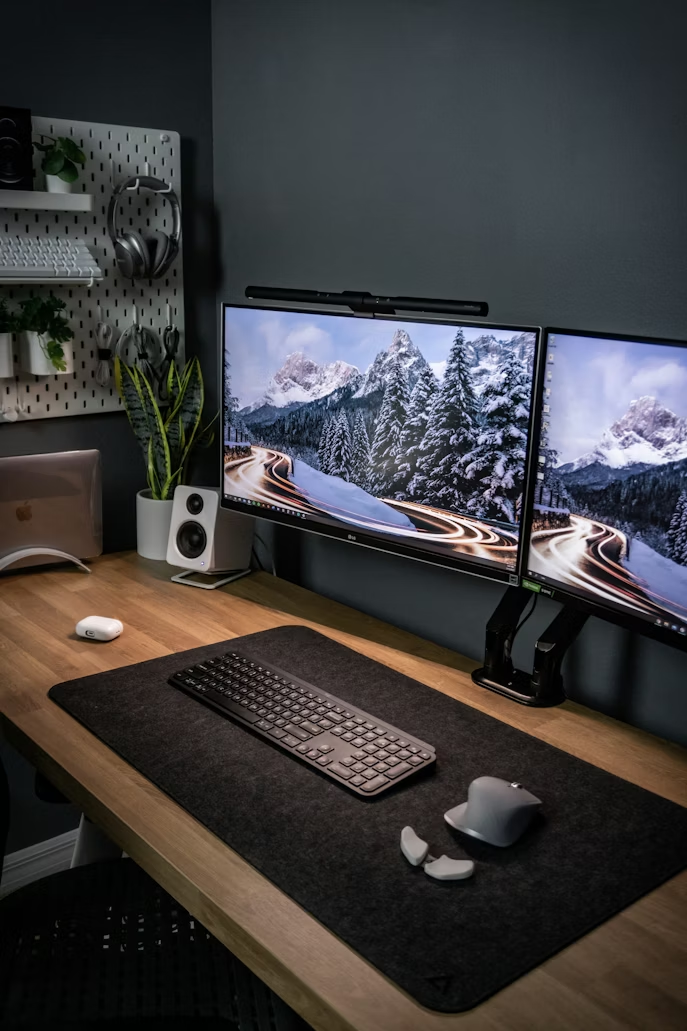
A desk mat is one of the simplest ways to elevate your workspace instantly. It acts as a visual anchor, tying everything together.
materials that look premium:
- Faux leather
- Felt (clean and modern)
- Matte rubber with muted tones
table: desk mat comparison
| Material | Price Range | Look & Feel | Durability |
|---|---|---|---|
| Faux leather | $10–$20 | Sleek, premium | Medium |
| Felt | $12–$18 | Soft, minimalist | Medium |
| Rubber/matte | $8–$15 | Clean, modern | High |
color tip: Stick to neutral tones like black, gray, beige, or brown. Bright colors tend to reduce the premium feel.
idea 4: vertical space optimization
Premium setups often feel spacious—not because they are large, but because they are well-organized vertically.
Instead of crowding your desk surface, move items upward:
- Wall shelves
- Pegboards
- Monitor stands
table: vertical organization tools
| Item | Cost Range | Benefit |
|---|---|---|
| Wall shelf | $10–$25 | Frees desk space |
| Pegboard | $12–$20 | Customizable storage |
| Monitor stand | $10–$18 | Adds height and storage below |
this approach creates a layered look, which is commonly seen in high-end setups.
idea 5: cable management for a clean finish
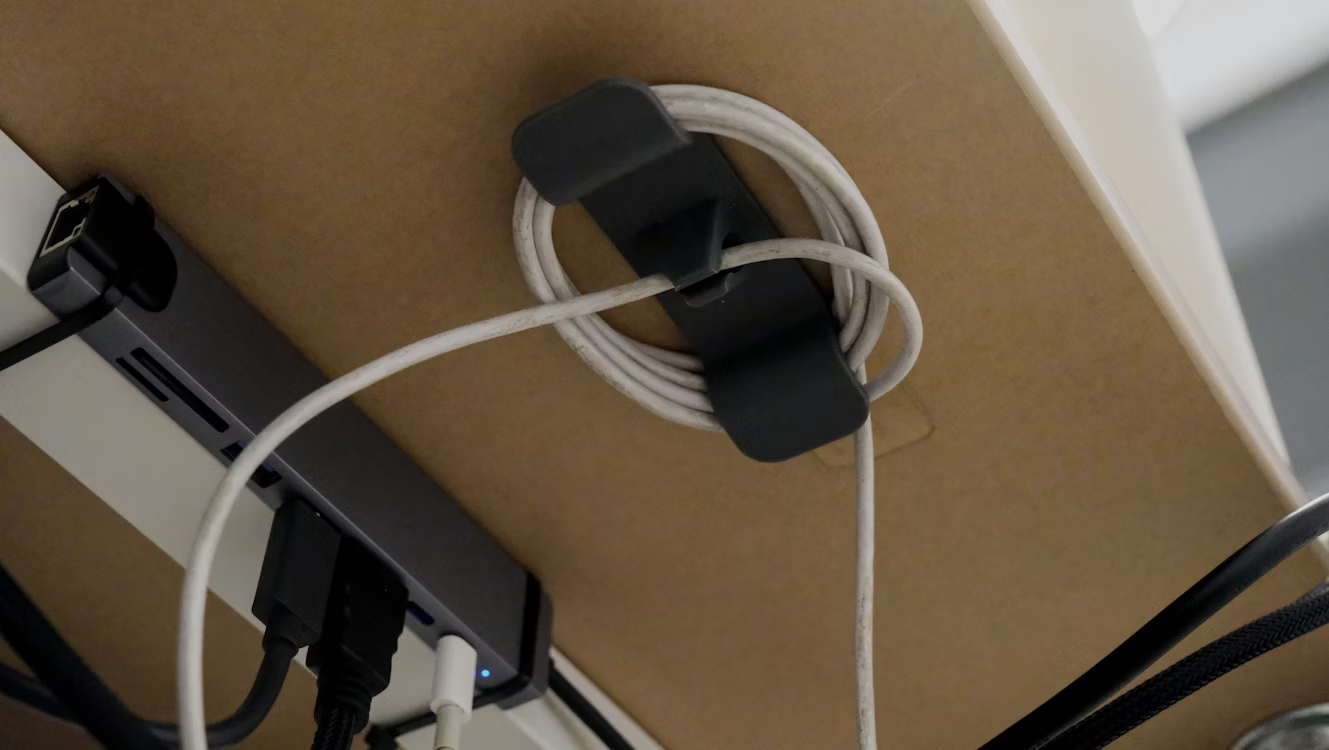
Nothing destroys a premium look faster than messy cables. Even an expensive setup looks cheap if wires are visible everywhere.
budget cable solutions:
- Cable clips
- Velcro ties
- Cable boxes
table: cable management options
| Tool | Cost Range | Function |
|---|---|---|
| Cable clips | $5–$10 | Hold cables in place |
| Velcro ties | $3–$8 | Bundle wires neatly |
| Cable box | $10–$15 | Hide power strips |
quick rule: if you can see it, manage it.
idea 6: curated decor instead of clutter
A premium desk doesn’t have more decor—it has better decor choices.
Instead of adding multiple random items, choose 2–3 intentional pieces:
- A small plant
- A framed print
- A minimal clock
table: decor selection guide
| Decor Type | Budget Cost | Why It Works |
|---|---|---|
| Plant | $5–$15 | Adds life and freshness |
| Frame/art | $5–$12 | Personalizes space |
| Desk clock | $8–$15 | Functional + aesthetic |
less is more—but meaningful is better.
idea 7: color coordination for a cohesive look
Color coordination is what separates random setups from premium ones.
pick a simple palette:
- Black + white
- Beige + wood tones
- Gray + silver
table: color palette examples
| Theme | Primary Colors | Accent Suggestions |
|---|---|---|
| Minimal modern | Black, white | Silver, gray |
| Warm aesthetic | Beige, brown | Gold, cream |
| Tech-inspired | Gray, black | Blue LED accents |
consistency matters more than complexity. Even cheap items look premium when they match.
sample budget setup breakdown
Here’s an example of a complete premium-looking desk setup under $100:
| Item | Estimated Cost |
|---|---|
| Desk mat | $12 |
| LED lighting | $10 |
| Desk lamp | $15 |
| Cable management | $10 |
| Decor (plant/frame) | $15 |
| Monitor stand | $15 |
| Accessories | $20 |
| Total | $97 |
this demonstrates that design—not cost—is the real factor.
common mistakes to avoid
Even with a budget setup, certain mistakes can ruin the final look:
- Mixing too many colors
- Overcrowding the desk
- Ignoring cable management
- Using harsh lighting
- Buying trendy but mismatched items
premium setups feel calm, not chaotic.
how to gradually upgrade your desk
You don’t need to build everything at once. A phased approach works better:
phase 1:
- Declutter
- Add desk mat
phase 2:
- Improve lighting
- Organize cables
phase 3:
- Add decor
- Optimize vertical space
phase 4:
- Refine color coordination
this approach keeps spending manageable and results intentional.
psychology behind premium design
There’s a reason certain setups feel “expensive” even when they’re not:
- symmetry creates balance
- neutral colors reduce visual noise
- spacing improves clarity
- texture adds depth
understanding these principles allows you to replicate high-end aesthetics affordably.
final thoughts
A premium desk setup isn’t about expensive gear—it’s about thoughtful design. By focusing on simplicity, cohesion, and smart organization, you can transform even the most basic desk into a refined workspace.
Start small. One improvement at a time. Over time, the difference becomes not just visible—but deeply felt in how you work every day.
faqs
- how much should i spend on a budget desk setup?
You can create a premium-looking setup for as little as $50–$100 by prioritizing essentials like lighting, a desk mat, and cable management. - what is the most important element for a premium look?
Lighting and organization have the biggest impact. Even cheap items look high-end when well-lit and neatly arranged. - can i achieve a premium setup without buying new furniture?
Yes. Rearranging, decluttering, and adding small accessories can completely transform your existing desk. - what colors work best for a clean desk aesthetic?
Neutral tones like black, white, gray, and beige create the most cohesive and premium appearance. - how do i keep my desk looking clean daily?
Adopt a simple habit: reset your desk at the end of each day. Put everything back in its place. - are plants necessary for a premium setup?
Not necessary, but highly recommended. Even a small plant adds life and balance to your workspace.