


Remote Work Is Forever — Is Your Setup Prepared?
There are more people working from home than ever before.
And with that shift comes an actual challenge — how do you manage to stay focused, comfortable and productive when your home is also your office?
The solution does not just involve a desk and a laptop. It’s about creating a workspace that actually works with how you work. A frictionless setup that gives you energy and propels you to want to sit down and get things done.
This guide explores 10 modern home office productivity setups built with remote worker comfort and ergonomics in mind. There’s a setup here that will accommodate your life, whether you live in an expansive room or the tiniest corner of an apartment.
Each one has a simple list of what you need, why it works and how it helps you increase performance day after day.
Let’s dive in.
What Makes a Home Office Setup “Modern”?
Before diving into the setups, it’s useful to know what distinguishes a modern workspace from a basic one.
A contemporary home office isn’t just a matter of aesthetics. It’s about function. It combines intelligent technology, ergonomic design and personal comfort in a single cohesive space.
Here’s a quick overview of what most modern setups tend to focus on:
| Modern Setup Principle | What It Means in Practice |
|---|---|
| Ergonomics | Your body doesn’t hurt after a couple of hours |
| Clean cable management | No knots to cramp up your desk |
| Smart lighting | Adjustable brightness based on what you’re doing |
| Dual or multi-screen use | More screen space means more productivity |
| Personalization | A workspace that feels like you |
| Tech integration | Devices that play nicely together |
You don’t have to check every box. But the more of these principles your setup adheres to, the better your workday will feel.
Setup #1 — The Clean Minimalist Command Center
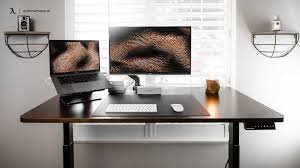
Best for: Easily distracted remote workers who seek a calm, uncluttered environment.
Less is more. That is the whole idea behind this setup.
A minimal command center removes anything you don’t need. What’s left is a clean, focused workspace that tells your brain one thing — it’s time to work.
The Core Pieces
- Wide single monitor (27″) — one large screen beats two small, hard-to-read ones
- Wireless keyboard and mouse — no cables cluttering the desk surface
- Monitor arm — gets your screen off the desk, freeing up space below
- Minimal desk organizer — only one small tray for essentials
- Under-desk cable management tray — conceals every last wire
Why This Setup Works
When your desk is organized, so is your mind. Evidence shows, again and again, that visual clutter increases cognitive load — your brain is working harder just to filter out the mess.
One of the best investments you can make in this setup is a monitor arm. It raises your screen off the desk, creates workspace underneath and lets you perfectly adjust your screen height.
Opt for a neutral color palette — white, grey or natural wood tones. It gives the space an open, professional feel.
Best for long stretches of: Writing, coding, deep research, content creation.
Setup #2 — The Dual Monitor Power Desk
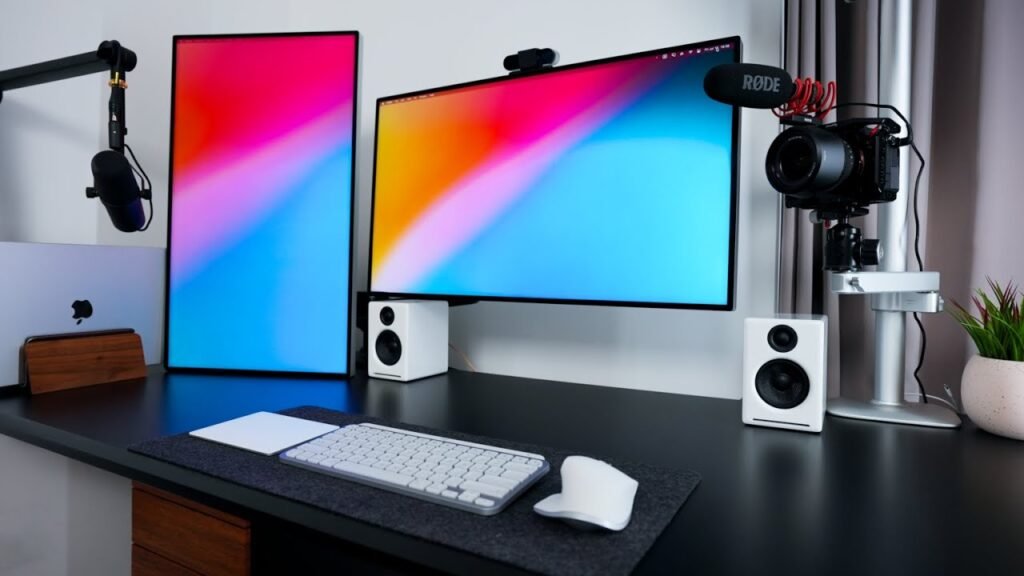
Stellar for: Developers, project managers, data analysts and anybody juggling multiple apps simultaneously.
One screen is never enough when you’re switching between a spreadsheet, a video call, a browser and a Slack channel all at the same time.
The Core Pieces
- Two matching monitors (24″–27″ each) — side by side for maximum screen real estate
- Dual monitor stand or arm — keeps both screens at the same visual level
- Full-size mechanical keyboard — satisfying to type on and built to last
- Large desk pad (extended size) — covers the whole desk area
- USB-C docking station — one cable connects everything to your laptop
Why This Setup Works
Studies by Jon Peddie Research show that a dual monitor setup can boost productivity by up to 42%. That’s not a small number.
The key is positioning. The primary monitor should be directly in front of you. Position the secondary screen slightly to the side — at the same level. That lessens neck strain from constantly turning.
With a docking station, it’s plug-and-play for everything. One USB-C cable connects your laptop to both monitors, your keyboard, mouse, webcam and speakers. Clean and instant.
Designed for long stretches of: Coding, data work, project management, video editing.
Setup #3 — The Ergonomic Health-First Workstation
Best for: Anyone who spends 6–10 hours a day at their desk and wants to protect their body long-term.
Hours of poor sitting takes a toll on your body. This setup revolves entirely around keeping you pain-free.
The Core Pieces
- Ergonomic office chair (adjustable lumbar, armrests, height) — the single most important piece
- Sit-stand desk (electric, motorized) — allows you to alternate between sitting and standing
- Monitor at exactly eye level — using a stand or arm
- Ergonomic vertical mouse — reduces wrist rotation and strain
- Footrest — gives your feet support when the chair is at the right height
- Anti-fatigue mat — for extended periods of standing
Why This Setup Works
The sit-stand desk is the focus here. Alternating between sitting and standing throughout the day reduces back pain, improves circulation and bolsters afternoon focus.
A vertical mouse sounds unusual but truly makes a difference. Your hand rests in a natural “handshake” position rather than lying flat on the desk. Less twist = less tension.
Add a good ergonomic chair to all of this and you’ve solved the three biggest physical complaints of remote workers — back pain, wrist strain and neck stiffness.
Best for long sessions of: Anything, really. This setup is designed for all-day comfort.
Pain Points of the Remote Worker — And How Great Setups Solve Them
Here is a look at the most common remote work frustrations and which setup elements take care of them:
| Common Remote Work Problem | Setup Solution |
|---|---|
| Neck and back pain | Ergonomic chair + monitor at eye level |
| Eye strain and fatigue | Proper lighting + monitor distance |
| Poor video call quality | Ring light + external webcam + USB mic |
| Loss of focus | Clean desk + noise-canceling earbuds |
| Too many cables | Docking station + cable management tray |
| No separation from home life | Dedicated desk space + work-only scent or lamp |
| Low energy in the afternoon | Standing desk + natural light exposure |
Setup #4 — The Home Studio Creator Desk
Best for: Content creators, YouTubers, podcasters, online educators and coaches.
If your work involves recording video or audio — your environment IS part of your product. This setup ensures it looks and sounds wonderful.
The Core Pieces
- Acoustic panels or foam tiles — enhance sound quality in recordings
- Key light or ring light — professional front lighting
- 4K webcam or mirrorless camera with capture card — sharp, clean video
- Condenser USB microphone with arm — studio-quality voice recording
- Backdrop or styled bookshelf behind you — clean, intentional visual background
- Dual monitors — one for your content, one for your workflow tools
Why This Setup Works
Most online creators underestimate audio. People will put up with mediocre video quality — but bad audio makes viewers drop off immediately.
Acoustic panels placed on the wall behind or around you absorb echoes and background noise. Even a couple of panels make a huge difference in how your voice sounds on recordings.
The styled backdrop matters too. A tidy bookshelf, a potted plant or a professional-looking background signals to your audience that you take your work seriously. It establishes trust before you even speak.
Best suited to long forms of: Recording, streaming, teaching, coaching and podcasting.
Setup #5 — The Natural Light Zen Workspace
Good for: Remote workers experiencing mood issues, motivation struggles or seasonal energy slumps.
Most people don’t realize how much lighting affects their energy levels. This setup is designed to take advantage of natural light and emulate it when the sun sets.
The Core Pieces
- Desk facing or near a window — maximize natural daylight
- Sheer curtains — diffuse harsh direct sunlight without blocking it
- Daylight-balanced LED desk lamp (5000K–6500K color temperature) — resembles natural light
- One or two indoor plants — add life, purify the air and lower stress
- Warm bias lighting behind monitor — keeps screen brightness balanced at night
- Light-colored desk surface — reflects light and keeps the space bright
Why This Setup Works
Exposure to natural light during the day is directly linked to better sleep at night and increased daytime alertness. According to a study from Northwestern Medicine, workers with windows in their offices slept an average of 46 more minutes per night than those without.
Position your desk so the window is to your side — not directly behind your screen, which causes glare, and not behind you, which puts a shadow over your face during video calls.
When natural light fades, switch to your daylight-balanced lamp. It maintains your circadian rhythm and helps avoid that 3 p.m. energy slump.
Best for long sessions of: Creative work, writing, design and any task where mood affects output.
Setup #6 — The Tech-Integrated Smart Desk
Ideal for: Remote workers who love automation, smart devices and a highly connected workspace.
This setup systematizes your home office. Everything is connected, automated and optimized.
The Core Pieces
- Smart desk lamp (voice or app controlled) — regulate brightness and color temperature by voice
- Smart power strip — remote on/off control and energy usage monitoring
- Wireless charging pad built into or placed on desk — no charging cables needed
- Voice assistant device (Amazon Echo or Google Nest) — set timers, view calendars, control devices
- Bluetooth mechanical keyboard — connects to multiple devices, switch with one button
- Cable-free desk surface — achieved through smart charging and wireless peripherals
Why This Setup Works
The charm of a smart desk is how much friction it eliminates from your workday.
Telling your setup “hey, turn on work mode” and having your lamp switch to focus-level brightness, your phone go silent and your playlist start — that’s not a gimmick. That’s a ritual your brain learns to associate with performance time.
With a wireless charging pad on your desk, your phone is always charged and always within reach — with no cable creeping across your work surface.
The Bluetooth keyboard that connects to multiple devices is a quiet hero here. Switch between your laptop and your tablet with just one button. No unplugging, no delays.
Best for long sessions of: Tech-heavy work, multi-device workflows and anyone who appreciates automation.
Setup #7 — The Corner Desk Maximizer
Best for: Those with a dedicated room who want to make use of every square foot wisely.
A corner desk setup surrounds you. It provides more workspace than any straight desk and naturally creates a “cockpit” feel.
The Core Pieces
- L-shaped or corner desk — the foundation of this setup
- Triple monitor arrangement — one straight ahead, two to the sides at slight angles
- Monitor arms for all three screens — keeps everything adjustable
- Wall-mounted pegboard — for hanging accessories, notes and headphones
- Under-desk drawer unit — adds storage without taking up floor space
- LED light strip along desk edge or behind monitors — ambient lighting throughout
Why This Setup Works
The L-shape provides two separate zones — a primary work area directly in front of you and a secondary space to the side for reference materials, notebooks or a second task.
The pegboard above your desk is a practical powerhouse. Hang your headphones, mount small shelves, clip notes, hang a small calendar. Your desk stays tidy because everything has a home on the wall.
Triple monitors may seem extreme — but for the right kind of worker, they eliminate window-switching entirely.
Best for extended sessions of: Trading, development, video editing and any workflow that benefits from multiple screens.
Setup #8 — The Small Space Home Workplace
Best for: Remote workers in studios, small apartments or shared living spaces.
Not everyone has an extra room. This setup shows you don’t need one.
The Core Pieces
- Wall-mounted fold-down desk — folds flat against the wall when not in use
- All-in-one desktop or laptop with arm mount — eliminates the need for a tower
- Vertical monitor orientation (portrait mode) — saves horizontal space
- Floating shelves above the desk — adds storage without a floor footprint
- Room divider or curtain — creates a visual boundary between workspace and living space
- Compact Bluetooth speaker — doubles as a white noise machine and music player
Why This Setup Works
The fold-down desk is a brilliant answer to space constraints. When work is over, fold it up. The room goes back to being a living room. This physical separation — even if only symbolic — carries genuine psychological benefits for work-life balance.
Mounting a room divider or hanging a curtain around your workspace is powerful. It builds a “work zone” that your brain learns to connect with focus. You’re at work when you step through the curtain. When you step out, you’re home.
Best for long periods of: Any remote work in close quarters — writing, calls, admin, design.
Setup #9 — The Executive Home Office
Ideal for: Senior remote workers, business owners, consultants or anyone who meets with clients virtually and needs to project authority and professionalism.
You never get a second chance to make a first impression — even on a screen.
The Core Pieces
- Large executive desk (solid wood or premium finish) — sets the tone right away
- High-back leather or premium mesh office chair — visible and impressive on video calls
- Large monitor (32″+) or ultra-wide screen — cinematic, professional display
- Bookshelf or credenza in background — styled with books, plants and awards
- Professional lighting kit (key light + fill light) — removes shadows completely
- Premium USB microphone — broadcast-quality voice on every call
Why This Setup Works
The desk and chair together make an immediate visual statement during video calls. A quality desk visible behind your screen conveys stability and seriousness before you even open your mouth.
Your background matters just as much as your foreground. A styled bookshelf with a few well-placed books, a plant and perhaps a framed piece of art tells clients and colleagues that you take your professional environment seriously.
The two-light kit — a key light in front of you and a softer fill light to the side — eliminates the flat, washed-out look that single ring lights often produce. The result is a three-dimensional, broadcast-quality image.
Ideal for long stretches of: Client calls, virtual presentations, leadership meetings and business development.
Setup #10 — The Hybrid Focus + Flex Station
Ideal for: Remote workers who alternate between deep focus work and collaborative video calls, and need a setup that handles both without compromise.
This is arguably the most versatile setup on the list. It is designed to switch modes on demand.
The Core Pieces
- Primary monitor + secondary portrait monitor — main screen for work, portrait screen for Slack, email and calendar
- Motorized sit-stand desk — switch positions throughout the day
- Acoustic privacy panel (desktop) — absorbs noise and signals focus time
- Premium noise-canceling headphones — for deep focus sessions
- Arm-mounted ring light — swings into position for calls, out of frame otherwise
- Modular desk organizer system — reconfigure your layout as your tasks change
Why This Setup Works
The portrait monitor beside your main screen is the secret weapon of modern remote work. Keep your communications — email, Slack, calendar — on the portrait screen at all times. Your primary screen stays reserved for actual work. You stop task-switching every five minutes to check messages.
The acoustic desktop privacy panel is worth mentioning separately. It’s a small panel that sits on your desk like a screen divider. It absorbs sound, reduces echo on calls and creates a subtle visual boundary that signals to anyone nearby that you’re in focus mode.
This setup adjusts to you — not the other way around.
Best for long stretches of: Any role that combines deep work with frequent communication — product managers, marketers, consultants and team leads.
What Is the Right Setup for You?
With 10 options on the table, choosing the right one comes down to three things:
| Question to Ask Yourself | What It Points To |
|---|---|
| How many hours do I spend seated each day? | If 6+, prioritize ergonomics — Setup #3 or #10 |
| Do I have video calls regularly? | Yes → Setup #5, #9 or #10 |
| Do I work in a small space? | Yes → Setup #8 or #1 |
| Do I do creative or content work? | Yes → Setup #4 |
| Do I use multiple apps simultaneously? | Yes → Setup #2 or #7 |
| Do I want a quiet, distraction-free space? | Yes → Setup #1 or #5 |
| Do I love smart tech and automation? | Yes → Setup #6 |
The good news is you don’t have to choose just one. Many of the best remote work setups are hybrids — like the ergonomics from Setup #3 combined with the lighting approach from Setup #5.
Begin with the category that tackles your greatest daily frustration. Build from there.
Quick Notes Before Building Your Modern Home Office
A few things worth keeping in mind as you plan your setup:
Buy your chair before your desk. You sit in it all day. It matters more than nearly anything else.
Get monitor height right first. The top of your screen should be at or slightly below eye level. This one adjustment can instantly relieve most neck pain.
Don’t overbuy technology. Most remote workers will be better served by a $30 USB microphone than a $300 camera with a poor mic. Fix your weakest link first.
Invest in your lighting. It is the most cost-effective and quickest upgrade for video calls. A $25 ring light makes a tangible difference on every single call.
Keep your desk clear of non-work items. Phone face-down, no snacks on the desk, no personal mail nearby. Your desk is for work. Train your brain to see it that way.
For a deeper dive into building your perfect remote workspace from the ground up, Remote Work Desk Setup is packed with practical guides, gear recommendations and layout ideas for every type of remote worker.
FAQs — Modern Home Office Setups for Remote Workers
Q: What is the single most important piece in a modern home office setup? It depends on your biggest pain point. But if you had to choose one — your chair. A bad chair causes back pain, fatigue and distraction. Everything else can be upgraded gradually, but your chair affects every single hour that you work.
Q: Do I need a separate room for a proper home office? Not at all. Setup #8 demonstrates that a neatly arranged corner or wall-mounted fold-down desk can be just as effective as an entire room. The trick is establishing a visual and mental divide between where you work and where you live.
Q: What is a realistic budget for a modern home office? It varies widely. A functional setup can be built for $300–$600. A premium setup with a sit-stand desk, ergonomic chair and dual monitors can cost $1,500–$3,000. The good news — you can build it incrementally over time.
Q: Are standing desks worth the investment for remote workers? Yes, for most people. Alternating between sitting and standing reduces back pain, increases afternoon energy and improves circulation. Electric sit-stand desks have dropped significantly in price. A decent one can be found for $400–$600.
Q: What is the ideal monitor size for a home office? For a single monitor, 27″ is the sweet spot. It’s large enough to work comfortably with multiple windows open, but not so large that you’re constantly turning your head. Two 24″ monitors work very well for a dual setup.
Q: How do I make my home office look professional on video calls? Lighting, background and audio make the biggest difference. A ring light or key light, a clean or styled background and an external microphone will make your video calls look and sound more professional than 90% of other participants.
Q: I’m renting and can’t change the walls. Can I still build a modern home office setup? Absolutely. Most of the setups in this guide require no wall modifications at all. A freestanding pegboard, floor-standing shelves, a freestanding room divider and a clip-on lamp all work without a single screw in the wall.
Q: I have trouble focusing while working from home. What can I do? Your setup matters more than most people realize. Noise-canceling headphones, a clean desk, a defined work zone and a physical timer — like the timer cube mentioned in Setup #8 — all reduce distraction significantly. The goal is to make focus the path of least resistance.
According to research published by the American Journal of Epidemiology, prolonged sedentary behavior — especially without ergonomic support — is linked to increased risk of musculoskeletal disorders and reduced cognitive performance, making a well-designed home office setup not just a comfort choice but a genuine health investment.
Build It Once, Work Better Every Day
A modern home office doesn’t come together in a single afternoon. It’s built purposefully — one upgrade at a time.
The 10 setups in this guide are not about impressing anyone. They’re about designing an environment that genuinely serves your performance, protects your health and makes remote work feel less like a concession and more like an upgrade.
Choose the setup that matches your work style. Start with the single item that solves your greatest daily frustration. Then keep building.
Because the right environment doesn’t just help you work more. It helps you work better.
And for remote workers, that makes all the difference.








