


Working from home is all fun and games — until you’re huddled over a kitchen table, your laptop propped on some books, your back screaming by lunchtime.
The good news? You can create an effective home office without spending thousands. An efficient budget home office productivity setup doesn’t have to break the bank — with inexpensive tools, secondhand finds, and a little ingenuity, you can have a smart workspace pulled together in a weekend (or even an afternoon).
This guide will take you step-by-step through 7 real, buildable setups — from a barebones desk in a closet to an under-$200 dual-monitor command center. All are meant to sharpen your focus, protect your body, and help you achieve more for less.
Let’s build something.
Why Your Workspace Matters More Than You May Think
Before getting into setups, here’s a simple truth: your output is influenced by where you work.
Research consistently demonstrates that an organized, dedicated workspace — even a small one — increases concentration and reduces mental fatigue. When your brain sees your “work spot,” it automatically goes into work mode. When that space is cluttered, uncomfortable, or distracting, your performance pays the price.
You don’t need a Pinterest-perfect office. You need a setup that:
- Keeps your body comfortable
- Reduces visual clutter
- Has everything you need literally at your fingertips
- Signals to your brain: time to concentrate
That’s precisely what each setup below is intended to do — on a budget.
What to Look For Before You Build
Not every setup works in every space or for every budget. Consider the following before deciding on one:
How much space do I have? Some setups work in a corner. Others need a full wall.
What’s my budget? Each setup features an estimated total cost.
What do I actually do at my desk? A video editor requires more screen real estate than a writer.
Do I share the space? Noise cancellation and visual dividers matter more in shared homes.
As you scroll through the setups, keep your answers in mind.
Cost Overview: All 7 Setups in One Place
| Setup | Estimated Cost | Best For | Space Required |
|---|---|---|---|
| 1. The Closet Command Center | $30–$60 | Small apartments | Tiny (closet-sized) |
| 2. The IKEA Hack Desk | $50–$100 | DIY lovers | Medium corner |
| 3. The Standing Desk Riser Setup | $40–$80 | People who sit too much | Any desk |
| 4. The Dual-Monitor Budget Build | $100–$200 | Heavy computer users | Medium desk |
| 5. The Minimalist Floating Shelf Desk | $25–$70 | Clean, distraction-free thinkers | Wall space |
| 6. The Secondhand Power Setup | $0–$50 | Thrifty hunters | Any size |
| 7. The All-in-One Mobile Cart Setup | $40–$90 | People without a permanent room | Moveable |
Setup 1 — The Closet Command Center
Estimated Cost: $30–$60
Got a spare closet? You’ve got an office.
One of the most underrated budget home office productivity setups out there is the closet command center. Take out the hanging rod, insert a simple shelf or a sheet of plywood at desk height, plug in a power strip, and you have yourself a focused work nook with built-in walls on three sides — which means fewer visual distractions.
What You Need
- 1 piece of plywood or hollow core door, cut to size (~$15–$25 at a hardware store)
- 2 shelf brackets ($5–$10)
- A power strip ($8–$12)
- A small LED desk lamp ($8–$15)
- Optional: peel-and-stick wallpaper for the back wall ($10–$20)
Why It Works
The enclosed walls act like blinders. You’re physically closing off the rest of the room, which makes it much easier to concentrate. At the end of the day, when you close the closet doors, work is “over.” That mental separation is powerful.
Pro tip: Hang a pegboard on the inside of the closet for vertical storage. You can hang headphones, chargers, and notebooks — clearing precious space on your tiny desk.
Setup 2 — The IKEA Hack Desk
Estimated Cost: $50–$100
IKEA is the unofficial sponsor of budget home offices everywhere, and for good reason. Their modular pieces fit together in combinations the company never planned — and the results are surprisingly solid.
The most popular combo? The LINNMON tabletop (~$15–$25), combined with ALEX drawers (~$60) or standard ADILS legs (~$10 for a pair). You get a wide, stable surface with storage underneath for far less than a “real” desk costs.
What You Need
- IKEA LINNMON tabletop (or similar flat surface)
- ADILS legs or ALEX drawers
- A monitor riser (DIY from a wooden box or purchase one for ~$15)
- Cable clips or velcro ties ($3–$5)
Make It Work Your Way
The power of IKEA hacks is their flexibility. Put a pegboard on the wall above the desk for vertical storage. Attach binder clips to the desk edge to keep cables organized. Mount a small shelf on the wall just above for books or plants.
This setup scales with you. As your needs grow, you swap in new components.
Ergonomics Check
Ensure that the desk height allows your elbows to rest at 90-degree angles. Most IKEA desks hit standard desk height, but shorter or taller people might need adjustable legs or a footrest.
Setup 3 — The Standing Desk Riser Setup
Estimated Cost: $40–$80
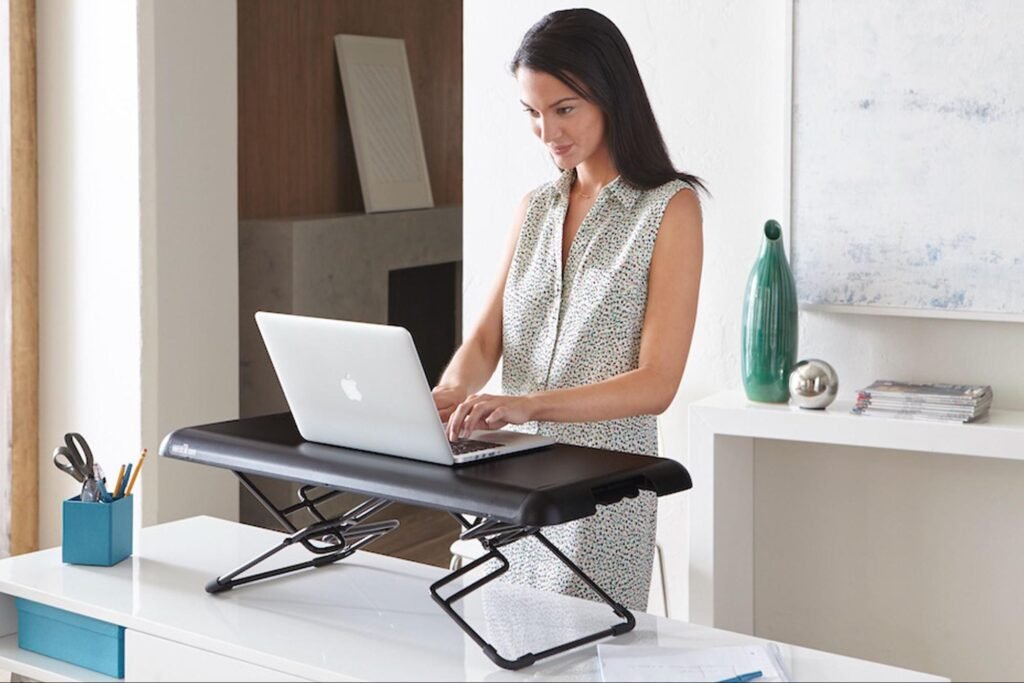
Sitting all day is hard on your body. But a full standing desk can cost $300–$600. Here’s the workaround: a standing desk riser.
A riser sits on your existing desk and raises your monitor, keyboard, and mouse to standing height. Most fold flat in seconds when you want to sit back down.
Budget Riser Options
| Product Type | Price Range | Pros | Cons |
|---|---|---|---|
| Z-shaped riser | $35–$55 | Compact, easy to use | Limited surface area |
| X-lift riser | $45–$75 | More stable, wider top | Bulkier when folded |
| DIY wood riser | $10–$20 | Cheapest option | Fixed height only |
The DIY Standing Riser
Two wooden boxes or crates from a craft store can be used to build a fixed-height riser. Stack them, sand the edges, and you’ve got a stable platform. It won’t adjust, but if you alternate between a standing box and your normal desk surface throughout the day, you’ll still enjoy the health benefits.
How Long Should You Stand?
Aim for 20–30 minutes of standing for every hour of sitting. Set a phone timer if you need a reminder. The goal isn’t to stand all day — it’s to break up long sitting sessions.
Setup 4 — The Dual-Monitor Budget Build
Estimated Cost: $100–$200
Two screens change everything.
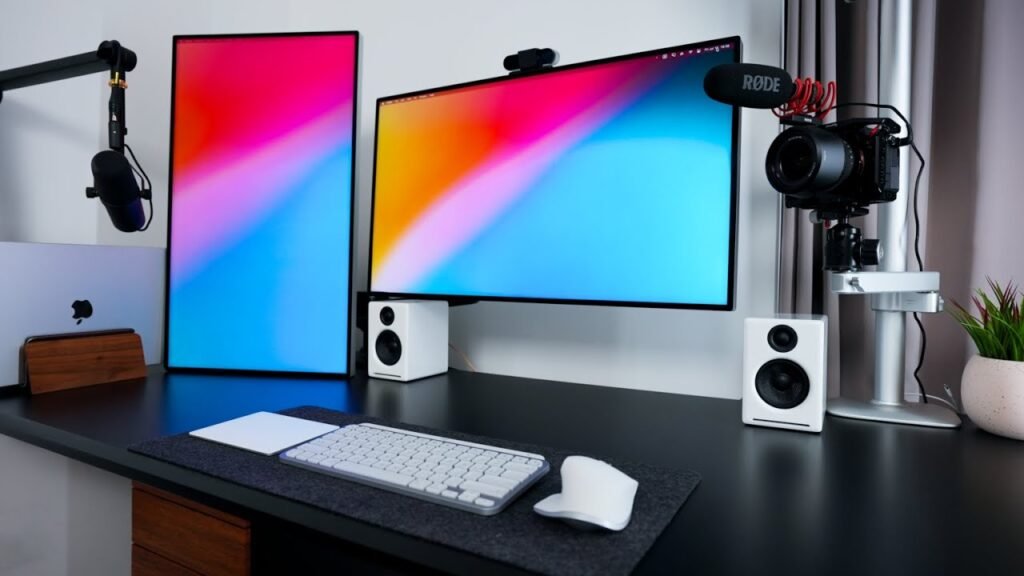
Whether you’re writing and researching, coding and testing, or video editing with a timeline on one screen and a preview on another — a second monitor cuts the time you spend switching between windows by a huge margin.
How to Go Dual Without Going Broke
You don’t need two brand-new monitors. Here’s the smart path:
Step 1: Check Facebook Marketplace, OfferUp, or local thrift stores for used monitors. A 21″–24″ monitor in good condition often sells for $20–$50.
Step 2: Make sure your laptop or desktop has the ports to support a second screen. Most have at least one HDMI or USB-C output.
Step 3: Buy a dual-monitor stand if needed (~$25–$40). This frees up desk space and lets you position both screens at eye level.
Essential Accessories for This Setup
- Cable management box or velcro ties: $5–$10
- USB hub (if you need more ports): $12–$20
- Blue light-blocking glasses (for long screen days): $10–$20
- Wireless mouse and keyboard combo: $20–$35
A Note on Eye Level
Both monitors should sit with the top of the screen at or just below eye level. If they’re too low, you’ll crane your neck down all day. If they’re too high, you’ll tilt your head back. Either way, neck pain follows.
Setup 5 — The Minimalist Floating Shelf Desk
Estimated Cost: $25–$70
If your space is tiny and your brain craves calm, this is your setup.
A floating shelf desk is exactly what it sounds like: a wide, sturdy shelf mounted to the wall at desk height. No legs. No drawers. Just a clean, open surface.
For more inspiration on clean and minimal home office arrangements, check out Remote Work Desk Setup — a great resource for desk layout ideas and workspace guides.
What You Need
- 1 floating shelf (24″–48″ wide, rated for at least 50 lbs): $20–$40
- Wall anchors and screws (usually included)
- A stud finder ($10–$15) or ask at the hardware store
- A small monitor stand or laptop riser: $10–$20
Why Minimalists Swear By It
There’s nowhere to pile junk. A floating shelf forces you to keep only what you’re actively using on the surface. Everything else has to live somewhere else — meaning clutter has no home on this desk.
This setup also works beautifully in bedrooms, where a full desk can feel overwhelming. The floating shelf tucks against the wall without eating up floor space.
Storage Solution Without the Bulk
Add two or three small floating shelves above the desk for books, a plant, and supplies. Use a wall-mounted power strip to keep cords off the floor. A pegboard panel beside the shelf rounds out storage without adding bulk.
Setup 6 — The Secondhand Power Setup
Estimated Cost: $0–$50
This one requires more hunting than building — but the payoff is massive.
A well-sourced budget home office productivity setup can include a solid desk, an ergonomic chair, a monitor, and accessories for under $50 total. The key is knowing where to look and what to look for.
The Best Places to Find Office Gear for Nearly Nothing
- Facebook Marketplace — Search “office desk,” “office chair,” “monitor.” Filter by your city. Lots of people offload entire home office setups when they return to in-office work.
- Craigslist “Free” section — People give away desks and chairs constantly.
- Local thrift stores — Goodwill and Salvation Army often have desks for $10–$25.
- Office liquidation sales — Companies shutting down or downsizing sell quality furniture for next to nothing. Search “[your city] office liquidation.”
- University end-of-semester sales — Students leaving campus often sell everything.
What to Check Before You Buy
| Item | What to Look For |
|---|---|
| Desk | Sturdy surface, no wobble, height works for you |
| Chair | Adjustable height, lumbar support intact, no broken casters |
| Monitor | No dead pixels (check by displaying solid colors), accepts common inputs |
| Keyboard/Mouse | All keys work, no sticky residue |
Red flags to skip: Chairs with broken armrests or non-adjustable height, desks with warped surfaces, monitors with cracked screens or lines across the display.
Setup 7 — The All-in-One Mobile Cart Setup
Estimated Cost: $40–$90
Not everyone has a dedicated room — or even a permanent corner. If you move between rooms, share your space, or live in a studio apartment, a mobile cart setup is your answer.
A rolling utility cart (think the IKEA RÅSKOG or similar) becomes a portable office tower. The top shelf holds your laptop or tablet. The middle shelf stores your notebook, chargers, and headphones. The bottom shelf carries your books or files.
Building Your Rolling Office
- IKEA RÅSKOG cart or similar (~$20–$35)
- Laptop stand (folds flat when stored): $12–$20
- Wireless keyboard and mouse combo: $20–$35
- Small power strip with USB ports (zip-tie to the cart): $10–$15
- Drawer organizer tray for supplies: $5–$8
Making It Work Daily
The key to a mobile setup is routine. Each morning, roll your cart to your chosen work spot, open your laptop stand, and connect your peripherals. At the end of the day, unplug, fold down the stand, and roll it away.
It’s surprisingly satisfying. Your “office” comes with you, and when it’s packed up, there’s no visual reminder of work sitting in your living space.
The 5 Accessories That Upgrade Every Setup
No matter which setup you build, these five items will improve your experience without blowing your budget.
1. A Good Desk Lamp
Proper lighting reduces eye strain dramatically. An LED lamp with adjustable color temperature costs $12–$25. Cool white light keeps you alert. Warm light is better for evenings.
2. A Wrist Rest
For heavy typists, a foam or gel wrist rest under $10 reduces strain on the wrists and forearms. Your future self will thank you.
3. Cable Management
A bundle of velcro cable ties ($3–$5) transforms a messy, distracting desk into a clean workspace. This is the highest ROI purchase on this list.
4. A Headset or Earbuds with a Mic
For calls and focus sessions, a basic headset ($15–$30) beats your laptop’s built-in mic and speakers every time.
5. A Whiteboard or Sticky Notes Station
Physical to-do lists reduce digital tab-switching. A small whiteboard ($8–$15) or a dedicated sticky note wall section costs almost nothing and keeps your priorities visible.
Budget Ergonomics: The Non-Negotiables
According to Mayo Clinic’s office ergonomics guidelines, proper workstation setup is essential to preventing strain and long-term injury. Here’s a simple checklist to make sure your setup doesn’t hurt you:
| Body Part | What to Check |
|---|---|
| Eyes | Screen at arm’s length, top of screen at eye level |
| Neck | No tilting up or down — head balanced over shoulders |
| Shoulders | Relaxed, not hunched or raised |
| Elbows | Bent at 90°, arms resting naturally |
| Wrists | Flat when typing, not bent up or down |
| Back | Lumbar (lower back) supported by chair or rolled towel |
| Feet | Flat on floor or footrest — no dangling |
You don’t need an expensive ergonomic chair to hit all these marks. A pillow behind your lower back, a footrest made from a shoebox, and a monitor raised on a stack of books can get you 80% of the way there.
FAQs About Budget Home Office Productivity Setups
How much does a good home office setup cost on a budget?
A functional, comfortable budget home office productivity setup can cost anywhere from $30 to $200 depending on what you already own. The secondhand setup can cost almost nothing if you’re patient with your sourcing.
Do I need a dedicated room for a home office?
No. Some of the most effective setups in this guide — like the closet command center and the mobile cart — work in tiny or shared spaces. What matters is creating a consistent spot your brain associates with focused work.
Is a standing desk worth it on a budget?
Yes — especially using the riser method. You don’t need to buy a full adjustable standing desk. A $40–$60 riser gives you most of the same benefits at a fraction of the cost.
What’s the single most important upgrade for a home office?
Chair comfort and monitor height. Bad posture costs you focus and health. Before buying anything else, make sure your chair supports your lower back and your screen is at eye level.
Can I build a dual-monitor setup for under $100?
Yes, if you shop secondhand. A used 22″–24″ monitor on Facebook Marketplace typically runs $20–$50. Combined with a $25 dual-monitor arm and a $10 HDMI cable, you can hit two screens for around $80–$90.
How do I stay productive in a shared home?
Noise-cancelling headphones (even budget ones around $20–$30) are your best tool. Pair that with a visual signal — like a small “Do Not Disturb” sign or a specific lamp being on — to communicate to others that you’re in work mode.
What if I have almost no budget at all?
Start with the secondhand setup. Hit the free section of Craigslist and your local thrift stores. A basic desk and a used chair can often be found for free or under $20. Combine that with your existing laptop and the cable management and lighting tips above, and you have a real office.
Putting It All Together
You don’t need a fancy renovation, a big space, or a lot of money to work better from home.
Every budget home office productivity setup on this list can be built this weekend. Some can be built today. The closet command center takes two hours. The secondhand power setup takes a Saturday of smart shopping. The floating shelf desk takes an afternoon and a drill.
The point isn’t perfection. The point is having a space that works — one where you sit down and your brain knows it’s time to focus, your body isn’t fighting your chair, and your desk isn’t covered in yesterday’s clutter.
Pick the setup that matches your space, your budget, and your work style. Start small. Then layer in improvements as you go.
A better workday starts with a better workspace. And a better workspace doesn’t have to cost you much at all.
Start with one setup. Build it. Work in it for a week. Then decide what to add next. That’s how productive home offices actually get built — one good decision at a time.








