


Working from home seems like heaven. No commute. No dress code. No irritating co-worker taking your lunch.
But here’s the truth that no one tells you: a bad home office setup will kill your productivity quicker than a Monday morning meeting.
The good news? You don’t have to spend thousands of dollars building a workspace that really works. Home offices of some of the most efficient workers in the world are, in fact, constructed on shoestring budgets — through wise investment, creativity, and a little DIY spirit.
In this guide, you’ll find 5 secret budget home office productivity setups — practical, stylish, and simple to assemble. Whether you are in a studio apartment, a spare bedroom, or a corner of your living room, there’s an arrangement here for you.
Let’s get into it.
Why Your Home Office Setup Is More Important Than You Realize
Before getting to the setups, why does this even matter?
The environment in which you live directly influences your brain. A disorganized, uncomfortable environment communicates to your mind: “This is chaos. Don’t focus here.”
Conversely, a clean, ordered, and intentional workspace says: “This is where work gets done.”
Research in environmental psychology indicates that people who work in well-designed spaces are more focused, less stressed, and produce better output — even when the arrangement is simple and low-cost.
The key isn’t spending money. The key is being intentional.
Now let’s examine how that intentionality plays out in practice — through five very different, and very practical, setups.
Setup #1: The Minimalist Desk Warrior
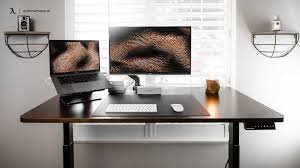
Best for: Distractible people who need a laser-focused zone.
The Core Idea
Less is more. This arrangement breaks things down to the most basic elements. No clutter. No decoration overload. Just you, your screen, and your work.
It’s inspired by a Japanese concept called ma — the idea that empty space can be powerful. When there’s nothing on your desk except what you need at that moment, your brain doesn’t have to waste energy processing visual noise.
What You Need (And How Much It Costs)
| Item | Budget Option | Estimated Cost |
|---|---|---|
| Desk | IKEA LINNMON or secondhand find | $30–$60 |
| Chair | Used office chair from Facebook Marketplace | $20–$50 |
| Monitor riser | Stack of sturdy books or a $10 riser | $0–$10 |
| Cable organizer | Velcro ties or binder clips | $3–$5 |
| Desk lamp | Basic LED lamp | $12–$20 |
| Total | $65–$145 |
How to Set It Up
Start with an empty desk. Seriously — remove everything.
Then only reintroduce what you use every single day. Your laptop or monitor. A notebook. One pen. A water bottle.
That’s it.
Wrap and mount your cables under the desk with binder clips or easy-to-use velcro cable ties. Run them along the wall if you can. Keep the power strip out of sight.
Add one small plant — a succulent works wonders — to soften the space without feeling cluttered.
The Productivity Trick
Use a “daily reset” habit. At the end of each workday, take a minute to restore your desk to its minimal state. This trains your brain to perceive a clean desk as a signal for a fresh start every morning.
Quick Tips for the Minimalist Setup
- Place a simple, solid-colored desk mat under your workspace to create a defined “office zone”
- Turn your phone face-down or stick it in a drawer while you work
- Pick a neutral wall color behind your desk — white, beige, or light grey works best
- Set a small tray or box aside as a temporary home for items that don’t belong on your desk
Setup #2: The Corner Command Center
Ideal for: Small apartments or anyone with minimal square footage.
Making the Most of Dead Space
Every home has at least one neglected corner. Perhaps it’s where boxes accumulate haphazardly. Perhaps it’s where Amazon deliveries go to die.
That corner? It’s your new office.
The Corner Command Center transforms an overlooked nook into an unexpectedly powerful productivity station. The secret is using vertical space instead of horizontal spread.
What You Need (And What It Costs)
| Item | Budget Option | Estimated Cost |
|---|---|---|
| Corner desk | L-shaped desk (secondhand) or DIY with two boards | $40–$80 |
| Wall shelves | IKEA LACK shelves or similar | $15–$30 |
| Pegboard | Standard pegboard from hardware store | $10–$20 |
| Pegboard hooks | Set of assorted hooks | $8–$12 |
| Desk organizer | Dollar store tray set | $3–$6 |
| Monitor arm | Budget arm from Amazon | $20–$35 |
| Total | $96–$183 |
Building Upward, Not Outward
Here’s the magic move: hang a pegboard on the wall above your desk.
Pegboards are one of the most underutilized productivity tools ever made. For around $15–$20, you get a completely customizable wall organizer capable of holding:
- Headphones
- Notebooks
- Sticky note pads
- Small shelves for supplies
- A calendar or whiteboard
- Cable routing hooks
Above the pegboard, install one or two floating shelves for reference books, a small speaker, or storage boxes.
The Two-Monitor Trick
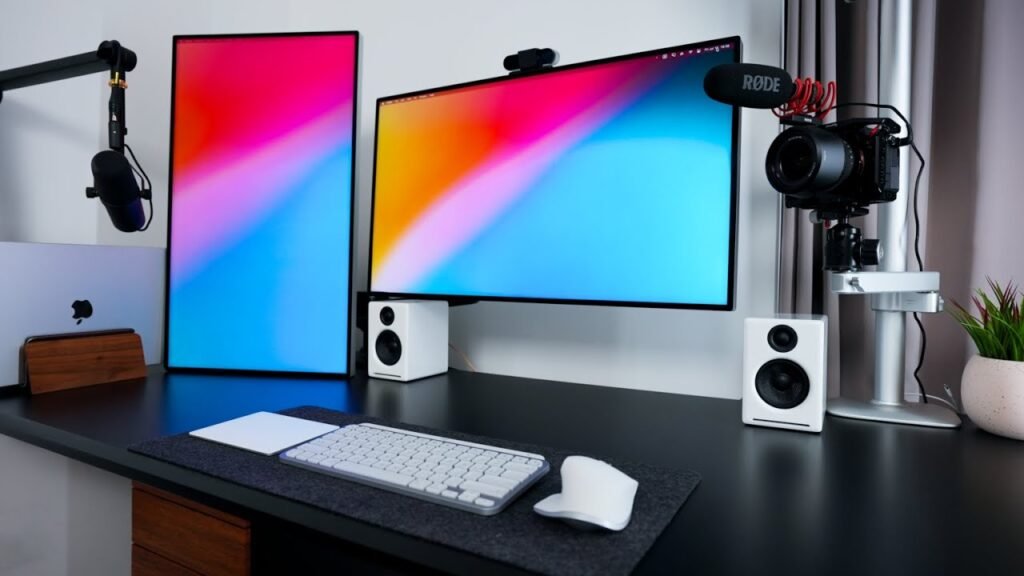
If you have two monitors, the corner setup works perfectly. Place one monitor facing you and the other at an angle on the side panel of the L-shape. This configuration is used by traders, coders, writers, and video editors — and it effectively multiplies how much you can achieve at once.
Even with one screen, the extended surface area of a corner desk gives you space to spread out physical materials without things falling off the edge.
Lighting in a Corner Setup
Corners can get dark. Fix this with:
- A clip-on desk lamp for task lighting
- LED strip lights placed under the shelf above your workspace
- A small floor lamp in the corner if the space feels cave-like
LED strips are inexpensive (about $10–$15 on Amazon) and create a dramatic change in how the space feels. For more inspiration on optimizing your corner workspace, check out Remote Work Desk Setup — a great resource for layout ideas and gear recommendations.
Setup #3: The Standing Desk Hybrid
Great for: Anyone who becomes stiff, tired, or loses focus after sitting for hours.
Sitting All Day Is Quietly Hurting Your Work
Here’s something that most work-from-home guides don’t mention: sitting for 6–8 hours in a row isn’t just bad for your body. It’s bad for your brain.
Research consistently shows that movement breaks improve cognitive function. Your blood flows more efficiently when you stand. Your energy goes up. Your focus sharpens.
But full standing desks? They can cost $300–$1,500. That’s well out of budget territory.
The Standing Desk Hybrid has a clever workaround for this.
The Budget Standing Desk Hack
You don’t need a motorized sit-stand desk. You just need a standing desk converter — or even better, a DIY version using things you probably already own.
Option A: The Box Stack Method Place a sturdy box or stack of books on your desk to prop your laptop or monitor up to standing height. This works surprisingly well for temporary standing periods.
Option B: Buy a Budget Converter Standing desk converters sit on top of your current desk and are adjustable. Budget versions start around $40–$60.
Option C: Wall-Mount a Shelf Mount a shelf on the wall at standing height. Use it as your standing workstation when you want to be on your feet.
What You Need (And What It Costs)
| Item | Budget Option | Estimated Cost |
|---|---|---|
| Existing desk | What you already have | $0 |
| Standing converter or riser | Budget converter or DIY | $0–$60 |
| Anti-fatigue mat | Foam kitchen mat | $15–$25 |
| Monitor at standing height | Adjustable arm or shelf | $20–$35 |
| Total | $35–$120 |
The 20-8-2 Rule
Here’s a simple guideline for your hybrid setup:
- 20 minutes sitting
- 8 minutes standing
- 2 minutes moving (stretching, walking to the kitchen, doing a lap)
This 30-minute cycle keeps energy levels high and reduces the physical fatigue that often derails afternoon productivity.
Set a repeating timer on your phone. It sounds simple. It works remarkably well.
Setup #4: The Sensory-Focused Zen Den
Ideal for: Creative workers, writers, designers, or anyone who needs to achieve a “flow state” regularly.
What Is a Flow State — And Why Should You Care?
Flow state is that magical condition where you are so engrossed in your work that time vanishes. Athletes call it “being in the zone.” Writers call it “being in the groove.”
You do your best work when you are in flow. And the right environment is one of the quickest ways to trigger it.
The Zen Den is built around your senses — not simply your desk layout. Sound, light, smell, and visual calm are used to train your brain to shift into deep work mode quickly.
What You Need (And What It Costs)
| Item | Budget Option | Estimated Cost |
|---|---|---|
| Noise-canceling option | Budget foam earplugs or $20 earbuds | $3–$25 |
| White noise machine | Free app (myNoise, Noisli) or $15 machine | $0–$15 |
| Warm lighting | Smart bulb or warm LED lamp | $8–$20 |
| Scent diffuser | Small plug-in or candle | $5–$15 |
| Essential oils/candle | Lavender, eucalyptus, or citrus | $5–$12 |
| Plants | 1–2 small plants (pothos, succulent) | $6–$15 |
| Desk mat | Soft fabric or cork mat | $10–$20 |
| Total | $37–$122 |
Building Your Flow Trigger System
The brain loves patterns. If you do the same things every time you sit down to do deep work, your brain learns to associate those signals with focus.
Build a “flow trigger ritual” using your senses:
Sound: Use the same style of background sound every time you do deep work. Lo-fi beats, binaural beats, rain sounds, or brown noise all work well. The key is consistency. Use the same playlist or soundscape every session.
Scent: Light the same candle or diffuse the same oil during each deep work session. Scent is directly connected to memory and focus. Over time, that smell literally triggers your brain to shift into work mode.
Light: Switch to warmer, dimmer lighting for creative work. Bright white light is stimulating — good for energetic tasks. Warm light is calming — great for focused, creative flow.
Visual Calm: Keep your background (what you see when you look up from your screen) as simple and peaceful as possible. A plain wall, a small plant, or a minimal piece of art works better than a busy, cluttered backdrop.
The 5-Minute Ritual That Changes Everything
Follow this exact sequence before starting deep work:
- Put on your headphones and start your sound
- Light your candle or start your diffuser
- Switch to your warm light setting
- Take three slow, deep breaths
- Open only the tab or document you are working on
- Start a 25-minute focus timer
Over time, even just putting on your headphones will begin to prime your brain for focus. That’s the power of sensory rituals.
Setup #5: The Mobile Productivity Pod
Best for: People who move around, work in different rooms, or don’t have a dedicated workspace.
When You Can’t Have a Permanent Desk
Not everyone has a spare room. Not everyone even has a corner to spare.
If you’re in a shared space, a small apartment, or a living situation where a permanent desk just isn’t possible — this setup is for you.
The Mobile Productivity Pod is a portable, self-contained work system. Everything you need fits in a bag or a small rolling cart. You can set up anywhere — the kitchen table, a café, a corner of your couch — and be fully productive within minutes.
What You Need (And What It Costs)
| Item | Budget Option | Estimated Cost |
|---|---|---|
| Laptop stand | Foldable aluminum stand | $15–$25 |
| Portable keyboard | Compact Bluetooth keyboard | $20–$35 |
| Wireless mouse | Basic Bluetooth mouse | $10–$20 |
| Lap desk | Cushioned lap board | $18–$30 |
| Noise-canceling earbuds | Budget buds (SoundPEATS, etc.) | $20–$35 |
| Portable light | Small clip-on or ring light | $10–$18 |
| Cable pouch | Small zippered bag | $5–$10 |
| Power bank | 10,000mAh bank | $18–$28 |
| Total | $116–$201 |
The “Pod Kit” System
Keep everything in one dedicated bag or box. Never unpack it completely.
When you sit down to work, you unpack your pod. When you’re done, everything goes back inside. This creates a clear psychological boundary between “work mode” and “not-work mode” — which is one of the biggest challenges when working from a shared living space.
Setting Rules for Shared Spaces
If you work at a kitchen table or shared area, establish these boundaries:
- Use a small sign, a specific chair, or a seat position to signal “this is my workspace right now”
- Inform housemates or family members of your work hours
- Treat your earbuds as a visual “do not disturb” sign
- Pack up completely when you’re done — this helps your brain and everyone else’s
Choosing Your Work Spots Strategically
Not every spot in your home is created equal. Here’s a quick guide:
| Location | Best For | Watch Out For |
|---|---|---|
| Kitchen table | Morning work sessions | Distractions around mealtimes |
| Living room floor | Brainstorming, creative work | Posture problems over time |
| Bedroom desk or nightstand | Focused morning work | Can blur sleep/work boundaries |
| Balcony or porch | Energy reset, calls | Weather, wind noise |
| Dedicated couch corner | Light tasks, reading | Easy to slip into leisure mode |
How to Choose the Right Setup for You
Not sure which setup applies to your situation? Use this quick guide:
| Your Situation | Best Setup |
|---|---|
| Easily distracted, love simplicity | Minimalist Desk Warrior |
| Small apartment, limited space | Corner Command Center |
| Sedentary, low energy afternoons | Standing Desk Hybrid |
| Creative work, need deep focus | Sensory-Focused Zen Den |
| No dedicated space, often mobile | Mobile Productivity Pod |
You can also mix elements from different setups together. Add the sensory rituals from Setup #4 inside the Corner Command Center from Setup #2. These are building blocks — use them together however they serve you best.
5 Budget Home Office Upgrades That Pay for Themselves
Once you have your basic setup down, these small investments make a surprisingly large difference:
- A decent chair cushion ($15–$25) — Your back will thank you come hour three.
- Blue light blocking glasses ($12–$20) — Reduce eye strain during long screen days.
- A physical to-do notepad ($5–$10) — Writing tasks by hand improves memory and clarity.
- A second monitor ($60–$120 secondhand) — Doubles your screen real estate at a fraction of the cost.
- A USB hub ($12–$20) — Fewer cables, more ports, neater desk.
The Most Common Budget Home Office Setup Mistakes
Well-intentioned as they may be, these mistakes can hold you back:
Mistake #1: Spending on aesthetics before function A pretty desk that hurts your back or strains your eyes isn’t doing you any good. In the first phase, prioritize ergonomics and lighting above aesthetics.
Mistake #2: Ignoring natural light Where you place your desk in relation to windows matters a lot. Find a spot where natural light hits you from the side — not directly behind or in front of your screen. This lessens glare and eye strain. According to research from the American Optometric Association, poor lighting and glare are among the top causes of digital eye strain — a common complaint among remote workers.
Mistake #3: No separation between work and life In a home office, this boundary has to be created deliberately. A physical space, a set schedule, or a ritual that signals “work is done” — you need something.
Mistake #4: Buying everything at once Start with what you have. Add one thing at a time. You’ll figure out what you actually need versus what just looks good in YouTube office tours.
Mistake #5: Copying someone else’s setup exactly Everyone works differently. Take inspiration — but modify everything to suit how your brain operates.
Frequently Asked Questions About Budget Home Office Productivity Setups
Q: What is a realistic budget for a home office setup? A great starter setup can be built for $75–$200. With time, you can add upgrades as your budget allows. The two most essential investments are a decent chair and good lighting — everything else is secondary.
Q: Is it possible to build a productive home office in a very small space? Absolutely. The Corner Command Center and Mobile Productivity Pod setups are made specifically for tight quarters. Many people run successful full-time businesses from a single desk in a shared room.
Q: What is the single most important thing for a productive home office? Lighting. Consistently, this is the most underrated aspect of home office productivity. Bad lighting causes eye strain, headaches, and fatigue. Well-designed lighting — whether natural daylight or warm, soft LED — boosts mood, focus, and energy.
Q: Do I need a standing desk to stay healthy while working from home? No. But you do need to move regularly. Even modest movement breaks every 30–60 minutes — a short walk, some stretches — deliver similar benefits at zero cost.
Q: What’s a good chair for a budget home office? Search for office chairs secondhand on Facebook Marketplace or Craigslist. Genuine office chairs — even older ones — are far superior to cheap new chairs from big-box stores. Look for lumbar support and adjustable height. Brands like Herman Miller and Steelcase appear secondhand frequently at surprisingly low prices.
Q: How do I stay productive when family members or roommates keep interrupting me? Establish clear “work hours” and communicate them. Use visual cues (headphones on = do not disturb). A simple door sign or a red/green light system is all you need. The Mobile Productivity Pod section above has additional tips for shared spaces.
Q: Do you need expensive monitors for a good home office? Not at all. A 24-inch 1080p monitor can be found secondhand for $60–$90. For most tasks — writing, spreadsheets, video calls, even light design work — this is more than enough.
Wrapping It All Up
A productive home office doesn’t require a big budget, a separate room, or a Pinterest-worthy aesthetic.
It requires intention.
It requires figuring out how you work best — what puts your brain into focus mode, what drains your energy, and what makes you want to sit down and actually do the thing.
This guide gives you five different frameworks to work with for your budget home office productivity setups. Whether you go Minimalist Desk Warrior, Corner Command Center, Standing Desk Hybrid, Sensory-Focused Zen Den, or Mobile Productivity Pod — or some combination of all five — you now have a roadmap.
Start small. Start with what you have. Make one change this week.
Your best work is waiting on the other side of a better workspace.
Focus keyword: budget home office productivity setups








