


Working Smart Doesn’t Have to Cost Big Bucks
A great many people feel a productive home office comprises pricey standing desks, triple monitors and posturally correct ergonomic chairs costing more than a month’s rent.
That’s simply not true.
The most productive remote workers in the world can work from humble setups — a clean corner, the right tools and some good decisions. The secret isn’t money. It’s intention.
This piece analyzes 8 authentic, cost-effective home office setups that really work. Whether you’re spending time at a small apartment, a shared home or an additional bedroom, there’s something for you here.
Let’s dive in.
Setup 1: Minimalist Corner Desk Build
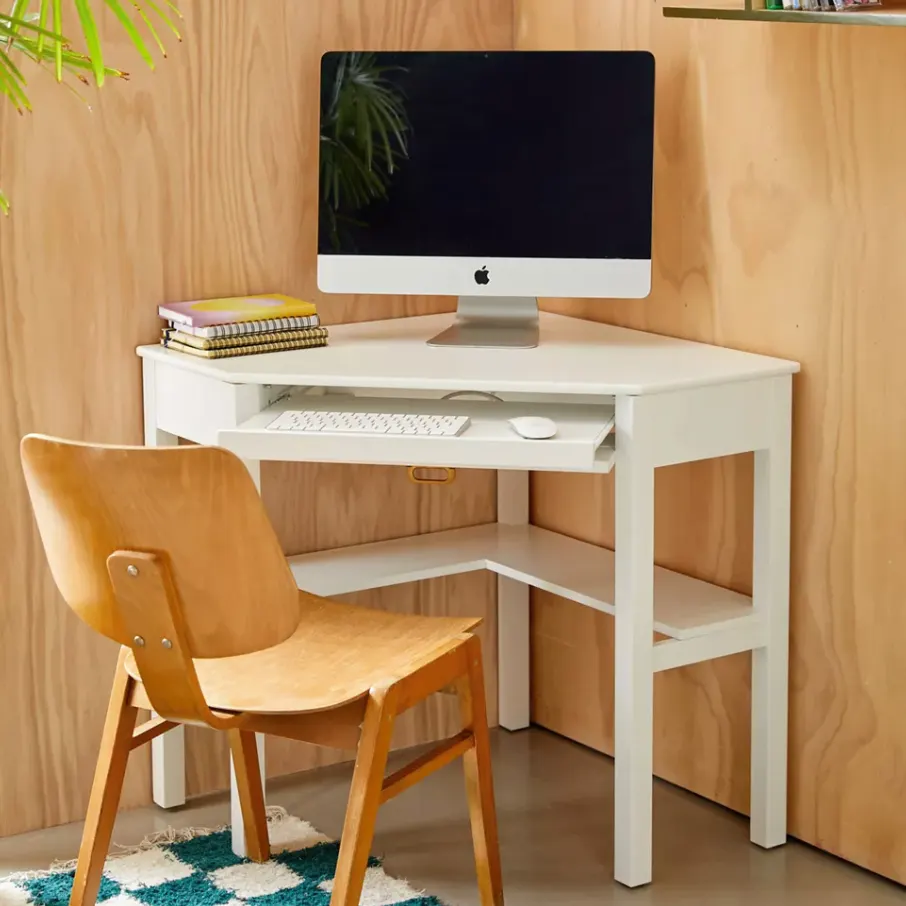
Who it’s for: Freelancers, writers and anyone working in a small space.
You don’t need a whole room to set up a productive workspace. Perhaps the most space-efficient and budget-friendly type of desk setup is a corner desk.
What You Need
| Item | Estimated Cost |
|---|---|
| L-Shaped desk (IKEA LINNMON or similar) | $40–$80 |
| Simple task chair | $50–$100 |
| Desk lamp with adjustable warm/cool light settings | $20–$35 |
| Cable organizer clips and/or sleeve(s) | $8–$12 |
| Small shelf or riser for monitor/trackpad/laptop | $15–$25 |
Total Estimated Cost: $133–$252
Why This Setup Works
A corner desk gives you two surfaces in one. You keep your laptop or monitor to one side and notes or coffee to the other. This mental separation between “work zone” and “everything else zone” retrains your brain to focus as soon as you sit down.
Maintain a clear desk. Keep only daily-use items on the top surface. Everything else just goes in a drawer or a shelf.
Pro Tip
Use a monitor riser to get your screen to eye level. It keeps your neck from getting strained and makes you look more put together on video calls — all for less than $25.
Setup 2: The Secondhand Hero — Thrift Store + Marketplace Finds
Who it’s for: Frugal workers who aren’t afraid to scour websites for a steal.
Facebook Marketplace, Craigslist, OfferUp and local thrift stores are goldmines for home office gear. Every single day people sell perfectly good office furniture and equipment — typically at 70–90% off retail price.
What to Look For
- Office chairs: Herman Miller and Steelcase chairs often pop up on Marketplace for $50–$150. New, they cost $500–$1,500.
- Monitors: 2018–2021 24-inch monitors are still terrific for most remote work tasks.
- Desks: You can find used solid wood desks, including L-shaped and standing ones.
- Keyboards and mice: Mechanical keyboards, ergonomic mice — all available used.
Budget Breakdown
| Item | Retail Price | Secondhand Price |
|---|---|---|
| Ergonomic office chair | $500 | $60–$120 |
| 24″ monitor | $200 | $40–$80 |
| L-shaped desk | $300 | $50–$100 |
| Keyboard + mouse combo | $80 | $15–$30 |
Savings: $800+ vs buying new
The One Rule
Always test before you buy. Sit in the chair. Check the monitor for dead pixels. Make sure zippers, drawers and wheels function. A bad deal is not a deal.
Setup 3: The Budget Standing Desk
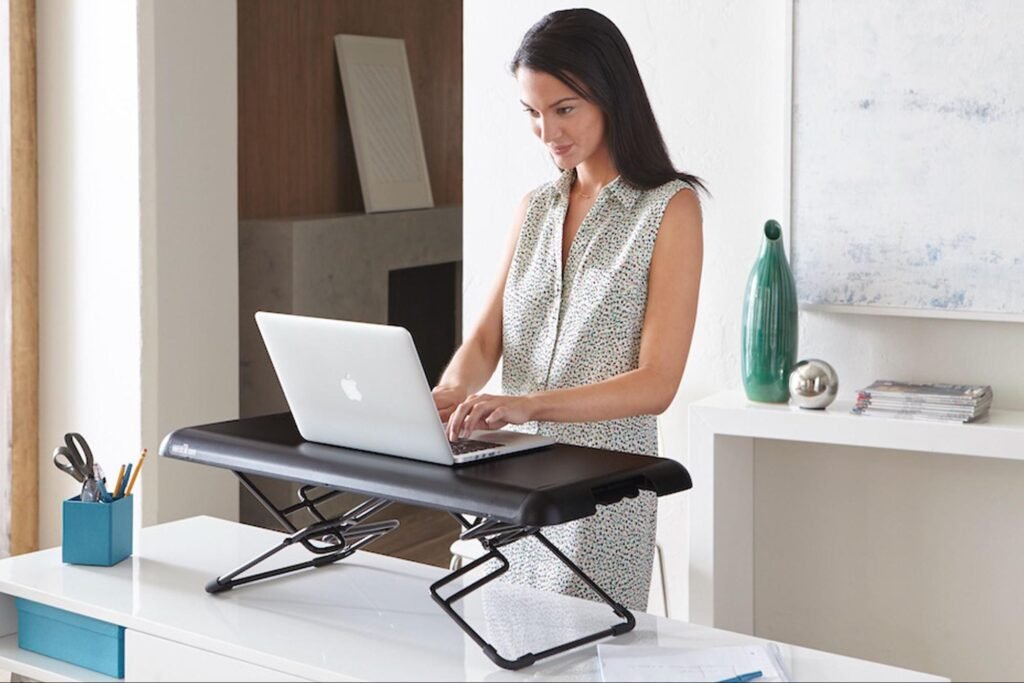
Who it’s for: Anyone who sits for six or more hours a day and wants to protect their health.
Sitting all day wreaks havoc on your back, posture and energy levels. However, electric standing desks can be in the range of $400–$800. You don’t have to spend that.
Affordable Standing Desk Alternatives
Option A: Desk Converter A desk converter sits on your existing desk and raises your monitor and keyboard. Good ones start at $50–$80.
Option B: DIY Standing Desk Use a tall dresser, a kitchen counter, or an appropriately heightened bookshelf. Measure so that when you stand, your elbows are at a 90-degree angle.
Option C: Adjustable Laptop Stand Get a $20–$35 adjustable laptop stand, then get a separate wireless keyboard and mouse. Instant standing workstation.
Standing vs. Sitting: A Quick Look
| Factor | Sitting All Day | Alternating Sit/Stand |
|---|---|---|
| Back pain risk | High | Lower |
| Afternoon energy | Often drops | More stable |
| Focus after lunch | Can dip | Generally better |
| Long-term health | More risk | Improved outcomes |
The point is not to stand at your desk all day. Switch between sitting and standing every 30–60 minutes. Your body will thank you.
Setup 4: The Budget Dual-Monitor Powerhouse
Who it’s for: Developers, designers, virtual assistants and anyone who keeps multiple windows open.
Two screens can really double your output. Constantly switching between tabs wastes more time than most people realize. A second monitor eliminates that.
How to Build This Setup for Under $150
- Use your TV as a second monitor. Most new TVs today function as HDMI monitors. It’s not ideal for close-up work, but it works great for reference materials, Slack or video.
- Buy a used monitor. A 22–24 inch monitor from 2017–2020 costs $30–$70 on Marketplace and works just fine for documents, email and coding.
- Get a cheap monitor arm. A single monitor arm costs $20–$35 and frees up massive amounts of desk space.
Recommended Budget Dual Monitor Setup
| Item | Estimated Cost |
|---|---|
| Used 24″ monitor | $40–$70 |
| HDMI cable | $8–$12 |
| Monitor arm or stand | $20–$35 |
| USB hub (if needed) | $15–$25 |
Total: $83–$142
Placement Matters
Keep your main display directly in front of you. Tilt the second monitor to one side. That helps your neck and keeps the bulk of your work in your direct line of sight.
Setup 5: The Noise-Canceling Focus Zone
Who it’s for: Parents, apartment dwellers and anyone else with distracting environments.
Background noise kills focus. A barking dog, loud neighbors, children in the next room — any of it can derail your deep work within seconds.
You don’t need soundproof walls to fix this.
Affordable Noise Control Solutions
For your ears:
- Budget noise-canceling headphones (Anker Soundcore Q20 or equivalent): $35–$60
- Foam earplugs for deep focus: $5–$10 for a pack
- White noise machine or free apps like Mynoise.net: $0–$30
For your space:
- Hang curtains or heavy fabric on walls — they absorb echo
- Add a rug if you’re on hard floors
- Seal door gaps with a draft stopper: $10–$15
Noise vs. Productivity
Studies show that loud, unpredictable noise damages concentration far more than steady background sound. Music with no lyrics or lo-fi beats tends to help more than hurt.
Quick Focus Zone Checklist
- ✅ Noise-canceling headphones or earplugs
- ✅ White noise app or machine
- ✅ Door closed or privacy sign in place
- ✅ Phone on Do Not Disturb
- ✅ Computer notifications turned off
Setup 6: The Lighting-First Workspace
Who it’s for: Video call workers, creatives and anyone who stares at a screen all day.
Bad lighting is one of the most underrated productivity killers. It leads to eye strain, headaches and fatigue. It also makes you look bad on camera — which matters more than ever in remote work.
The Three Types of Light You Need
1. Natural Light (Free) Face a window when you set up your desk — don’t put it behind you. Natural light improves mood and wakefulness. A light source behind you causes glare on your screen and puts your face in shadow on calls.
2. Overhead or Ambient Light ($0–$30) Make sure your room is generally well-lit. A simple LED bulb upgrade ($10–$15) can shift the whole vibe of a room.
3. Task Lighting ($15–$40) A desk lamp with adjustable brightness and color temperature is a game-changer. Warm light (2700K–3000K) is relaxing. Cool daylight (5000K–6500K) keeps you awake and focused.
Budget Lighting Setup
| Item | Estimated Cost |
|---|---|
| LED desk lamp with adjustable color temp | $20–$40 |
| Warm + cool LED bulb for overhead light | $10–$15 |
| Ring light for video calls (optional) | $15–$30 |
Total: $45–$85
Bonus: Video Call Lighting Tip
Place the light source in front of your face, not behind it. Even a $20 ring light makes you look dramatically more professional on Zoom or Google Meet. This is one of the highest ROI investments on this entire list.
Setup 7: The Organized-on-a-Budget System
Who it’s for: Everyone. Seriously, clutter is productivity poison.
A messy, cluttered desk is not only an eyesore. It actively slows you down. Every time you search for a pen, a sticky note or a charger, you break your flow.
Organization doesn’t require expensive storage systems. Dollar stores and discount shops carry everything you need.
Build Your Tidy Desk for Under $30
| Item | Where to Buy | Cost |
|---|---|---|
| Desk organizer/pencil holder | Dollar Tree | $1–$3 |
| Cable management clips | Amazon | $8–$12 |
| Velcro cable ties | Amazon or Dollar Store | $5–$8 |
| Wall-mounted pegboard (optional) | Hardware store | $10–$20 |
| Sticky note pads + label maker | Dollar Tree / Office Depot | $5–$10 |
The “Clear Desk” Rule
At the end of each workday, clear your desk completely. This takes 2–3 minutes. When you sit down tomorrow, you’ll start fresh rather than digging through the chaos of yesterday.
Digital Organization Counts Too
Don’t just clean your physical space. Organize your desktop files, browser bookmarks and downloads folder. A messy screen is just as distracting as a messy desk.
Free tools to help:
- Notion — Notes, tasks, and wikis in one place
- Google Drive — File storage and management
- Todoist — Simple, free task management
Setup 8: The All-in-One Budget Home Office for Under $300
Who it’s for: Remote workers starting from scratch who need a fully functional setup quickly.
This is the full package. Every item selected for maximum value at minimum cost.
For more inspiration and detailed gear recommendations, check out Remote Work Desk Setup — a great resource dedicated to helping remote workers build their perfect workspace on any budget.
The Complete Setup List
| Item | Recommended Option | Estimated Cost |
|---|---|---|
| Desk | IKEA LINNMON (new) or secondhand find | $40–$80 |
| Chair | Used ergonomic chair from Marketplace | $50–$100 |
| Monitor | Used 24″ monitor | $40–$70 |
| Laptop stand + keyboard/mouse | Adjustable stand + wireless combo | $35–$55 |
| Desk lamp | Adjustable LED lamp | $20–$35 |
| Headphones | Anker Soundcore Q20 | $35–$45 |
| Cable management | Clips + velcro ties | $10–$15 |
| Webcam (if needed) | Logitech C270 | $25–$35 |
Total Range: $255–$435
Making It Work
You don’t need to purchase everything all at once. Start with the chair and desk. Those matter most. Then add a monitor. Then tackle lighting and audio.
Build it over 1–2 months if needed. Every piece makes your setup meaningfully better.
One Final Rule for Every Setup
Personalize your space. Add a plant, a photo or a color you love. It may seem like a minor point, but your brain reacts to spaces that feel like they belong to you. A space you enjoy being in makes it easier to show up and do the work.
Side-by-Side Comparison: All 8 Setups at a Glance
| Setup | Best For | Estimated Cost | Key Benefit |
|---|---|---|---|
| 1. Minimalist Corner Desk | Small spaces | $133–$252 | Space efficiency |
| 2. Secondhand Hero | Bargain hunters | $165–$330 | Huge savings |
| 3. Standing Desk Budget | Health-oriented workers | $20–$80 | Better posture/energy |
| 4. Dual-Monitor Powerhouse | Multi-taskers | $83–$142 | More screen space |
| 5. Noise-Canceling Focus Zone | Distracting environments | $40–$100 | Deeper focus |
| 6. Lighting-First Workspace | Video callers, creatives | $45–$85 | Better calls, less eye strain |
| 7. Organized-on-a-Budget | Everyone | $29–$53 | Fewer mental overheads |
| 8. All-in-One Under $300 | Starting from scratch | $255–$435 | Fully working setup |
Frequently Asked Questions: Budget Home Office Productivity Setups
Q1: What’s the one item worth investing in for a home office on a budget?
Start with your chair. You’re going to be in it for hours every day. A bad chair leaves you with back pain, poor posture and lost focus. Buy a decent secondhand ergonomic chair first. Check Facebook Marketplace or Craigslist.
Q2: Is it really possible to build a productive home office under $300?
Yes — Setup 8 in this article explains exactly how. Buy secondhand whenever you can, prioritize essentials first, and skip anything that doesn’t directly improve your focus, comfort or output.
Q3: I live in a noisy place. What can I do to get some peace and quiet without spending much?
Try free options first: shut your door, use a free white noise app like Mynoise.net, and inform people in your home of your working hours. Then add budget noise-canceling headphones (roughly $35–$60) as your first paid upgrade.
Q4: Will a second monitor really make a difference for remote workers?
For most jobs, yes. Constantly switching windows is a massive time waster. A second monitor — especially a used one for $40–$70 — pays for itself in productivity very quickly.
Q5: What’s the best lighting setup for video calls on a budget?
Sit facing a window during calls, or invest in a $20–$30 ring light and position it in front of your face. Avoid having windows or bright lights behind you — it turns your face into a silhouette.
Q6: How can I stay motivated if my home office isn’t perfect?
Keep the place neat, add at least one personal touch (a plant, a photo, a color you like) and develop a consistent start-of-day routine. Your brain gets cues from your environment. A tidy, personalized space signals “it’s time to work.”
Q7: Are standing desks worth it at the budget price point?
Yes, especially the DIY and desk converter types. You don’t need an electric desk that costs $600. According to Mayo Clinic’s research on sitting and health, even small reductions in sitting time can have meaningful health benefits. Switching between sitting and standing once an hour can relieve fatigue and keep you sharper through the afternoon.
In Conclusion: Small Budget, Big Results
The real deal with budget home office productivity setups is this: the gear matters far less than the habits you develop around it.
A $1,500 desk isn’t going to make you productive if your workspace is cluttered, noisy and badly lit. But an $80 used desk in a clean, well-lit corner with the right tools? That’s a setup that gets work done.
Start where you are. Use what you have. Add one upgrade at a time.
Choose a single setup from this list that fits your situation today. Even one change — better lighting, a second monitor, noise-canceling headphones — can shift how you feel and how much you get done every single day.
Your best work doesn’t require a huge budget. It just needs a smart one.








