


Just because you work at a tiny desk doesn’t mean you have to produce tiny results.
Millions of workers have moved to home offices, but many don’t come equipped with a huge office or a sprawling desk. Many are jamming a full workday into a corner of their bedroom, a spare nook in the hallway, or a small spot in the living room.
The good news? Big desks may rule the day — but small desks can be just as powerful, if you configure yours to work for you.
This guide includes 5 home office productivity setups that have been proven to work and are designed for small desks. Each setup includes layout advice, essential tools, and actionable strategies you can implement today. No matter if you’re a student, remote worker, freelancer, or content creator, there’s a setup here for you.
Let’s get into it.
Why Your Desk Setup Matters (And Not Just for Comfort)
Most of us assume a messy or cramped workspace is simply irritating. But it’s actually so much more than that.
Your surroundings affect your focus, mentally. When your desk is a mess, your brain has to make sense of more visual information. That causes mental fatigue faster. Research in environmental psychology suggests that a clean, purposeful workspace allows the brain to transition into “work mode” more readily.
A home office productivity setup that looks good in photos is not all — it helps you to:
- Start tasks without procrastinating
- Stay focused for longer stretches
- Reduce tightness from bad posture
- Finish your workday accomplished, not exhausted
Now the cool thing about small desks is they make you intentional. Every object on the surface has to earn its place. That constraint, when wielded properly, is a superpower.
What Makes a Small Desk Setup Actually Productive?
Before diving into the five setups, it’s worth knowing what distinguishes a productive small desk from one that only looks organized on Pinterest.
The Three Core Principles
1. Your Best Friend Is Vertical Space
Most people only think about the flat surface of the desk. But the space above it — walls, shelves, monitor arms — is frequently utterly wasted. A small desk setup that is truly productive will definitely use vertical space aggressively.
2. Cable Management Changes Everything
There’s nothing that can kill small desk energy faster than a rat’s nest of cables. A desk with hidden wires feels double the size. This isn’t purely aesthetic — with fewer visual distractions comes less mental noise.
3. Only Keep What You Use Daily
If it doesn’t get touched in three days, it’s not allowed on your desk. Everything else should be in a drawer, on a shelf, or in a storage box nearby.
Setup #1 — The Minimalist Focus Station
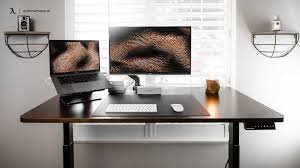
Best For: Writers, coders, deep-work professionals
This is the tidiest of all five home office productivity setups. Here, the aim is to boil things down to their most elemental form. Nothing is on the desk unless it’s used daily.
What the Minimalist Focus Station Looks Like
You will have only three things on the actual surface:
- A laptop or monitor
- A keyboard and mouse
- One small notepad or notebook
That’s it. No decorations. No coffee mug collection. No stack of papers.
Key Products for This Setup
| Item | Function | Budget Pick | Premium Pick |
|---|---|---|---|
| Monitor arm | Frees up desk space | Ergotron LX | Amazon Basics Arm |
| Wireless keyboard | Eliminates cable clutter | Logitech K380 | Apple Magic Keyboard |
| Minimalist desk pad | Defines your workspace | Moft Desk Pad | Orbitkey Desk Mat |
| Laptop stand | Raises screen to eye level | Nexstand K2 | Twelve South Curve |
Why It Works
With a cleared visual field, your brain defaults to the work at hand. Your eyes — or your attention — have nowhere else to go.
The minimalist focus station is particularly great for those who have a hard time concentrating. If you keep rearranging things on your desk instead of doing any work, nothing will get you out of that habit quite as quickly as this setup.
Pro Tip for the Minimalist Setup
Use a single-cable charging solution. With a USB-C hub or one power strip tucked behind the desk, you plug in one cable and everything just works. That leaves the surface completely clear.
Setup #2 — The Do-Everything Compact Workstation
Best For: Remote employees who also need space for hobbies or creative work
Not everyone has the luxury of a separate home office. Some people use the same desk for meetings during the day and personal projects in the evening. That transition is made seamless with this setup.
The Zone-Based Layout
The trick to this home office productivity setup is splitting your small desk into two invisible zones:
Zone A (Work Zone): Where your monitor, keyboard, and work tools are located
Zone B (Personal Zone): A small space — sometimes only 12 inches wide — for your sketchbook, instrument, journal, or hobby supplies
The trick is to keep Zone B as clear as possible during work hours. You can use a simple physical marker — even a houseplant or bookend — to signify the boundary.
Transition Rituals Matter
At 5 PM, when you close your laptop, physically move something from Zone B to center. It seems small, but this ritual signals to your brain that work time is over. Psychologists refer to this as “environmental cuing,” and it’s one of the easiest ways to stave off work-from-home burnout.
Storage Hacks for Dual-Purpose Desks
| Storage Solution | Best For | Space Saved |
|---|---|---|
| Under-desk rolling drawer | Documents and supplies | High |
| Pegboard on wall above desk | Tools, accessories | Very High |
| Monitor stand with drawers | Small items, cables | Medium |
| Magnetic strips | Metal tools, scissors | Medium |
What to Avoid
Don’t attempt to have both zones active simultaneously. The moment your hobby supplies are laid out next to your work monitor, both areas become irrelevant. Boundaries matter, even when your desk is the size of a postage stamp.
Setup #3 — The Ergonomic Power Setup
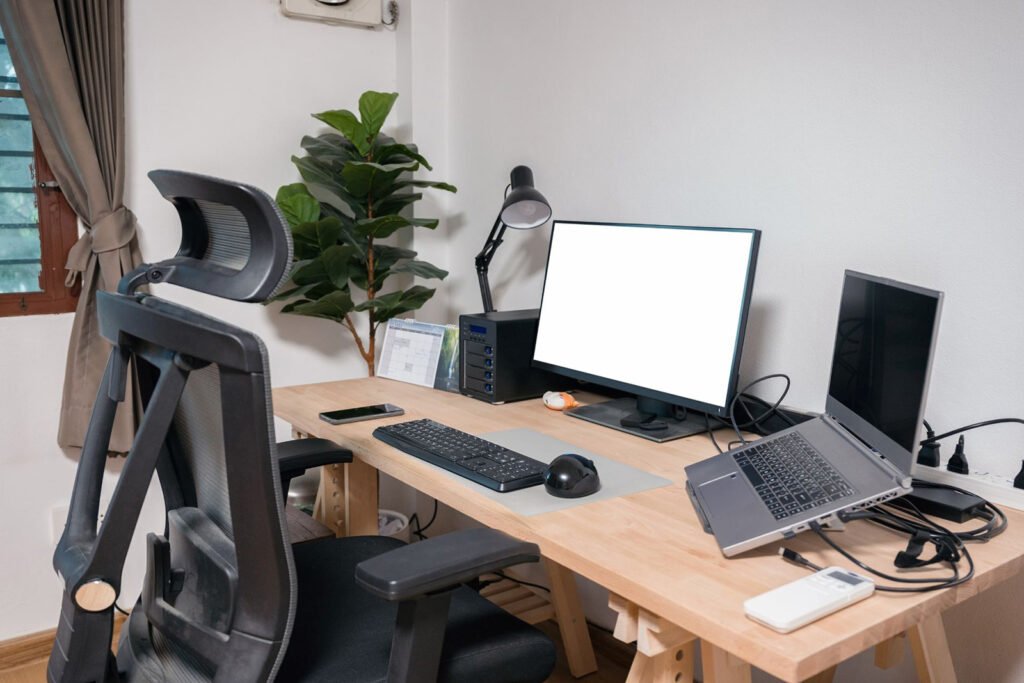
Best For: Anyone sitting for 6+ hours per day
This is the setup that most people need but never create. Long hours spent at a desk — particularly a small one — can cause neck and back pain, wrist strain, and eye fatigue. The ergonomic power setup solves all of that without needing a larger desk.
The Core Ergonomic Rules for Small Desks
It takes a bit of creativity to get the ergonomics right on a small desk, but it’s totally doable.
Monitor Height: Your monitor should be at eye level or just a little bit below. If your monitor sits too low — such as a laptop lying flat — you’re going to have your head tilted down all day and end up with neck pain. A monitor arm or laptop stand eliminates this problem without occupying additional space.
Keyboard Position: Your elbows should be at a 90-degree angle. If your desk is too high, a keyboard tray that attaches under the desk allows you to lower your hands to the perfect level.
Chair Height: Your feet should be flat on the floor. If your chair is too low or too high relative to your desk, no amount of equipment will fix the problem.
The Ergonomic Small Desk Layout
[Wall]
[Monitor at eye level — on an arm mount]
[Keyboard tray below desk surface]
[Mouse pad to the side]
[Desk surface: water bottle only + small notepad]
Must-Have Ergonomic Accessories
- Monitor arm — The single most important item. It frees up desk space and allows you to adjust height precisely.
- Vertical mouse — Less wrist rotation; helps prevent carpal tunnel symptoms.
- Laptop stand + external keyboard — Lifts the screen while keeping your hands at desktop level.
- Blue light glasses or screen filter — Eases eye strain during long sessions.
The Impact of Ergonomics on Productivity
Here’s something most people don’t know: by the time you actually realize it, physical discomfort is already killing your productivity. If your back is a little sore, your mind automatically begins searching for excuses to get up and step away. Improving ergonomics is one of the highest-ROI changes you can make to any home office productivity setup.
According to OSHA’s computer workstation ergonomics guidelines, proper desk and chair positioning can significantly reduce the risk of discomfort and long-term musculoskeletal problems — making ergonomics one of the most important investments any remote worker can make.
Setup #4 — The Content Creator Corner
Best For: YouTube creators, podcasters, streamers, social media creators
Content creators have unique needs. They frequently require a microphone, a camera, ring lights or softboxes, and editing software all functioning simultaneously — and they want it all to fit on a small desk without appearing chaotic on camera.
The Creator’s Small Desk Challenge
The biggest challenge is that creators need two things at once: a well-functioning workspace AND a clean background when they go on video. These two aims pull in different directions. One is about keeping things neat, and the other is about keeping things visually appealing.
How to Solve It
The trick is to design for the camera angle, not merely for function.
Step 1: Before you set up anything else, set your camera up and frame your shot.
Step 2: Only place items inside the camera frame that are either functional or visually intentional.
Step 3: Everything else — hard drives, extra cables, snacks, stationery — goes behind the camera or off to the side.
Creator Setup Gear Guide
| Item | Why It Matters | Space-Saving Option |
|---|---|---|
| Boom arm microphone | Keeps desk clear | Rode PSA1 folds away |
| Compact key light | Better video quality | Elgato Key Light Air |
| Webcam or camera mount | Camera off desk surface | Arm-mounted webcam |
| Stream deck (mini) | Quick shortcuts | Fits in one hand |
| Dual monitors (vertical stack) | More screen, less width | LG Ultrafine vertical mount |
Color and Aesthetic for Creator Desks
Don’t underestimate visual branding. If your audience gets a regular view of your desk, it becomes part of your brand — so be selective about what’s included. Pick 2–3 colors and use them consistently. Use desk accessories, background items, and lighting that coordinate. It helps a small desk look deliberate and professional on camera.
Setup #5 — The Student and Side-Hustle Mix
Best For: Students trying to juggle school, a job, and a personal project at the same time
This is the most demanding of the five setups. A student or side-hustler often needs to hop between drastically different types of work over the course of a day — writing an essay, attending a client call, and building out a Shopify store all at the same desk.
The Multi-Mode Small Desk System
What you need is a desk that can smartly transform to different modes. Think of it like a transformer — same desk, different configurations.
Mode 1 — Study Mode: Textbooks, notebooks, and a laptop. Minimal tech.
Mode 2 — Hustle Mode: Two screens, headphones in, everything within reach.
Mode 3 — Rest/Reset Mode: Everything put away. Just a plant or candle on the desk. This mode prevents burnout.
Making Mode-Switching Fast
The goal is switching modes within two minutes. Here’s how:
- Keep a rolling cart next to the desk for items that are mode-specific
- Label three small bins: Study, Work, Clear
- Bring the right bin to your desk at the beginning of each session
- Return it to the cart at the end
This approach works because it eliminates decision fatigue. You don’t have to figure out what you need to set up. You just grab the right bin.
Budget-Friendly Gear for Students
| Item | Cost Range | Why It’s Worth It |
|---|---|---|
| Laptop stand | $15–$40 | Saves the neck, frees up space |
| USB-C hub | $20–$50 | One cable for everything |
| Desk organizer with drawers | $15–$35 | Keeps modes separated |
| Foldable second monitor | $80–$150 | Huge productivity boost |
| Clip-on desk lamp | $20–$45 | Eye-safe lighting on any desk |
The Time-Blocking Connection
Side-hustlers and students usually do better with time blocking — assigning specific hours to certain tasks. Combine your mode-switching system with a time-blocked calendar and the effects compound. Your physical environment and your schedule will both be aligned toward the same task at the same time.
For more ideas on building a workspace that matches your workflow, visit Remote Work Desk Setup — a dedicated resource for anyone serious about optimizing their home office space.
Comparing All 5 Setups at a Glance
| Setup | Best For | Complexity | Budget Level | Top Feature |
|---|---|---|---|---|
| Minimalist Focus Station | Deep work, writing | Low | Low–Medium | Complete distraction removal |
| Dual-Purpose Workstation | Remote + hobby users | Medium | Low–Medium | Zone-based transitions |
| Ergonomic Power Setup | Long-hour workers | Medium | Medium–High | Pain prevention + stamina |
| Content Creator Corner | YouTubers, streamers | High | Medium–High | Camera-ready design |
| Student/Side-Hustle Hybrid | Multi-taskers | Medium | Low–Medium | Fast mode-switching |
Selecting the Right Setup for You
There are five options in front of you, so this may feel daunting. Here’s an easy way to make that choice.
Ask yourself three questions:
- What is the most important thing I do at this desk?
- How many hours per day do I spend here?
- What is my greatest present problem — clutter, discomfort, distraction, or context-switching?
Your answer to question 3 points directly to your setup:
- Distraction → Setup #1 (Minimalist)
- Context-switching → Setup #2 (Dual-Purpose) or Setup #5 (Student Hybrid)
- Aches and pains → Setup #3 (Ergonomic)
- Looking professional on camera → Setup #4 (Creator)
Desk Habits That Quietly Sabotage Your Productivity
Even with a great setup, some habits will quietly kill your results. Here are the most common ones:
Mistake #1 — Using the desk as a storage shelf. Things pile up. Papers stack. Boxes get placed “just for a second.” Before you know it, your workspace disappears. A 5-minute weekly desk reset prevents this completely.
Mistake #2 — Poor lighting. In dim light, your eyes work harder and you tire faster. A simple desk lamp with adjustable color temperature — warm for reading, cool for focused work — is one of the cheapest upgrades you can make.
Mistake #3 — No cable management. Even a single nest of tangled wires makes a small desk feel chaotic. Cable clips, velcro ties, and a cable box costing under $20 combined completely change the visual feel of any setup.
Mistake #4 — Not paying attention to chair height. Even with the perfect desk setup, a poorly adjusted chair can cause back pain. Make sure your chair height is correct before investing in desk accessories.
Mistake #5 — Treating setup as a one-time task. Your work changes. Your needs change. A great home office productivity setup should be reviewed every couple of months and adjusted as necessary.
Quick-Start Checklist for Any Small Desk Setup
Use this checklist to audit your current desk today:
- [ ] Is my monitor at eye level?
- [ ] Are cables concealed or organized?
- [ ] Is only daily-use equipment on the surface?
- [ ] Do I have enough light?
- [ ] Is my chair height correct?
- [ ] Is there a distinct work zone on my desk?
- [ ] Can I find what I need in under 10 seconds?
- [ ] Is there space to write by hand if needed?
If you checked fewer than five boxes, your setup has room for improvement. Choose one or two things you can do with the least cost and greatest impact, and go from there.
FAQs: Home Office Productivity Setups for Small Desks
Q1: What is the optimal desk size for a home office? Most people should be comfortable with a desk sized between 40 and 55 inches wide. But size matters less than how you utilize the space. A well-organized 40-inch desk is far superior to a cluttered 72-inch desk.
Q2: Is it possible to use dual monitors on a tiny desk? Yes. The trick is to use a dual monitor arm instead of two separate stands. Monitor arms attach to the back edge of your desk and support both displays above the surface, clearing up nearly all of your desk space.
Q3: How can I prevent my small desk from feeling cramped? Have one rule: everything that stays on the surface should be used daily. Everything else finds a home in a drawer, on a shelf, or in a storage box. Then do a 5-minute reset at the end of each workday to return things to their homes.
Q4: Can a standing desk fit in a small space? A sit-stand converter (a riser that sits on top of your current desk) is a perfect compromise. It provides the health benefits of standing without needing you to purchase a new desk. Most are under $100 and have a small footprint when lowered.
Q5: What is the best lighting for a home office on a small desk? Natural light is best. Ideally, place your desk to face or sit beside a window. For artificial lighting, use a lamp with a color temperature between 4000K and 5000K (neutral to cool white) to facilitate focus. Avoid overhead-only lighting, which casts harsh shadows on your screen.
Q6: How can I make my home office setup look professional for video calls? Have your camera at eye level — not looking up at you from below. Keep a light source in front of your face, not behind you. Keep the visible area behind you clean and tidy. A simple bookshelf or a plain, clean wall works perfectly.
Q7: Do I have to spend a lot of money to build a productive small desk setup? Not at all. Some of the most effective setups can be built or upgraded for under $100. A $15 laptop stand, a $10 cable organizer, and a $20 desk lamp can turn an average desk into a truly productive workspace.
Wrapping It All Up
Your desk does not need to be large in order for you to be productive. It needs to be intentional.
All five home office productivity setups in this guide are designed to convert a small desk into a focused, ergonomic, and functional work surface. The bare-bones approach gets rid of everything so your mind can concentrate. The ergonomic setup looks after your body for the long haul. The creator corner makes you look and sound professional. The dual-purpose and student hybrid setups help you wear multiple hats without losing your mind.
The best setup isn’t necessarily the priciest or the most popular one on social media. It’s the one that applies to your real life — your work style, your routine, and your environment.
Start small. Choose one setup that aligns with your greatest pain right now. Make one or two changes this week. Then build from there.
A better workday is closer than you think — and it all starts at your desk.








