


Less is more. It sounds easy — but the right home office setup can revolutionize how you work.
Clean desk, clean mind. Cables all over the place, piles of paper here and there, too many tech gadgets — each one of these things quietly gnaws away at your ability to focus without you even knowing. Minimalist home office productivity setups flip that equation. They distill things down to what really matters, so your brain can too.
The best part? You don’t need to break the bank or have an eye for design to pull it off. Minimalism is intentional, not aesthetic. It’s about retaining what helps you and discarding what hinders.
Whether you’re working from a spare bedroom, the corner of your studio apartment or a tiny desk shoved next to the couch — this guide is for you. Here are 9 easy minimalist home office productivity setups anyone can try today.
What a “Minimalist” Home Office Is — and Why It Works
Before we get into any of the setups, it’s good to know what minimalism even means in a workspace context.
A minimalist home office is not just empty desks and white walls. It’s about reducing friction. Everything on your desk, every notification popping up on your screen, every visual distraction in your line of sight costs you a bit of mental energy. That adds up quickly over a full workday.
Research conducted at Princeton University showed that physical clutter competes for your attention and makes it harder to focus. A cleaner environment literally allows your brain to process information better.
Minimalist setups work because they:
- Reduce visual distraction from the task at hand
- Make it easier to get started (lower setup cost, lower decision cost)
- Create a more tranquil, business-focused environment
- Are quicker and simpler to clean and maintain
You don’t have to go full monk-mode and own three things. You only need a space that’s intentional — where everything has a reason for being there.
Setup 1: The Single-Screen, Single-Task Desk
One Screen. One Job. Total Focus.
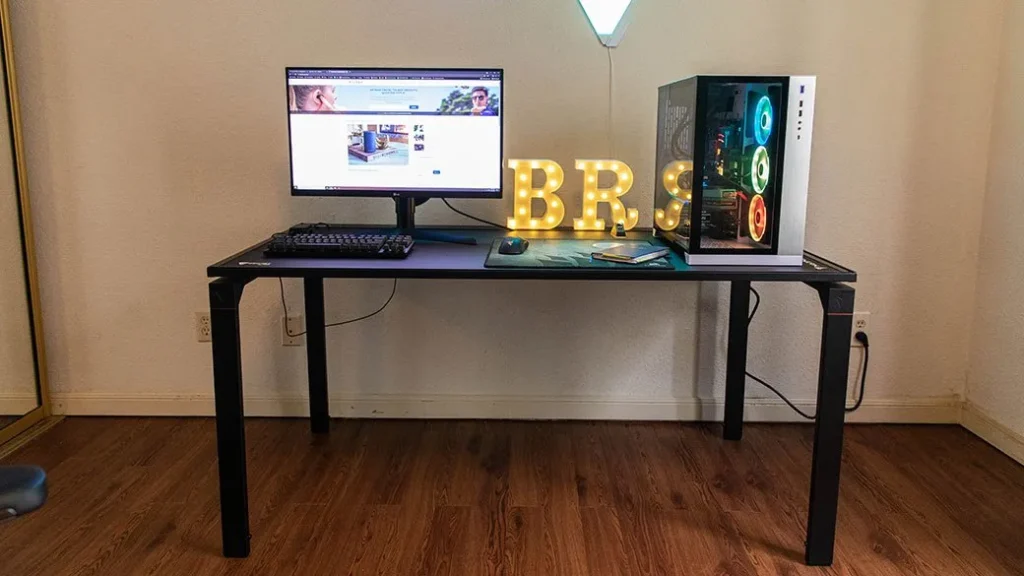
The most classic of all minimalist home office productivity setups is the single-screen desk. No dual monitors, no tablet angled up beside it — just one screen, front and center.
That may seem limiting, but it’s a real advantage for deep work.
Multiple screens invite multitasking — and multitasking is a productivity illusion. Studies show that switching between tasks reduces efficiency by up to 40%. A single screen nudges you to focus on one thing at a time, and that’s how the best work gets done.
What Goes on This Desk
Stick to the bare minimum:
- One monitor or laptop (on a riser to reach eye level)
- A wireless keyboard and mouse (fewer cables = cleaner look)
- One notebook and one pen
- A small lamp for task lighting
- Nothing else
That’s it. Everything that isn’t actively used during the workday goes into a drawer, on a shelf or in another room entirely.
The golden rule of this setup: If you haven’t touched it in three days, it doesn’t belong on the desk.
Setup 2: The Cable-Free Desk Zone
The Invisible Upgrade That Makes All the Difference
You may not realize how much cable clutter stresses you out — until it’s gone.
Tangled cables are the number one enemy of a clean, minimalist workspace. They make even a tidy desk look untidy. And visually busy surfaces are mentally taxing in ways most people don’t consciously register.
Going cable-free (or close to it) is one of the highest-impact, lowest-cost changes you can make to any home office.
How to Eliminate Cable Clutter
| Problem | Solution | Cost |
|---|---|---|
| Power cables everywhere | Under-desk cable tray or raceway | $10–$25 |
| USB/charging cables on desk | Wireless charger pad | $15–$35 |
| Keyboard and mouse cables | Switch to Bluetooth keyboard/mouse | $30–$80 |
| Monitor cable hanging down | Cable sleeve or wall channel | $8–$20 |
| Power strip visible on floor | Mount power strip under desk | $5–$15 |
Once the cables are gone, the desk already looks more considered — even if nothing else changes.
Bonus tip: For any cable you can’t eliminate, use velcro cable ties (not plastic zip ties). They are reusable, inexpensive and keep things organized without locking your cables in place permanently.
Setup 3: The “Only What I Need Today” Desk Reset
A Daily Habit to Keep the Clutter from Coming Back
This isn’t a setup about furniture or gadgets. It’s about a system — and it might be the most powerful minimalist habit on this list.
The concept is straightforward: every workday morning, you only put on your desk what you need for that specific day. Everything else stays off the surface.
Working on a writing project today? Laptop, notebook, pen, lamp. That’s your desk.
Taking calls and doing spreadsheets? Laptop, headset, notepad. Done.
Why This Works Better Than a One-Time Declutter
Most people clean off their desk once, feel good about it, and then watch it gradually fill back up over the following weeks. The “only what I need today” reset prevents that creep.
It also enforces a small but powerful planning habit: to decide what goes on your desk, you have to think about what you’re actually doing that day. That 30-second decision primes your brain for focused work before you even open your laptop.
How to start: Clear your desk completely tonight. In the morning, put back only what you need. Repeat daily. That’s the whole system.
Setup 4: The Floating Shelf Workstation
Declutter Your Desk by Going Up the Wall
A floating shelf workstation is one of the most stylish minimalist home office productivity setups and also one of the most practical.
Rather than a large desk covered in items, this arrangement uses a single floating shelf as the work surface — paired with wall-mounted storage above it to keep everything off the desk and within easy reach.
How to Build This Setup
The work surface: A floating shelf (typically 40″–48″ wide and 12″–16″ deep) mounted at desk height. This is your entire workspace. Because it’s shallow, it physically can’t hold much — which enforces minimalism naturally.
Above the shelf: Two or three smaller floating shelves for books, a small plant, a speaker and whatever supplies you need nearby.
Below the shelf: Nothing. No under-desk storage, no boxes, nothing on the floor. The visual emptiness beneath the shelf is part of what makes this setup feel so clean.
Ideal Items for a Floating Shelf Workstation
| On the Shelf | On Wall Shelves Above | Off Limits |
|---|---|---|
| Laptop or small monitor | Books and notebooks | Paper stacks |
| One small lamp | Small speaker | Extra gadgets |
| Wireless keyboard | Plant or décor item | Charging cables |
| Single notepad | Headphone hook | Food or drinks |
Best for: Renters, small-space dwellers and anyone who wants a setup that looks intentionally designed — not just functional.
Setup 5: The Monochrome Color Setup
How a Single Color Palette Quietly Boosts Your Focus
This one surprises people. The color scheme of your workspace actually affects how focused and calm you feel while working. It’s not only about aesthetics — it’s about reducing visual stimulation.
A monochrome or limited-color workspace — where everything on and around your desk sticks to one or two colors — creates visual harmony. Your eyes don’t have to work as hard. Your brain doesn’t have to process as much sensory input. The result is a workspace that genuinely feels restful to sit in.
Choosing Your Minimalist Color Palette
Option 1 — All Neutrals: White, beige, warm grey. Calm and professional. Works well in rooms with natural light.
Option 2 — Dark and Grounded: Charcoal, black, deep wood tones. Focused and serious. Great for evening workers.
Option 3 — One Accent Color: Neutral base with one deliberate accent — a green plant, a terracotta lamp, a navy notebook. Adds personality without chaos.
The goal isn’t to make your office look like a magazine spread. The goal is to reduce the number of competing visual signals in your line of sight while you work.
Quick win: Make sure your desk accessories — pen holder, notebook, lamp, mouse pad — are all in the same color family. That single change makes a surprisingly big difference.
Setup 6: The Paperless Desk System
Ditch the Paper, Gain the Clarity
Paper is the biggest source of desk clutter for most people. Notebooks, printouts, sticky notes, random receipts — paper multiplies silently and takes over flat surfaces faster than anything else.
A paperless minimalist desk doesn’t mean you never write anything down. It means you have a system for paper so it never piles up.
The Three-Step Paperless System
Step 1 — Digital notes first. Use a note-taking app (Notion, Apple Notes, Google Keep — choose one and stick to it) for everything you’d normally scribble on a sticky note.
Step 2 — One physical notebook only. If you prefer writing by hand, allow yourself exactly one notebook on the desk. When it fills up, scan the important pages and recycle it.
Step 3 — Inbox tray with a 24-hour rule. Any physical paper that comes in (mail, invoices, forms) goes into a small inbox tray. It must be dealt with — filed, scanned or recycled — within 24 hours. The tray never becomes a permanent home for anything.
Paper Clutter vs. Paperless System
| Paper Clutter Desk | Paperless Minimalist Desk |
|---|---|
| Sticky notes everywhere | One note-taking app |
| Random printouts stacked up | Scanned and filed digitally |
| Multiple half-used notebooks | One active notebook |
| Receipts and mail piling up | 24-hour inbox rule |
| Constantly searching for notes | Everything searchable digitally |
Going paperless is one of the fastest ways to achieve a genuinely minimalist desk — and it costs nothing to start.
Setup 7: The Dedicated Deep Work Corner
A Space Designed for One Purpose: Getting Stuff Done
This setup isn’t so much about physical objects as it is about spatial intention. The point is to establish a specific corner or zone in your home that serves one purpose and one purpose only — focused, deep work.
No casual browsing. No social media. No eating. Just work.
The reason this works comes down to a concept psychologists call environmental cues. When you consistently do the same thing in the same place, your brain starts to associate that place with that behavior. Over time, simply sitting down in that corner triggers focus automatically.
How to Build a Deep Work Corner
Choose the right spot. Pick the quietest corner available. Away from the TV, away from foot traffic, away from the kitchen (where snack temptation happens to reside).
Keep it stripped back. This is not the place for décor, motivational posters or mood boards. A desk, a chair, a screen and good lighting — that’s all it needs.
Set the rules. Determine what is allowed in this space and what isn’t. Phone face-down? No notifications? Music only, no podcasts? Establish your own guidelines and stick to them consistently.
Use a ritual to enter it. A small consistent action before you sit down — making a cup of tea, listening to a favorite song, doing two minutes of breathing — signals to your brain that it’s time to focus.
For more practical ideas on designing a workspace that supports intentional focus, remoteworkdesksetup.online is a great resource with real setup guides and desk inspiration.
Setup 8: The Capsule Office Supply Collection
Own Less. Find More. Waste Nothing.
Most home offices are drowning in office supplies. Seventeen pens when you only use two. Three staplers. A drawer full of cables for devices you no longer own. Supplies you bought “just in case” that have never been touched.
The capsule office supply concept borrows from the world of capsule wardrobes — the idea of owning a small, curated collection of high-quality items that all work well together, rather than a large collection of stuff you barely use.
Your Minimalist Supply List
Writing: 2 pens (one black, one your preferred color), one highlighter, one pencil.
Paper: One notebook. One pad of sticky notes for truly temporary reminders only.
Tech: Laptop or desktop, wireless keyboard, wireless mouse, one set of headphones.
Desk tools: One lamp, a small plant (optional but effective for mood), one monitor riser or laptop stand.
Storage: One small drawer unit or desktop organizer — with a rule that if it doesn’t fit inside, it doesn’t stay.
The Capsule Supply Rule
For every new item you bring to the desk, one item leaves. This “one in, one out” rule prevents the slow accumulation that turns a clean desk back into a cluttered one.
Setup 9: The Minimalist Dual-Purpose Room Setup
Living Room + Office. Bedroom + Office. Done With Intention.
Not everyone has a dedicated office room. Many minimalist home office productivity setups need to coexist with living spaces — and when done right, it’s completely achievable.
The key is visual separation and functional separation. Your workspace needs to look and feel distinct from the rest of the room, even when there’s no physical wall between them.
How to Create Separation Without Walls
Use a rug. A small rug under your desk area visually anchors the workspace and separates it from the rest of the room. It’s one of the cheapest and most effective design tricks available.
Face away from the living space. Position your desk so your back is to the room, not your face. This simple move dramatically reduces distraction — both visual and social.
Use a narrow bookshelf as a divider. A bookshelf placed perpendicular to the wall creates a natural partition between workspace and living space without blocking light or making the room feel smaller.
Match — but don’t merge. Your desk furniture should complement the room’s style without blending into it. A distinct desk lamp, a different chair style — small signals that say “this area is for work.”
Minimalist Dual-Purpose Room Checklist
| Element | Goal | Quick Fix |
|---|---|---|
| Desk position | Face wall or window, not room | Rearrange today |
| Visual separator | Create zone boundary | Rug, bookshelf or curtain |
| Lighting | Different from room lighting | Add a desk lamp |
| Storage | Keep work items contained | One drawer unit or box |
| End-of-day reset | Remove work from sight | Fold-away or covered desk |
Minimalist Setup Comparison: All 9 at a Glance
| Setup | Difficulty | Cost Range | Best For |
|---|---|---|---|
| Single-Screen, Single-Task Desk | Easy | $0–$50 | Deep focus workers |
| Cable-Free Desk Zone | Easy | $20–$80 | Visual clutter haters |
| “Only What I Need Today” Reset | Easy | $0 | Habit-driven workers |
| Floating Shelf Workstation | Medium | $50–$150 | Small space dwellers |
| Monochrome Color Setup | Easy | $0–$40 | Aesthetics-minded workers |
| Paperless Desk System | Medium | $0–$20 | Organized digital workers |
| Dedicated Deep Work Corner | Easy | $0–$30 | Focus-first workers |
| Capsule Office Supply Collection | Easy | $0–$50 | Over-stuffed desk owners |
| Minimalist Dual-Purpose Room | Medium | $30–$100 | Studio/shared space workers |
5 Minimalist Habits That Keep Any Setup Clean Long-Term
Getting a minimalist desk is the easy part. Keeping it that way takes a little intentional practice. These five habits work with any of the setups above.
1. The 5-minute end-of-day reset. Before you close your laptop, spend five minutes returning everything to its place. This takes almost no time but means you always start the next day with a clean desk.
2. Weekly supply audit. Once a week, spend two minutes checking your desk. If something has appeared that doesn’t belong, deal with it then — not “later.”
3. One-in, one-out rule. Covered in the capsule supply setup, but worth repeating as a standalone habit. New item in? Old item out.
4. Digital clutter counts too. A clean physical desk paired with a chaotic desktop full of icons and browser tabs defeats the purpose. Apply the same minimalist logic to your digital workspace.
5. Buy less, choose better. Before purchasing any new desk item, ask: does this replace something, or is it extra? If it’s extra — wait 48 hours before buying. Most impulse purchases don’t survive that pause.
FAQs: Minimalist Home Office Productivity Setups
Q: Do I have to spend a lot of money to create a minimalist home office? Not at all. Many of the setups in this guide — like the daily desk reset, the deep work corner and the paperless system — cost nothing. Minimalism is about removing things, not buying new ones. Start by decluttering what you already own.
Q: Can a minimalist setup work if I have lots of tasks that require different tools? Yes. Minimalism doesn’t mean restricting your tools — it means storing what you’re not currently using out of sight. Use the “only what I need today” approach to bring out the right tools for each day’s tasks.
Q: What’s the single fastest change I can make to create a more minimalist workspace? Clear your desk completely, then only put back items you use daily. That one action — done in under 10 minutes — creates an immediate and noticeable shift in how your workspace feels.
Q: Is minimalism just a design trend, or does it actually improve productivity? The research backs it up. According to the American Psychological Association, cluttered environments elevate stress and reduce focus. A cleaner, more intentional workspace genuinely helps your brain allocate attention more effectively. It’s not just visual — it’s functional.
Q: Can I have a minimalist setup and still make it feel personal and warm? Absolutely. One small plant, a single framed photo, a lamp with warm light — personal touches don’t break minimalism as long as they’re intentional. The goal is purpose, not sterility.
Q: What do I do about papers and documents I genuinely need? Use the paperless desk system outlined in Setup 6. One inbox tray, a 24-hour rule and a simple digital filing system handle the vast majority of paper needs. For documents you’re legally required to keep in physical form, a dedicated filing cabinet away from your desk keeps them accessible without cluttering your workspace.
Q: What if I share my workspace with someone else? Shared workspaces can still be minimalist — it just requires mutual agreement on the system. Assign each person a defined zone on the desk or a dedicated drawer, and apply the same end-of-day reset habit together. A shared space rule (“we both clear the desk before dinner”) can work surprisingly well.
The Takeaway: Simple Is the Point
Minimalist home office productivity setups aren’t about perfection. They’re not about having the most stylish desk on the internet or owning only ten possessions.
They’re about creating a workspace that works for you — quietly, consistently, without unnecessary friction.
Pick one setup from this list. Just one. Try it for a week. See how it changes the way your workday feels. You might find that removing things — rather than adding them — is the most powerful upgrade you’ve made to your home office yet.
The best workspace isn’t the most equipped one. It’s the one that gets out of your way and lets you do your best work.








