


Working from home is a dream — until your laptop occupies the kitchen table, your papers are strewn across the couch and there’s no quiet corner to tune into. Sound familiar?
The good news? You can create a functional home office without a large room or a big budget. With the right arrangement, even a small nook can become an effective workspace.
This guide walks you through 9 simple and space-saving home office productivity setups — practical, stylish and made for the real world. Whether you have a studio apartment or just want to establish some order in one corner of your bedroom, there’s something for you here.
Let’s dive in.
Why Your Home Office Setup Really Matters
Before we dive into the setups, here’s one thing to make clear: your environment informs your output.
Studies have shown that a cluttered, poorly lit or uncomfortable workspace can lower focus up to 40%. Conversely, a clean and tidy desk allows your mind to enter “work mode” more quickly.
A good home office setup isn’t simply a pretty sight. It:
- Reduces distractions
- Keeps supplies within easy reach
- Protects your posture
- Saves time hunting for things
- Enables you to more easily “leave work” at the end of your day
And the best part? Space is saved and productivity is maintained — when things are tight and intentional, mess has no place in your setup.
Setup #1 — The Wall-Mounted Floating Desk
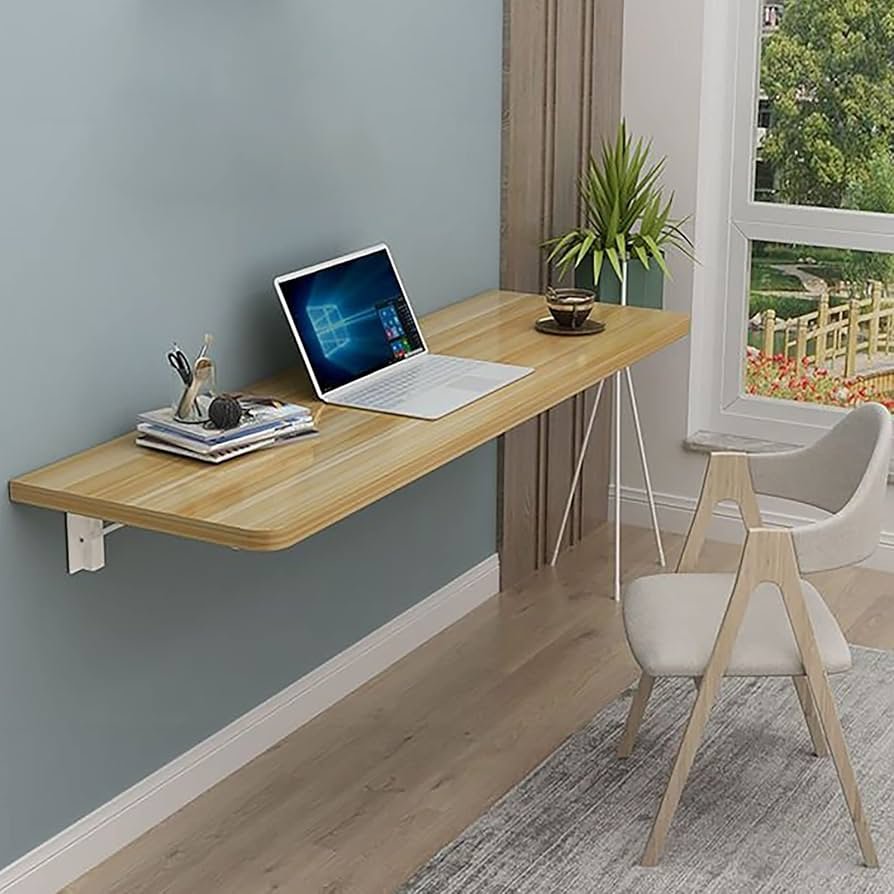
Best for: Small apartments, bedrooms and rental spaces
If you’re battling limited floor space, go vertical.
A wall-mounted floating desk does not have legs that rest on the floor. When you’re not using it, it doesn’t take up any floor space — especially if you opt for a fold-down version that’s the size of a picture frame when folded against the wall.
What You’ll Need
- A wall-mounted or fold-down desk (from $40–$150 online)
- Some sort of pegboard or wall shelf above it for storage
- A collapsible chair you can put out of reach or hang nearby
Why It Works
You take up space only when you need to. When the workday is done, fold it up and your room’s back to normal. It is also a clever psychological trick — out of sight, out of mind.
Pro Tip: Hang it close to a window so it can receive natural light. Your eyes will thank you and the natural environment helps to maintain energy levels.
Setup #2 — The Closet Office (Cloffice)
Ideal for: Spare closets, unused wardrobe spots
“Cloffice” — a closet repurposed as an office — has gone viral, and no wonder. It works incredibly well.
Take away the hanging rod, put in a simple desktop at an appropriate height and place shelving overhead, and there you have it: a completely functional office tucked into a closet. At the end of the day you close the doors and your work vanishes entirely.
How to Build Your Cloffice
| Step | Action to Take |
|---|---|
| 1 | Clear the closet and measure the inside width and depth |
| 2 | Top with a solid desk surface (a cut piece of butcher block or an IKEA countertop will work beautifully) |
| 3 | Add shelves above for books, files, and supplies |
| 4 | Install either a small LED strip or puck light inside for task lighting |
| 5 | Run a power strip through the back or side for outlets |
| 6 | Add a mini monitor arm to save on desk surface area |
Bonus Benefits
- Full visual disconnection from “home mode”
- Built-in privacy
- Ability to hide during video calls if necessary
Setup #3 — The Corner L-Shaped Nook
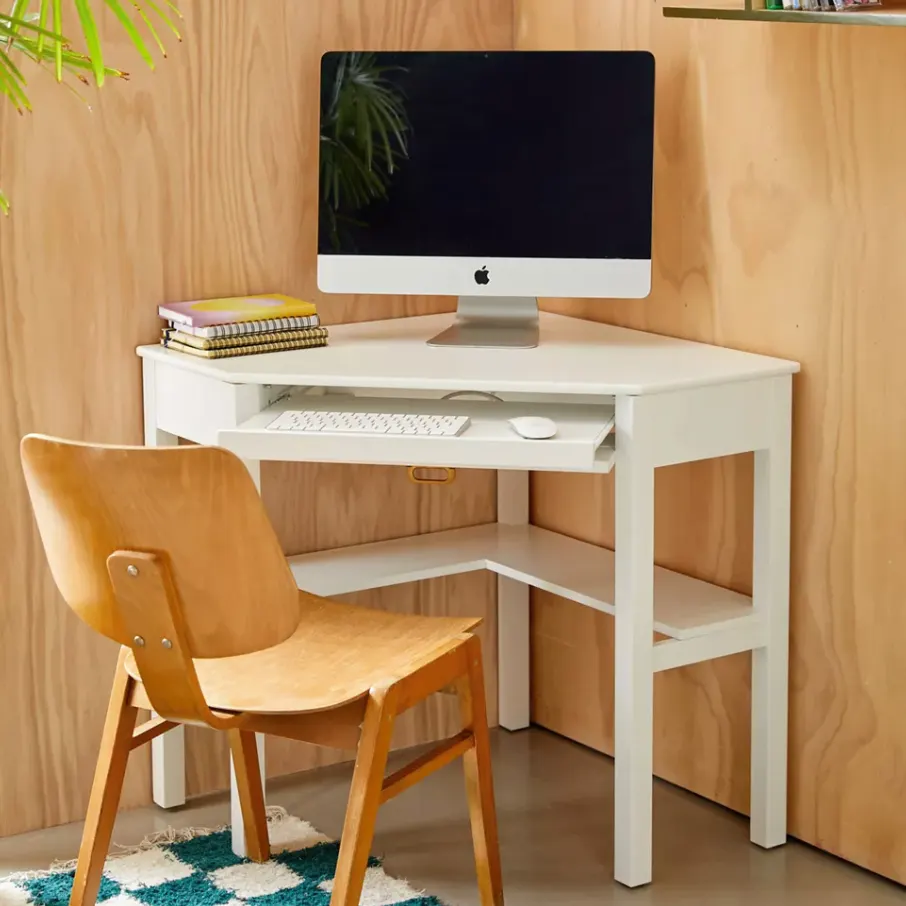
Ideal for: Living rooms, open-plan areas, large bedrooms
Corners are wasted space in most houses. A strategically placed L-shaped desk transforms that wasteland into a full-fledged workstation.
You get two surfaces — one for a main screen and keyboard, another for notes, a second monitor or creative projects. That’s the setup most professionals dream of, and it doesn’t have to be costly.
Budget-Friendly Corner Desk Options
- IKEA LINNMON + Alex combo — Classic DIY option, $150–$200
- Amazon Basics corner desk — Fully assembled, under $100
- DIY with two floating shelves — Less than $60 if you’re handy
Making It Work in Smaller Spaces
Position the corner of the desk flush against the wall. Use a monitor arm instead of a stand to open up the surface. Use the walls above the desk for shelving.
The L-shape creates natural zones — one for focused computer work, another for reading, writing or phone calls.
Setup #4 — The Single-Monitor Minimalist Desk
Best for: Focus-first workers, writers, students
More is not always better. If your work involves writing, coding or deep thought, a no-frills minimalist desk might be the most productive setup you’ve ever had.
The theme: one monitor (or laptop), one notebook, one pen. Nothing else resides on the desk full-time.
The Minimalist Desk Rule
If you haven’t used it in the past 24 hours, it has no place on the desk.
That’s a strict-sounding rule, but it makes all the difference. Clutter demands your focus, even if you don’t realize it.
What to Include
- A clean desk surface (at least 48″ wide)
- A cable management tray underneath
- A single monitor or laptop riser
- A wireless keyboard and mouse (no cable clutter)
- One small tray or drawer for everyday items
What to Leave Off the Desk
- Printers (shelf it or cabinet it)
- Piles of paper (use a wall-mounted vertical file holder instead)
- Decor that takes up workspace
Setup #5 — The Murphy Bed + Desk Combo
Best for: Studio apartments and guest rooms that moonlight as offices
This one’s a lifestyle re-shifter for small apartment dwellers.
A Murphy bed (a fold-out wall bed) coupled with a built-in desk allows the same room to work as both bedroom and office. When you get up, you fold the bed up and your desk comes out. At night, fold it back down.
What to Look For in a Murphy Bed Desk Combo
| Feature | Why It Matters |
|---|---|
| Desk stays put when bed folds | No clearing it every night |
| Built-in shelves | Opens up vertical storage |
| Smooth folding action | Daily use made easier |
| Holds 50+ lbs | Safe to hold a monitor |
These units run from $800 to $2,500 depending on size and brand — but they replace both furniture pieces, so the value is good.
Setup #6 — The Standing Desk Converter Setup
Best for: Those who already have a desk but need flexibility
You don’t need to go out and buy a brand new sit-stand desk to enjoy the health and productivity benefits of standing while working.
A standing desk converter is a device that sits on top of your existing desk, elevating your monitor and keyboard to standing height. You can go from sitting to standing and back in seconds.
Why Standing Helps Productivity
- Reduces afternoon energy slumps
- Improves circulation
- Reduces back pain (a total distraction killer)
- Helps you stay alert during long calls
Top Converter Picks by Budget
| Budget | Product Type | Approximate Cost |
|---|---|---|
| Low ($50–$100) | Z-lift or X-lift converter | Basic but functional |
| Mid ($150–$250) | Gas spring converter | Smooth, easy height changes |
| Higher ($300+) | Electric desktop riser | One-touch height memory |
Combine a converter with an anti-fatigue mat, and you’ve got one of the healthiest productivity setups on this list. For more inspiration on ergonomic and space-efficient workstations, check out Remote Work Desk Setup — a great resource for building your ideal home office.
Setup #7 — The Pegboard Power Wall
Ideal for: Creative professionals, anyone who needs tools, supplies or more than one device within reach
Floor and desk space is scarce. Wall space? Almost always ignored.
A pegboard hung above or next to your desk creates an instantly customizable storage solution that keeps everything in sight and at hand — without occupying any precious surface space.
What You Can Keep on a Pegboard
- Headphones
- Chargers and cables
- Notebooks and folders (with clip holders)
- Small plants or decor (to keep the energy positive)
- A small whiteboard or calendar
- Scissors, pens, sticky notes
Setting Up Your Pegboard
- Pick a pegboard size that works for your wall space (2×4 ft is a perfect starter size)
- Mount it 6–8 inches from the wall for hooks to fit properly
- Paint it a color that matches your room if brown or white doesn’t work
- Begin with your most-used items and adapt over time
Pegboards are very affordable — a typical panel costs $15–$40 at most hardware stores.
Setup #8 — The Office Under the Stairs
Best for: Houses or townhomes with open space below a staircase
The triangular void beneath your stairs is nearly always wasted space. It can become a dumping ground for storage in many homes. However, with a little creativity, it becomes one of the most unique and functional home office setups you can create.
How to Transform the Space
The height at the tall end (typically near the top of the stairs) is often 6–7 feet — more than enough headroom for a desk and monitor. The shorter end is perfect for shelving or filing.
Basic under-stair office checklist:
- Desk surface (built-in or a narrow freestanding desk)
- Task lighting (wall-mounted or clamp-on lamp since ceiling space is limited)
- Cable management to keep cords out of the way
- A small rolling cart or set of drawers for supplies
- A curtain or sliding panel if you wish to close it off
This setup feels private, cozy and entirely separate from the rest of the living space — which is great for concentration.
Setup #9 — The Mobile Cart Office
Ideal for: Renters, frequent movers, people without a consistent workspace
Not everyone has a wall to mount something on or a corner to call their own. That’s where the mobile cart office comes into its own.
The concept: everything you need to do your work lives on a rolling utility cart or trolley. You wheel it to your workspace — kitchen table, living room, balcony — and within two minutes you’re all set. When you’re finished, roll it away.
What to Pack on Your Cart
| Shelf / Level | What Goes Here |
|---|---|
| Top shelf | Laptop stand, small monitor, or tablet holder |
| Middle shelf | Keyboard, mouse, notebook, planner |
| Bottom shelf | Power strip, chargers, cables, headphones |
| Side hooks | Small bag, headphones, or earbuds |
Best Cart Options
- IKEA RÅSKOG cart (~$20) — cost-effective and a fan favourite
- Amazon rolling utility cart — $30–$70
- Origami folding cart — more stable, around $80–$120
The mobile cart office is the most flexible setup in this list. It travels with you, adapts to any room and needs no installation whatsoever.
Quick Comparison: All 9 Setups at a Glance
| Setup | Best For | Space Needed | Approx. Cost |
|---|---|---|---|
| Wall-Mounted Floating Desk | Tiny apartments | Minimal | $50–$200 |
| Closet Office (Cloffice) | Spare closets | One closet | $100–$400 |
| Corner L-Shaped Nook | Open rooms | Corner space | $80–$300 |
| Minimalist Single Desk | Focus workers | Small desk area | $50–$200 |
| Murphy Bed + Desk | Studio apartments | Full wall | $800–$2,500 |
| Standing Desk Converter | Existing desk users | On existing desk | $50–$300 |
| Pegboard Power Wall | Creative workers | Wall space | $20–$100 |
| Under-Stair Office | Houses/townhomes | Under stairs | $150–$600 |
| Mobile Cart Office | Renters/flexible users | Anywhere | $20–$120 |
Accessories That Improve Any Setup
Whatever setup you go for, these small additions pack more of a punch than they have any right to:
Cable management trays or clips — Messy cables ruin the look and the focus. A simple under-desk tray costs $15 and will make your workspace look 10x cleaner.
A proper chair or seat cushion — Your back is everything. Even if you’re at a small desk, invest in lumbar support. A decent chair ($80–$200) pays for itself in reduced headaches and aches.
Warm or neutral desk lighting — Harsh overhead lights tire your eyes. A warm-toned desk lamp helps keep your eyes relaxed during long sessions.
Noise-canceling headphones — For home workers who share space with family members or roommates, a quality pair of headphones is productivity gold.
A physical inbox/outbox tray — Prevents paper from piling up on your desk. Whatever comes in goes on the tray. The outbox is for everything you’re done with. Simple, effective.
According to research published by the American Psychological Association, workplace environments — including home offices — have a measurable impact on both mental wellbeing and daily performance.
Common Questions About Home Office Productivity Setups
Q: What is an ideal home office setup in a small apartment?
Some of the best options for small apartments include a wall-mounted floating desk or a cloffice (closet office). Both leave a very small permanent footprint and can be hidden entirely when not in use.
Q: How much should I spend on setting up a home office?
For $50–$150, you can establish a basic but functional home office setup using a floating shelf desk, a second-hand chair, and some organizational tools. More involved setups with standing desks or Murphy beds run $500–$2,500.
Q: Should my desk face a certain direction to be productive?
Yes — many productivity experts and interior designers suggest sitting facing either a wall or a window rather than having your back to an open room. Facing a wall limits visual distractions. A window view brings in natural light and can reduce eye strain.
Q: Can I be productive without a dedicated office room?
Absolutely. Many of the setups discussed in this article — the cloffice, floating desk and mobile cart — are geared toward homes without a spare room. A full room, while nice, is less important than consistency and a clear visual separation between “work zone” and “relaxation zone.”
Q: How do I maintain order in my small home office?
Take advantage of vertical space with shelves and pegboards. Follow the “one-in, one-out” rule for supplies. Do a 5-minute desk reset at the end of each workday. Use labeled bins or trays to give each item a home.
Q: Do I need special lighting for a home office?
Natural light is preferred when possible. Pair it with a warm or cool-white LED desk lamp. Do not position your screen so it faces directly into a bright window, which produces glare and eye strain. A lamp positioned to the side of your monitor works great.
Q: Is a standing desk worth it?
For most people, yes — particularly if you sit for 6+ hours each day. You don’t need a full electric standing desk to reap the benefits. A $50–$100 standing desk converter lets you stand without having to replace your current desk.
In Closing — Your Workspace, Your Rules
Here’s the reality: the best home office productivity setup is the one you’ll actually use every day.
It doesn’t have to cost a lot of money. It does not have to be Instagrammable. It only needs to work for your life, your space and the way your brain operates.
Start with one change. Perhaps it’s adding a pegboard to declutter your desk. Perhaps it’s turning that spare closet into a real work zone. Maybe it’s grabbing a $25 IKEA cart and finally having a “work spot” that doesn’t involve the kitchen table.
Small wins stack up fast.
Choose the setup that suits your space, act on it this week and watch how much your focus, output and attitude toward work changes.
Your home office doesn’t need to be big. It just needs to be yours.








