


Just because you’re confined to a small room, it doesn’t mean you have to work in chaos.
Many people believe you need a large, dedicated space to create a productive home office. That’s simply not true. In fact, given the right setup, even a corner in your apartment or bedroom can be an organized and productive workspace.
The issue is not the size of your room. It’s how you use it.
From here, we present: 7 smart home office productivity setups designed specifically for small spaces. All of them are practical, affordable and optimized for helping you get more done — without feeling cramped or distracted.
If you’re a student, remote worker, freelancer or just need a quiet space to concentrate — there’s a setup here for you.
Let’s get into it.
You Probably Don’t Realize How Much Your Workspace Matters
As we get into the setups, it’s worth learning why your environment can affect your output.
Research in environmental psychology shows that physical spaces that are cluttered and disorganized lead to increased stress and decreased focus. A well-organized workspace — even a small one — can help focus your attention and increase both creativity and motivation.
When your space makes sense to you, your brain isn’t running interference with distractions and it does real work.
Rooms that are small require you to be thoughtful. And intentional design almost always wins over big, messy space.
What Qualifies as a “Productive” Home Office in a Small Room?
Not every combination of desk and chair constitutes a productive home office. Here’s what actually matters:
| Factor | How It Helps |
|---|---|
| Lighting | Decreases eye strain and enhances alertness |
| Ergonomics | Avoids back and neck pain during long stints |
| Organization | Reduces time wasted searching for things |
| Noise control | Allows you to maintain deep focus |
| Separation from rest areas | Teaches your brain that you’re in “work mode” |
| Cable management | Lowers visual clutter and stress |
Keep these six factors in mind as you read through each of the setups below. Every good small-space office hits most of them.
Setup #1 — The Wall-Mounted Command Station
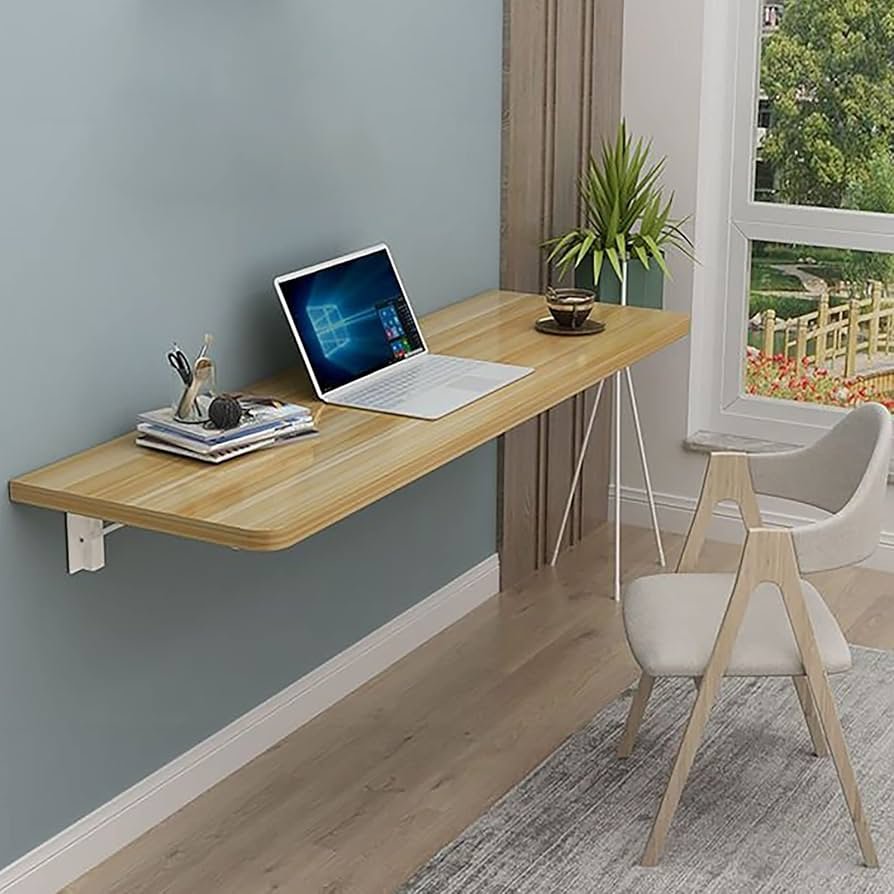
Best for: Workers who need dual screens but have no floor space
This configuration gets everything off the floor and onto the wall.
The foundation is a floating wall desk (also known as a Murphy desk or fold-down desk). When you’re finished working, it folds flush against the wall. Your room reverts to being a room — not a permanent office.
What You Need
- A fold-down wall-mounted desk (many also come with built-in shelves)
- A wall-mounted monitor arm — single or dual-screen
- A pegboard panel above the desk for tools, cables, and small items
- An under-desk cable tray to keep wires off the floor
- A small, stackable drawer unit next to the desk
Why It Works
The use of vertical wall space is the genius of this arrangement. Instead of spreading out horizontally, you build upward.
One pegboard can replace an entire filing cabinet. Hang your headphones, tape, chargers, sticky notes, notebooks — everything within arm’s reach, and nothing cluttering your desk surface.
Pro tip: Paint the pegboard the same color as your wall. It looks intentional, not cluttered.
Cost range: $150–$400, depending on the monitor arm brand and desk quality.
Setup #2 — The Closet Conversion Office (Cloffice)
Best for: Those who want complete separation from work and living space
The “cloffice” (closet + office) trend went viral during the remote work boom — and for good reason.
A typical reach-in closet is 24–30 inches deep and 5–6 feet wide. That’s plenty of room for a desk, a monitor, storage and decent lighting. At the end of each day, when you close the closet doors, work disappears entirely.
Step-by-Step Cloffice Build
- Remove the hanging rod and shelves (or leave one upper shelf for storage)
- Install a butcher block or plywood desktop at seated height (28–30 inches)
- Add an LED light strip inside the upper edge for task lighting
- Place a small monitor or laptop stand on the desk
- Hang a small corkboard or magnetic board on the back wall
- Install a power strip with surge protection, mounted inside the closet
The Mental Health Benefit
This is one of the most underrated benefits of the cloffice.
If your workspace has literal doors, you can close them. The act of closing the doors is psychologically powerful. Your brain registers it as “work is done.” This helps avoid burnout — which is very common when your office and your home are the same place.
Bonus: Closet walls absorb sound better than open rooms, giving you a naturally quieter workspace.
Setup #3 — The Corner Nook Desk Build
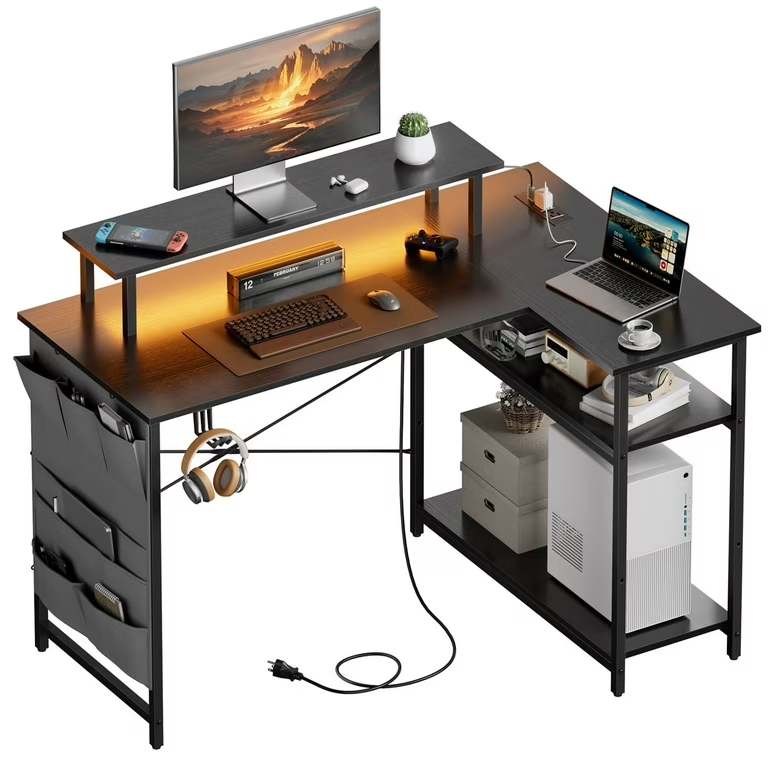
Best for: Anyone who has an unused corner and a small budget
Corners are wasted space in many homes. An L-shaped corner desk turns that dead zone into a massively functional workspace.
You do not need to invest in an expensive L-shaped desk. You can build one.
DIY Corner Desk: The Cheap Way
- Two wall-mounted brackets (IKEA EKBY or similar) on neighboring walls
- One or two IKEA countertops cut to fit (or butcher block from a hardware store)
- Three legs if you want a freestanding version (two at the ends, one at the corner)
Total cost: As low as $60–$120.
Maximizing the Corner Layout
| Zone | What Goes Here |
|---|---|
| Left side | Monitor + keyboard + mouse |
| Corner point | Laptop stand or second screen |
| Right side | Notebook, planner, reference materials |
| Above desk | Floating shelves for books and supplies |
The corner arrangement naturally creates separate “zones” without taking extra floor space. You always know where things live.
Setup #4 — The Minimal Laptop Station
Best for: Digital nomads, students or anyone who moves around a lot
Not everyone requires a full desktop setup. If you work mostly from a laptop, you really don’t need much real estate — but you do need some smart accessories.
A minimal laptop station is just what it sounds like: neat, lightweight and intentionally pared back.
Essential Kit for the Minimal Station
- Laptop stand (raises screen to eye level — very important for posture)
- Compact wireless keyboard and mouse (frees your hands from the cramped laptop keyboard)
- USB-C hub (one cable connects your power, monitor, and peripherals)
- Small desk pad (defines your workspace, reduces noise, looks great)
- Single monitor or TV screen if you want a second display
The One Rule of Minimal Setups
Only what you use every day gets to stay on the desk.
Everything else goes in a drawer, a bin, or out of the room entirely. It sounds obvious but most people ignore it. Clutter creeps in slowly. A weekly “desk reset” — removing everything and only returning what belongs — keeps minimal setups minimal.
For more ideas on building a clean and efficient workspace, check out Remote Work Desk Setup — a great resource for desk inspiration and gear recommendations.
Ideal desk size for this setup: 40″–48″ wide is plenty.
Setup #5 — The Standing Desk Converter Setup
Best for: People with back pain or who sit for too long
You do not need to purchase a full standing desk (those range from $400–$1,500). A standing desk converter sits on top of your current desk, raising your monitor and keyboard when you want to stand.
This is a game-changer for small rooms because it doesn’t change your footprint at all.
Benefits of Standing While Working
- Reduces lower back pain significantly
- Boosts energy during the afternoon slump
- Burns more calories than sitting (not by much, but some)
- Keeps you alert during long video calls
Best Converter Types for Small Spaces
| Type | Best For | Price Range |
|---|---|---|
| Z-lift converter | Tight desks, minimal profile | $80–$150 |
| X-lift converter | Easy height adjustment | $100–$200 |
| Single monitor arm | Maximum flexibility | $50–$120 |
| Full surface converter | Dual monitor users | $200–$400 |
Pairing the Converter With an Anti-Fatigue Mat
If you’re going to stand, you need an anti-fatigue mat. Standing on a hard floor for hours causes foot and knee pain.
A decent mat costs $30–$60 and makes standing entirely comfortable. That one purchase makes the entire concept of a standing desk sustainable long-term.
According to the Mayo Clinic, prolonged sitting is linked to a range of health concerns — making a standing option one of the smartest upgrades for any home office.
Setup #6 — The Dual-Purpose Guest Room Office
Best for: Homes where one room needs to do double duty
This is one of the most common small-space challenges: you have a guest bedroom, and you want it to also function as a home office.
The trick is to design for both uses without sacrificing either.
Furniture That Works Double Duty
- Murphy bed with integrated desk: When the bed folds up, the desk is revealed. When guests arrive, the desk folds away. This is the gold standard in dual-purpose furniture.
- Daybed or sleeper sofa: Takes up less floor space than a full bed and functions as seating during work hours.
- Storage ottoman: Acts as seating, a footrest, and hidden storage for office supplies.
- Bookshelf room divider: Splits the “office zone” from the “sleeping zone” without walls.
Zone It With Lighting
Lighting is how you signal which “mode” the room is in.
Use warm, dim lighting for guest use (bedside lamp, string lights). Use bright, cool-toned task lighting for work hours (desk lamp with 4000K–5000K bulbs). The room feels entirely different depending on which lights are on.
Key rule: Keep your work area on one side of the room. Keep the bed and sleeping area on the other. The two zones should never bleed into each other.
Setup #7 — The Acoustic-First Focus Room
Best for: Those on constant video calls, podcasters, or easily distracted workers
This setup is all about sound.
In a small room, sound bounces off hard walls and creates echo. If you’re spending every day on video calls, poor audio makes you sound unprofessional. If outside noise easily distracts you, insufficient acoustic treatment destroys your focus.
How to Treat a Small Room for Better Sound (Without Breaking the Bank)
Step 1 — Soft surfaces absorb sound. Add a rug, heavy curtains and a fabric sofa or chair. This stuff is most likely already in your room — move it closer to your desk area.
Step 2 — Acoustic panels on the walls. Foam acoustic panels are inexpensive ($30–$80 for a pack) and greatly reduce echo. Mount them on the wall behind you (for video calls) and on side walls.
Step 3 — Bookshelves are natural diffusers. Books of varying sizes scatter sound waves. A bookshelf on one wall actually improves room acoustics.
Step 4 — Heavy door and window seals. A draft stopper under the door and thick curtains over windows block outside noise from entering.
Microphone and Headset Recommendations
Even with good room treatment, a quality microphone matters.
| Use Case | Recommended Type | Price Range |
|---|---|---|
| Video calls (Zoom, Teams) | USB condenser mic | $50–$120 |
| Podcasting | Dynamic mic with arm | $100–$250 |
| Casual calls | Quality headset with mic | $40–$100 |
| Budget option | AirPods Pro or earbuds | $30–$250 |
A cardioid condenser mic (picks up sound from the front only) is the best choice for small rooms because it rejects background noise from the sides and rear.
A Quick Look at All 7 Setups Compared
| Setup | Room Size Needed | Best Feature | Approx. Cost |
|---|---|---|---|
| Wall-Mounted Command Station | Very small (5×5 ft) | Folds away completely | $150–$400 |
| Cloffice | One closet | Total work/life separation | $100–$300 |
| Corner Nook Desk | Small corner | Uses dead space | $60–$200 |
| Minimal Laptop Station | Any size | Ultra-portable | $80–$250 |
| Standing Desk Converter | Medium desk | Health benefits | $80–$400 |
| Dual-Purpose Guest Room | Medium room | Two rooms in one | $400–$1,500 |
| Acoustic-First Focus Room | Any size | Professional sound quality | $100–$500 |
5 Universal Tips That Apply to Every Small Office Setup
No matter which setup you choose, these five principles will improve your productivity.
1. Control your lighting first. Natural light is best. Position your desk facing a window or perpendicular to it — never with the window directly behind your screen. Add a good desk lamp for cloudy days and evening work.
2. Go vertical, not horizontal. Shelves, wall mounts, pegboards and stacked organizers use height instead of floor space. Think of your walls as storage real estate.
3. Hide your cables. Visible cables make any space feel messy. Cable clips, velcro ties and cable channels are cheap and make a dramatic visual difference.
4. Keep your most-used items within arm’s reach. Anything you reach for more than three times a day should be on your desk or within one arm’s stretch. Everything else goes away.
5. Do a weekly 10-minute reset. At the end of each week, clear your desk completely. Wipe it down. Put things back where they belong. This simple habit keeps entropy from slowly destroying your setup.
FAQs — Small Home Office Setups
Q: What is the smallest space that can function as a home office? A: Technically, you just need around 24 inches of desk space and a comfortable chair. A 3×5 foot area is more than adequate for a focused, functional workspace if it’s well-organized.
Q: How do I minimize distractions in a small room I share with others? A: Noise-canceling headphones are the single best investment. Pair them with a visual signal — a “Do Not Disturb” sign or simply a closed door — to let others know you’re in focus mode.
Q: Can I set up a productive home office on a tight budget (under $200)? A: Absolutely. The Corner Nook DIY desk, a basic laptop stand, a desk lamp and a simple chair can all be sourced for under $200. Prioritize ergonomics — chair and screen height — over aesthetics when money is limited.
Q: What desk size works best for a very small room? A: A desk that is 40–48 inches wide and 20–24 inches deep is enough for most single-monitor or laptop setups. Anything smaller starts to feel cramped; anything significantly larger encroaches on your living space.
Q: Is it worth investing in an ergonomic chair for a small office? A: Yes — without question. Back and neck pain from poor seating is one of the top reasons remote workers lose productive hours. You don’t need to spend $1,000. A decent ergonomic chair in the $150–$300 range will protect your body and outlast a cheap chair many times over.
Q: How do I separate work and personal life when they share the same room? A: Physical cues help enormously. Closing a closet door, folding up a Murphy desk, or simply putting your laptop in a bag at the end of the day creates a psychological boundary. Consistent work hours help too — starting and stopping at the same time each day.
Q: What lighting temperature is best for a home office? A: For focus and alertness, use cool-white bulbs in the 4000K–5000K range during work hours. Avoid warm yellow lighting (2700K) while working — it’s relaxing, not focusing.
Conclusion — Small Space, Big Output
A small room is not an obstacle. It’s a design challenge.
These 7 smart home office productivity setups prove that square footage has nothing to do with your productive capacity. What counts is intention — how thoughtfully you design, arrange and use the space available to you.
Start with one change. Maybe it’s mounting a pegboard. Maybe it’s converting your closet. Perhaps it’s getting a standing desk converter and an anti-fatigue mat.
Small upgrades stack up. Within a few weeks, you’ll have a workspace that not only looks good — it actively helps you do better work.
Your room is small. Your output doesn’t have to be.








