


Working from home seems great — until you squeeze a full workday into your bedroom corner or kitchen nook. Space is tight. Distractions are everywhere. And your “desk” could be a dining table lined with cereal bowls.
But here’s the thing: You don’t need a big room to create an awesome workspace.
The right home office productivity setups for small spaces can transform even a 4×4 foot area into a focused, efficient, and comfortable place where real work gets done. Whether you’re a student, remote worker, freelancer, or side hustler — there’s something here for you.
Let’s get into 10 setups that really do work, regardless of whether your square footage is on board.
Why Setting Up Your Workspace Actually Makes a Difference
Before diving into the setups, let’s be real for a second about why this stuff matters.
Your brain is shaped by your physical surroundings. A crowded and uncomfortable environment leads to distracted, subpar performance. A clean, well-organized setup — even a small one — tells your brain that it’s time to work.
Research suggests people who work in organized, well-lit environments are much more productive than people who don’t. And you don’t have to spend thousands to get there.
What you need is a strategy.
Setup #1 — The Wall-Mounted Floating Desk
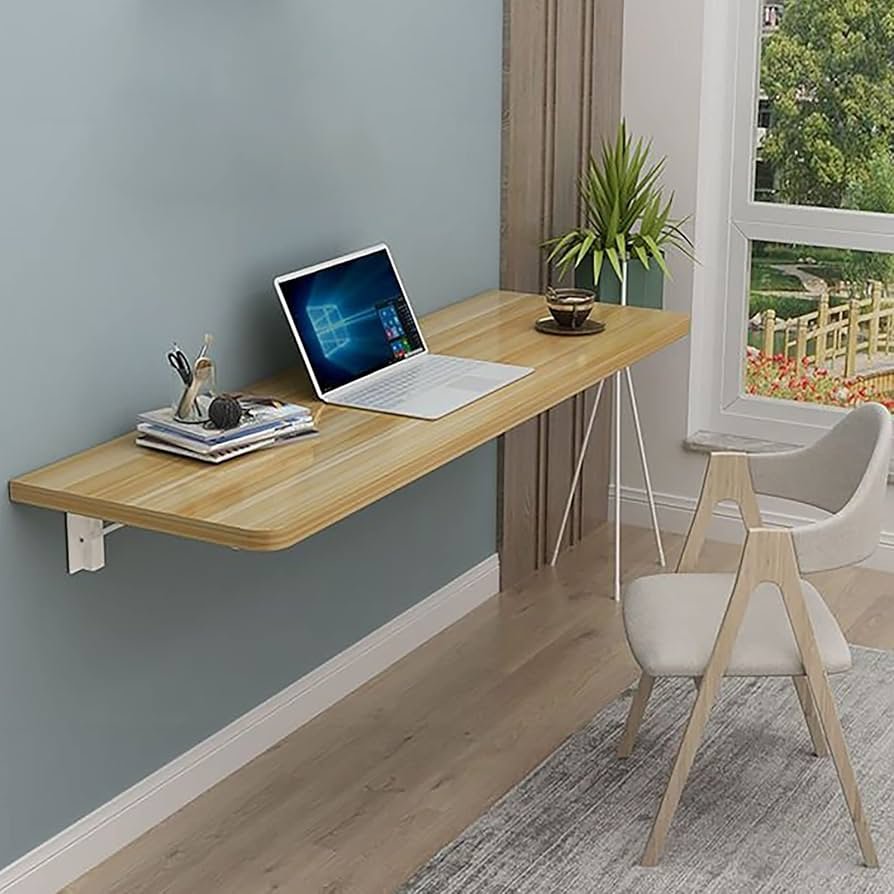
Ideal for: Bedrooms, hallways, small apartments
Are you short on floor space? Go vertical. One of the most space-efficient home office productivity setups for small spaces is a floating wall-mounted desk — it takes up zero floor space when folded upright.
How It Works
Mount a fold-down desk bracket on any wall. Pull it down when you need to work. When you’re finished, fold it back up. Your room is clean and open again.
Pair it with:
- A wall-mounted pegboard over the desk for supplies
- A tiny corkboard for sticky notes and reminders
- A collapsible stool that tucks under the wall
What to Look For
| Feature | Why It Matters |
|---|---|
| Weight capacity (50+ lbs) | Holds monitor + laptop safely |
| Smooth hinge mechanism | Easy open/close daily use |
| Built-in ledge or lip | Prevents items from sliding off |
| Powder-coated steel or solid wood | Durability over time |
This setup is particularly effective in rental apartments where you’re not able to do major renovations. One wall anchor and two screws, and you have a full desk.
Setup #2 — The Closet Office (Cloffice)
Ideal for: Anyone with a spare closet that’s not being fully utilized
The “cloffice” trend exploded during the work-from-home boom — and with good reason. A standard closet is usually 2–3 feet deep and 5–6 feet wide. That’s more than enough for a usable desk space.
Building Your Home Workspace in 4 Steps
- Empty it out — donate or move elsewhere anything stored there
- Run a shelf all the way along at desk height (28–30 inches)
- Add power — run an extension cord or call an electrician to install an outlet
- Use a monitor arm to free up desk real estate
The best part? When you finish working, simply shut the closet doors. Work disappears. Work-life balance: achieved.
Cloffice Lighting Tips
Poor lighting is one of the biggest productivity killers in closet offices. Options:
- Stick-on LED strip lights under upper shelves
- A tiny clip-on desk lamp with daylight-spectrum bulbs
- A battery-powered puck light mounted on the wall
Don’t skip lighting. A dark closet drains your productivity.
Setup #3 — The Murphy Bed Office
Ideal for: Studio apartments, guest rooms that double as a workspace
A Murphy bed (wall bed) with a fold-down desk built in is one of the most space-saving pieces of furniture ever created. With the bed up, you have a full desk and shelving unit. Fold the desk in and pull down the bed when guests come.
What Makes This Setup Shine
These units typically include:
- A full or queen bed
- A connected desktop that stays level when the bed folds down
- Shelving units on both sides
- Sometimes even a couch attachment
Yes, they’re an investment (typically $1,500–$4,000 for a good unit). But for people who live in a studio apartment, it’s basically buying back an entire room.
Setup #4 — The Under-Stair Nook Office
Ideal for: Houses or townhomes with open stairs
That strange triangular section of dead space beneath your stairs? It’s actually prime real estate for a home office.
Maximizing the Stair Nook
The trick is custom or semi-custom shelving to accommodate the angled ceiling. IKEA’s PAX wardrobe system can be cut down or configured to fit unusual shapes. Add:
- A small L-shaped desk curved toward the angle
- Built-in shelves climbing up the height of the nook
- A small rolling cabinet for files and supplies
The staircase’s natural enclosure actually creates a psychological “focus zone” — leading to better concentration with less effort.
Setup #5 — The Corner L-Desk Command Center
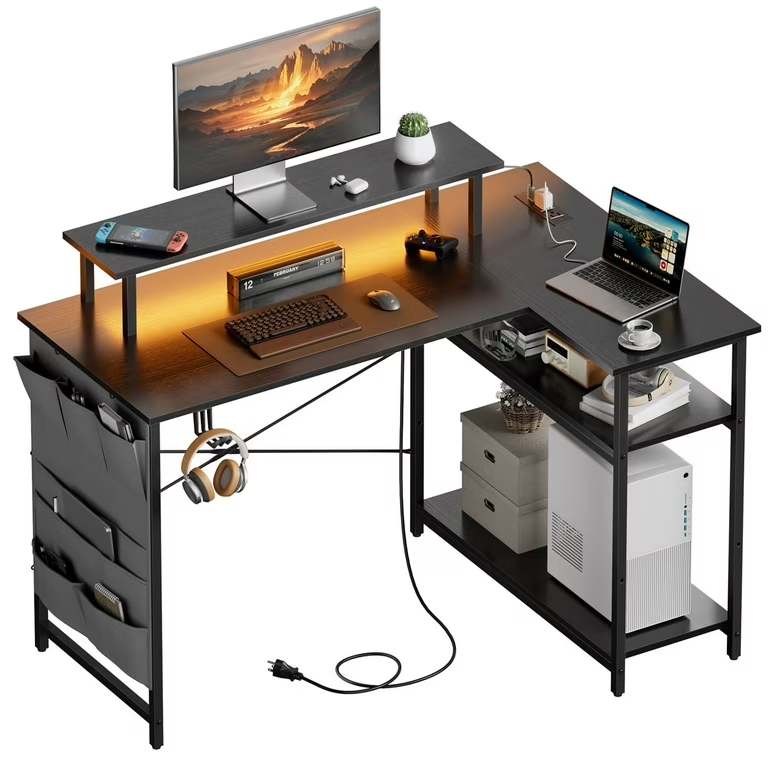
Best for: Anyone with an unused bedroom corner or living room nook
Corners are the most underused spaces in most homes. An L-shaped desk nestles neatly into a corner and gives you twice the usable desk surface without requiring much more floor space than an ordinary desk.
Layout for Maximum Productivity
[Monitor 1] [Monitor 2]
[Keyboard + Mouse     ]
[Laptop stand]  [Notepad area]
One side handles your main computer work. The other side stays free for writing, reading, or reference materials.
Must-Have Corner Desk Accessories
| Accessory | Purpose |
|---|---|
| Monitor arm (dual) | Frees up desk space |
| Cable management tray | Eliminates under-desk mess |
| Corner shelf unit | Adds vertical storage |
| Laptop stand + keyboard | Ergonomic setup |
| Wireless charging pad | Reduces cable clutter |
The corner L-desk is one of the most popular home office productivity setups for limited space — it gives you lots of room to spread out while keeping your footprint small.
Setup #6 — The Rolling Cart Mobile Office
Ideal for: Those who move between spaces frequently
Not everyone can afford to give their office a permanent space. If you work in various spots around your home — or sometimes take your work to cafes — a mobile rolling cart setup gives you total flexibility.
Building the Rolling Cart Setup
Use a sturdy 3-tier rolling cart (the RASKOG from IKEA is a fan favorite). Organize it like this:
- Top tier: Laptop, notebook, pens, chargers
- Middle tier: Reference books, files, headphones
- Bottom tier: Extra supplies, power strip, cables
When it’s work time, roll it wherever you are. When you’re finished, roll it to a corner or closet. Your entire office disappears in 10 seconds.
This works surprisingly well for people with tiny apartments who can never permanently dedicate any space to work.
Setup #7 — The Window Seat Workspace
Best for: Houses with bay windows or deep windowsills
Natural light is one of the best things you can add to any workspace. And if you’ve got a bay window or a deep windowsill at home, you already have the makings of a beautiful, calming office nook.
Designing the Window Workspace
Build (or buy) a bench cushion that stretches the length of the window. Below the bench, add:
- Pull-out drawers for storage
- A flip-top lid for hidden storage inside the bench
Place a slim desk or lap desk on top of the bench. Add a wall-mounted monitor arm. Now you’ve got natural light, a view, and an atmosphere of calm that most $2,000/month coworking spaces just can’t compete with.
Light Management Tips
- Place your monitor at a right angle to the window to reduce glare
- Add a small plant or two — greenery near your workspace reduces stress
Setup #8 — The Minimalist Standing Desk Setup
Ideal for: Health-conscious remote workers in tight spaces
Standing desks have gone from luxury to mainstream — and compact versions are now available for almost every budget. A small electric standing desk (48–55 inches wide) can fit in most bedrooms without overwhelming the room.
Why Standing Desks Work for Small Spaces
Standard desks are one height. Standing desks adjust from 25 inches (sitting) to 50+ inches (standing), which means:
- Kids can use it at sitting height after school hours
- You can change positions during the day to stay alert
- Its adjustable height makes it far more versatile for shared spaces
Compact Standing Desk Comparison
| Desk | Width | Height Range | Price Range |
|---|---|---|---|
| Flexispot E7 | 55″ | 22.8″–48.4″ | $300–$400 |
| Uplift V2 | 42″–80″ | 25.5″–51.1″ | $500–$700 |
| IKEA BEKANT | 63″ | Fixed + riser | $200–$300 |
| Vivo Crank | 48″ | 28″–47.6″ | $150–$200 |
Pair your standing desk with an anti-fatigue mat and a monitor arm, and you’ve got one of the most ergonomic home office productivity setups for limited space on this list. For more inspiration on how to configure your desk area efficiently, visit Remote Work Desk Setup — a great resource dedicated to helping remote workers build smarter workspaces.
Setup #9 — The Bookshelf Office Integration
Best for: Living rooms, dining rooms, or shared spaces
What if your office could disappear into a bookshelf? This setup is about embedding your workspace into a piece of furniture that doesn’t look like an office at all.
How to Build This Setup
Start with a large modular shelving unit — IKEA KALLAX or BILLY works perfectly. Dedicate:
- One or two cubes/sections to office supplies and files
- One section for your laptop docking station or monitor
- The rest for books, decor, and personal items
Place a thin desk in front of the unit. When you stop working, everything visually folds back into the shelf. To visitors, it simply looks like an elegant bookcase.
Pro Styling Tip
Hide supplies in the cubes with matching baskets or boxes. Label them on the inside but leave the outside clean and uniform. The result looks intentional and organized — not like a work zone crammed into a corner.
Setup #10 — The Garage or Balcony Office Pod
Ideal for: Homeowners with a garage, shed, or large balcony
Sometimes the best work-from-home setup is to not work from inside your home. If you have outdoor space — even a balcony — think about turning it into a dedicated mini office pod.
Garage Office Conversion Basics
No need to convert your whole garage. A small 6×8 foot section in one corner, separated by a room divider or bookshelf, is plenty. Add:
- Insulation panels (foam board works great)
- A small electric space heater or fan
- A weatherproof desk and chair
- An extension cord and power strip rated for outdoor use
Balcony Office Considerations
For balcony setups, less is more:
- Invest in an outdoor weather-resistant desk (teak or powder-coated steel)
- Use a laptop stand with a wireless keyboard and mouse
- Add a sun shade or pergola for glare control
- Keep supplies indoors and only carry what you need each session
Working outdoors — even just for a few hours a day — can significantly improve mood, focus, and creativity. According to research published by the American Psychological Association, exposure to nature and natural environments boosts attention, reduces stress, and enhances overall well-being. It’s one of the most underappreciated home office productivity setups for limited space — and it feels like cheating because it works so well.
Quick Comparison: All 10 Setups at a Glance
| Setup | Space Required | Best For | Cost Range |
|---|---|---|---|
| Wall-Mounted Floating Desk | Minimal | Apartments, bedrooms | $50–$300 |
| Cloffice (Closet Office) | 1 closet | Anyone | $100–$500 |
| Murphy Bed Office | Medium | Studios, guest rooms | $1,500–$4,000 |
| Under-Stair Nook | Stair space | Houses/townhomes | $200–$1,000 |
| Corner L-Desk | Corner space | Bedrooms, spare rooms | $200–$800 |
| Rolling Cart Mobile | Minimal | Movers, flexible workers | $30–$150 |
| Window Seat Workspace | Bay window | Homes with bay windows | $150–$600 |
| Standing Desk Setup | Medium | Health-conscious workers | $150–$700 |
| Bookshelf Integration | Living room | Shared spaces | $200–$600 |
| Garage/Balcony Pod | Outdoor space | Homeowners | $200–$2,000 |
5 Universal Productivity Tips for Any Small Office Setup
Whatever setup you go for, these tips will help any home office productivity setup perform better — regardless of how limited your space is:
1. Go wireless wherever possible. Cables are the enemy of small spaces. Switch to a wireless keyboard, mouse, and charger. You’ll be surprised how much cleaner and larger your desk feels.
2. Use vertical space aggressively. Walls are free real estate. Pegboards, floating shelves, magnetic tool strips, and wall-mounted organizers will give you triple the storage without using any desk or floor space.
3. Control your lighting. Get a daylight-spectrum bulb (5000K–6500K). It simulates natural sunlight and keeps your brain alert. Just this one change can really boost afternoon focus.
4. Add one analog element. A physical notebook, a wall calendar, or a whiteboard — having one non-screen surface to write on reduces screen fatigue and helps your brain process information differently.
5. Keep a daily reset routine. At the end of each workday, take 3–5 minutes to clear your workspace. Return everything to its place. It signals to your brain that work is over, and it sets you up for a fresh start the next morning.
Common Questions About Home Office Productivity Setups for Limited Space
Q: How much space do I really need for a functional home office? You can set up a productive workspace in as little as 4 square feet. All you technically need is a floating wall desk, a decent chair, proper lighting, and a laptop. It’s organization — not size — that is the key.
Q: How do I reduce noise in a small home office? Put up acoustic foam panels on one wall, lay a thick rug beneath your chair, and wear noise-canceling headphones when you’re concentrating. If noise is a big problem, white noise machines (about $30) work wonders.
Q: What type of chair works best in a small office setup? Look for chairs with a small footprint that still provide lumbar support. The Humanscale Freedom or a compact ergonomic chair from Branch or Autonomous are popular choices. Stay away from big gaming chairs — they eat up space fast.
Q: Can I set up a dual monitor in a small space? Yes. Use a wall-mounted or desk-clamped dual monitor arm. This lifts both screens off the surface, creates a cleaner look, and frees up desk space. Position monitors at eye level so your neck isn’t strained.
Q: How can I keep a small office from feeling cluttered? Embrace the “one in, one out” rule — when a new item enters the space, an old one leaves. Use matching storage containers for visual uniformity. And do a 5-minute desk reset at the end of every workday.
Q: Does natural light really matter in a small office? Absolutely. Natural light improves mood, reduces eye strain, and helps regulate your sleep cycle when you’re working during the day. Whenever possible, position your desk to face or sit beside a window. Just manage glare with sheer curtains.
Q: What’s the most affordable home office solution for tight spaces? The rolling cart mobile office is the cheapest option here, costing roughly $30–$50. Add a used laptop stand and a decent lamp, and you can have a fully functional setup for under $100.
Wrapping It Up
You don’t need a spare room, a big budget, or an interior designer to build a workspace that actually works.
The 10 home office productivity setups for limited space covered in this guide prove that creativity and smart organization beat square footage every time. From fold-down floating desks to garage pod conversions, there’s an option here for every kind of home, budget, and work style.
Pick one setup that works for your life right now. Start small. Get it working. Then refine it over time.
You don’t need a huge office to do your best work. You just need the right one.
Focus keyword used naturally throughout: “home office productivity setups for limited space”








