


Working from home has become a permanent reality for many professionals. Yet not everyone has the luxury of a dedicated office room. Many people work from a corner of their bedroom, a small apartment, or even a converted closet space. A tiny workspace can easily feel cramped, distracting, and unproductive if it is not arranged properly.
However, size does not define productivity. With thoughtful planning and clever setup choices, even the smallest home office can become a highly efficient workspace. The key lies in optimizing available space, minimizing distractions, and creating an environment that encourages focus and comfort.
This guide explores nine powerful home office productivity setups specifically designed for tiny home offices. These setups combine ergonomics, smart storage solutions, lighting techniques, and workspace design strategies to help you work efficiently without feeling restricted by limited space.
Whether you are a remote employee, freelancer, entrepreneur, or student, these setups will help transform your small workspace into a productive environment that supports your daily tasks and long-term goals.
1. The Vertical Workspace Setup
When floor space is limited, the most valuable area in a tiny office is the vertical wall space. A vertical workspace setup allows you to use shelves, pegboards, and wall organizers to keep your desk clutter-free while keeping essential items within reach.
Instead of spreading items across your desk surface, you mount them above your workstation. This creates a layered workspace where tools, documents, and accessories are neatly arranged along the wall.
Why Vertical Workspaces Boost Productivity
A cluttered desk can reduce focus and increase stress. By moving items upward onto wall storage, your desk becomes a clean and distraction-free surface dedicated only to your laptop, monitor, and notebook.
Vertical storage also improves workflow because frequently used items remain visible and accessible.
Example Vertical Storage Layout
| Wall Section | Storage Item | Purpose |
|---|---|---|
| Top Shelf | Books and reference materials | Keeps less-used items organized |
| Middle Shelf | Storage boxes or baskets | Holds cables, chargers, and stationery |
| Pegboard Area | Tools and accessories | Easy access during work |
| Magnetic Board | Notes and reminders | Visual productivity cues |
Ideal Items for Wall Storage
- Headphones
- Chargers and cables
- Sticky notes
- Task planners
- Pens and markers
- Small office tools
Quick Tip
Choose floating shelves instead of bulky cabinets. They maintain an open look and prevent your tiny workspace from feeling crowded.
2. The Minimalist Desk Setup
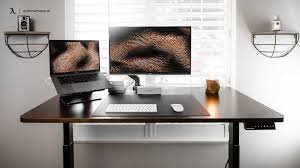
A minimalist desk setup focuses on simplicity. Instead of filling the workspace with decorative objects and unnecessary accessories, this setup includes only essential tools required for daily work.
Minimalism improves productivity because fewer visual distractions allow your brain to concentrate better on tasks.
Core Elements of a Minimal Desk Setup
A minimalist desk usually contains only a few carefully chosen items:
- Laptop or monitor
- Keyboard and mouse
- Desk lamp
- Notebook
- Water bottle
Everything else should be stored elsewhere.
Minimalist Desk Comparison
| Feature | Traditional Desk | Minimalist Desk |
|---|---|---|
| Items on desk | Many accessories | Only essentials |
| Visual clutter | High | Very low |
| Cleaning effort | Moderate | Minimal |
| Focus level | Often distracted | Higher concentration |
Benefits of Minimal Workspaces
- Faster task focus
- Reduced mental fatigue
- Easier desk maintenance
- Improved workflow
Minimalist setups are especially useful for tiny offices, where too many items quickly overwhelm the limited desk space.
3. The Foldable Desk Setup
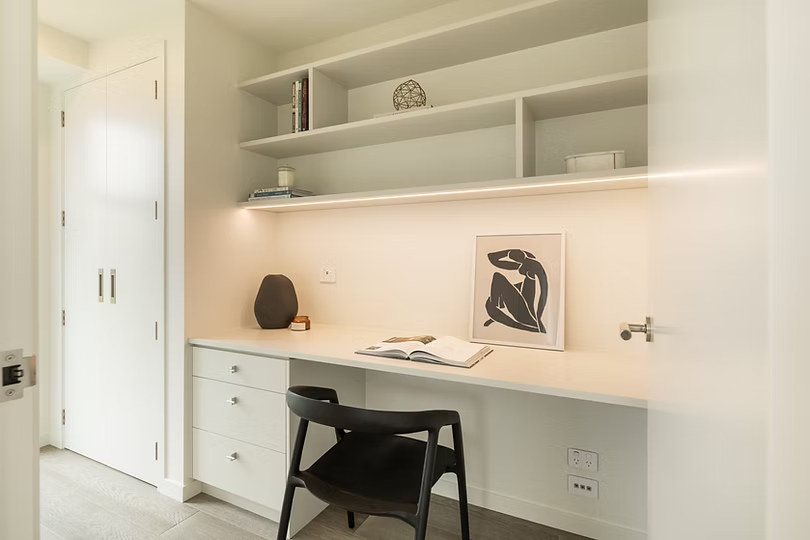
A foldable desk is one of the most powerful solutions for tiny spaces. It allows your office to disappear when not in use, freeing up valuable living space.
Foldable desks are mounted to the wall and can be opened during work hours and folded back afterward.
How Foldable Workstations Improve Small Spaces
In micro apartments or studio homes, a foldable desk prevents your workspace from permanently occupying your room.
When closed, it may look like a cabinet or decorative panel.
Typical Foldable Desk Dimensions
| Desk Type | Width | Depth | Best For |
|—|—|—|
| Compact fold desk | 60–80 cm | 40 cm | Laptop work |
| Medium fold desk | 90–110 cm | 50 cm | Laptop + notebook |
| Large fold desk | 120 cm | 55 cm | Full workstation |
Productivity Tips
- Add a wall shelf above the foldable desk.
- Use a slim desk lamp.
- Install cable clips to manage wires.
Foldable desks are particularly helpful for remote workers who share living space with family members.
4. The Corner Office Setup
Corners are often unused areas in homes. Transforming a corner into a workspace is one of the smartest ways to create a tiny office.
Corner desks naturally fit into unused angles, leaving the rest of the room open.
Why Corner Offices Work Well
A corner setup creates a sense of separation from the rest of the room, which helps your brain mentally switch into work mode.
Corner Workspace Layout Example
| Area | Recommended Item |
|---|---|
| Corner desk surface | Laptop or monitor |
| Left wall | Floating shelves |
| Right wall | Whiteboard or pinboard |
| Under desk | Cable organizer |
Advantages
- Efficient space usage
- Natural visual boundaries
- Better wall storage options
If possible, place the corner desk near a window for better lighting and mood improvement.
5. The Standing Desk Setup
Sitting for long hours can cause fatigue, back pain, and reduced energy levels. A standing desk setup helps maintain movement and improves physical health during work hours.
For tiny offices, compact adjustable desks or desk converters are ideal.
Standing Desk Productivity Benefits
Studies show alternating between sitting and standing can increase energy and focus.
Sitting vs Standing Productivity
| Factor | Sitting Desk | Standing Desk |
|---|---|---|
| Energy levels | Lower over time | More consistent |
| Back strain | Higher | Reduced |
| Posture | Often slouched | More upright |
| Movement | Limited | Encouraged |
How to Use a Standing Desk Properly
- Alternate every 30–60 minutes
- Keep monitor at eye level
- Use an anti-fatigue mat
- Maintain relaxed shoulders
Standing desks are excellent for professionals who spend long hours on video calls or coding sessions.
6. The Multi-Purpose Workspace Setup
Tiny homes require flexible furniture. A multi-purpose workspace can serve multiple roles such as a desk, dining table, or study area.
This setup is perfect for studio apartments or shared spaces.
Examples of Multi-Purpose Office Furniture
- Convertible desk-dining table
- Storage desk with drawers
- Laptop desk integrated with bookshelf
- Ottoman storage seats
Multi-Purpose Workspace Comparison
| Furniture Type | Functions | Space Saving Level |
|---|---|---|
| Desk with drawers | Work + storage | High |
| Desk-dining combo | Work + meals | Very high |
| Desk-bookshelf combo | Work + library | Moderate |
Using furniture that performs multiple functions reduces the number of items required in a room.
7. The Natural Light Productivity Setup
Lighting plays a crucial role in productivity. A poorly lit workspace can cause eye strain, headaches, and fatigue.
Positioning your desk near a window can dramatically improve focus and mood.
Why Natural Light Matters
Natural light regulates your circadian rhythm, helping your body stay alert during the day.
Lighting Productivity Comparison
| Lighting Type | Productivity Level | Eye Comfort |
|---|---|---|
| Natural daylight | Very high | Excellent |
| Warm desk lamp | Moderate | Good |
| Dim lighting | Low | Poor |
Tips for Maximizing Natural Light
- Place the desk beside a window
- Use light-colored curtains
- Avoid blocking windows with furniture
- Use mirrors to reflect light
Natural lighting also improves the visual appeal of your workspace, making long work hours more comfortable.
8. The Cable-Free Workspace Setup
Messy cables can quickly make a tiny office look chaotic. A cable-free setup focuses on wireless technology and hidden cable management.
Tools for Cable Management
- Wireless keyboard and mouse
- Laptop stand with cable routing
- Cable clips
- Under-desk cable trays
Cable Organization Chart
| Problem | Solution |
|---|---|
| Visible wires | Cable clips |
| Tangled cables | Velcro ties |
| Charger clutter | Cable box |
| Desk mess | Under-desk tray |
Keeping cables organized improves both aesthetics and functionality.
A clean desk helps maintain a calm and focused work environment.
9. The Focus Zone Setup
The focus zone setup is designed to eliminate distractions and create a dedicated mental workspace for deep work.
Even in a small home, you can design a productivity zone that signals “work mode” to your brain.
Elements of a Focus Zone
- Noise-canceling headphones
- Neutral color palette
- Minimal desk accessories
- Task planning board
Productivity Environment Factors
| Element | Effect on Focus |
|---|---|
| Neutral colors | Reduce visual distraction |
| Organized desk | Improves concentration |
| Noise control | Supports deep work |
| Task boards | Clarifies priorities |
Tips to Create a Focus Zone
- Use a simple color scheme
- Avoid placing TV or entertainment devices nearby
- Use plants to create calmness
- Keep your workspace consistent daily
A dedicated focus zone can dramatically increase productivity even in a tiny home.
Tiny Home Office Layout Ideas
Below is a quick overview of layout styles commonly used in small workspaces.
| Layout Type | Space Required | Best For |
|---|---|---|
| Wall desk | Very small | Studio apartments |
| Corner desk | Small | Bedrooms |
| Foldable desk | Very small | Multi-use rooms |
| Standing desk | Small | Health conscious workers |
| Minimal desk | Any size | Focused professionals |
Daily Productivity Routine for Tiny Offices
Creating the right setup is only half the solution. Productivity also depends on how you use your workspace.
Suggested Work Routine
| Time | Activity |
|---|---|
| Morning | Plan tasks |
| Midday | Focus work sessions |
| Afternoon | Meetings and collaboration |
| Evening | Workspace reset |
Cleaning and resetting your desk daily ensures your tiny office stays organized and ready for the next day.
Final Thoughts
A tiny home office does not have to limit your productivity. With thoughtful design and smart workspace setups, small spaces can become powerful work environments.
The nine setups discussed in this guide demonstrate that productivity depends more on organization, lighting, ergonomics, and focus rather than room size.
By experimenting with vertical storage, foldable desks, minimalist setups, and natural lighting, you can transform even the smallest corner of your home into a workspace that supports creativity, efficiency, and professional success.
The goal is to create a workspace that feels comfortable, inspiring, and distraction-free. Once your environment supports your workflow, productivity naturally follows.
Frequently Asked Questions (FAQs)
1. What is the best desk type for a tiny home office?
Foldable desks and corner desks are among the best options. They maximize space while providing enough room for a laptop and essential work tools.
2. How can I make a small office feel bigger?
Use vertical storage, light colors, mirrors, and minimal furniture. Keeping the desk clutter-free also helps create a more spacious feeling.
3. Is natural light important for productivity?
Yes. Natural light improves mood, reduces eye strain, and increases alertness. Positioning your desk near a window can significantly enhance productivity.
4. How do I keep my small workspace organized?
Use wall shelves, drawer organizers, cable clips, and storage boxes. Regularly remove unnecessary items from your desk.
5. Are standing desks suitable for small spaces?
Yes. Compact standing desks or adjustable desk converters work well in tiny offices and can improve posture and energy levels.
6. How can I reduce distractions in a tiny office?
Use noise-canceling headphones, keep your desk minimal, and create a dedicated focus zone away from entertainment devices.








