

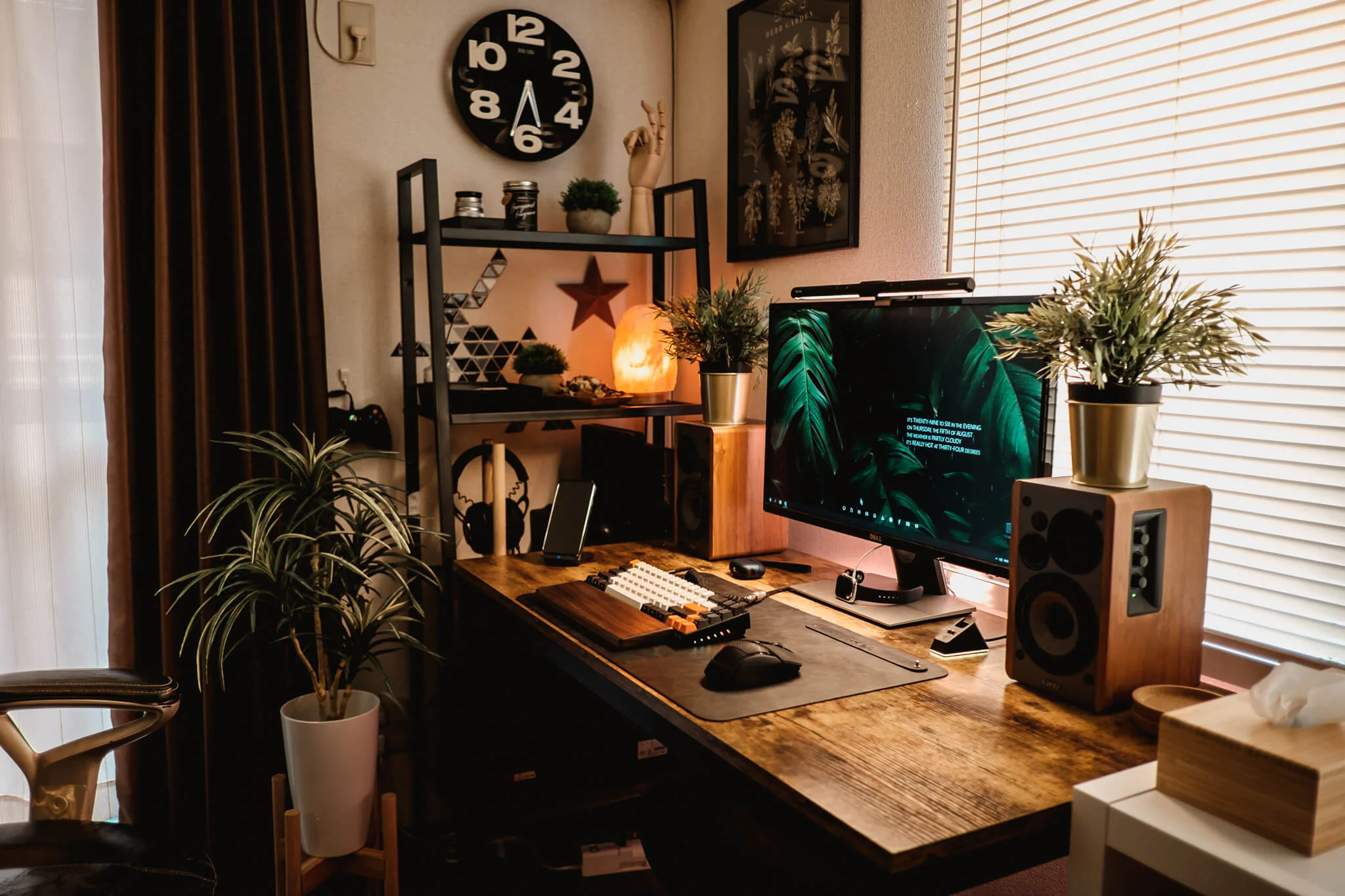
6 Secret Home Office Productivity Setups for Small Work Areas
Working from home has become a staple for so many of us, hasn’t it? But when your “office” is squeezed into a tiny corner of your living room or a spare nook in the bedroom, staying productive can feel like an uphill battle. I’ve been there myself—juggling deadlines in a space that’s barely bigger than a walk-in closet. The good news is, you don’t need a sprawling room to create a setup that keeps you focused and efficient. In fact, some of the best productivity hacks come from thinking outside the box, or in this case, inside very small boxes.
This article dives into six secret home office setups tailored for those cramped work areas. These aren’t your run-of-the-mill tips; they’re clever, under-the-radar strategies that I’ve gathered from personal trial and error, chats with friends in similar situations, and a bit of creative scavenging. Each one focuses on maximizing every inch while minimizing distractions, all to help you get more done without feeling like you’re trapped in a sardine can. We’ll explore how to implement them step by step, why they work, and even some pitfalls to avoid. By the end, you’ll have actionable ideas to transform your tiny workspace into a productivity powerhouse.
Let’s start with the basics: why does a small space pose such a challenge? For one, clutter builds up fast, and before you know it, your desk is buried under papers, cables, and that half-empty coffee mug from yesterday. Limited room also means poor ergonomics—hunching over a laptop on your bed might seem cozy, but it wreaks havoc on your back and concentration. Then there’s the psychological side: a cramped area can make you feel confined, leading to procrastination or burnout. But here’s the secret—these constraints can actually spark innovation. When you’re forced to be resourceful, you end up with setups that are not just functional but downright ingenious.
Take my own experience. A few years back, I was freelancing from a 10×10 foot apartment bedroom that doubled as my office. I couldn’t afford fancy furniture, so I had to get creative. What I learned is that productivity in small spaces isn’t about adding more stuff; it’s about smart subtraction and strategic placement. Things like using vertical space, incorporating hidden storage, and optimizing lighting can make a world of difference. And the best part? These setups are budget-friendly, often using items you already have or can pick up cheaply.
Now, before we jump into the specifics, a quick note on what makes these “secret.” They’re not the obvious ones like “buy a standing desk” (though that’s great if you have room). Instead, they’re hacks that fly under the radar—things like repurposing household items in ways you wouldn’t expect or tweaking your environment to trick your brain into better focus. I’ve aimed to keep this practical, with real-world examples and tips to customize for your setup. Whether you’re in a studio apartment, a shared house, or just a tiny alcove, these ideas should spark some inspiration.
Setup 1: The Vertical Storage Symphony
One of the most overlooked ways to conquer a small home office is by going up instead of out. Walls are your untapped real estate, and turning them into a “symphony” of storage can free up floor space while keeping everything within arm’s reach. This setup isn’t just about shelves; it’s about creating a layered system that flows like music—harmonious, efficient, and easy on the eyes.
Picture this: your desk is against a wall, and above it, you’ve got a series of floating shelves, pegboards, and magnetic strips working in tandem. Start with the basics—install a pegboard (you can get one for under $20 at a hardware store). It’s like a customizable canvas where you hang hooks for headphones, scissors, or even small baskets for pens. Above that, add floating shelves for books, plants, or a printer if it’s compact. The key is layering: lower shelves for daily essentials, higher ones for less-used items.
Why does this boost productivity? For starters, it declutters your desk surface, which studies show can reduce mental overload. When your workspace is clear, your mind follows suit. I remember setting this up in my old place—suddenly, I wasn’t rummaging through drawers for a charger; it was right there on a magnetic strip. That saved me minutes every hour, adding up to hours over a week.
To implement, measure your wall space first. Aim for shelves no deeper than 8 inches to avoid encroachment. Use command hooks if you’re renting and can’t drill. Add some personality with a small LED strip light under the shelves—it casts a soft glow that reduces eye strain during late nights. Pro tip: group items by function. One section for tech (cables, mouse), another for paperwork (file holders clipped to the board). This creates zones, making it intuitive to grab what you need without thinking.
But it’s not all perfect. If your walls are thin or you’re in an earthquake-prone area, secure everything properly to avoid disasters. Also, don’t overload—start light and add as needed. Over time, this setup evolves with you. A friend of mine turned her pegboard into a mood board too, pinning inspirational quotes amid the practical stuff. It kept her motivated during long work sessions.
Expanding on the ergonomics, position your monitor at eye level on a wall mount if possible. This frees desk space and encourages better posture. Pair it with a keyboard tray that slides out from under the desk. In small areas, every inch counts, and this vertical approach can make your setup feel twice as big. I’ve seen people incorporate cork strips for notes, turning the wall into a dynamic to-do list. It’s secretive because most folks think vertical storage is just for kitchens, but in an office, it’s a game-changer.
Let’s talk materials. Opt for lightweight wood or metal to keep costs down. IKEA has affordable options, or DIY with reclaimed wood for that rustic vibe. Lighting integration is crucial—poor shadows from overhead lights can kill focus, so those under-shelf LEDs are a must. And for sound? Hang a small acoustic panel on the pegboard to muffle echoes in tight spaces.
In terms of productivity metrics, think about flow state. With everything organized vertically, you’re less likely to break concentration hunting for items. A study from Princeton University found that visual clutter competes for attention, so this setup minimizes that. Customize it further: if you’re a creative type, add color-coded bins; for analysts, label everything meticulously.
Potential downsides? Dust accumulation on higher shelves—wipe down weekly. If you have pets or kids, secure loose items. But overall, this symphony turns chaos into order, making small spaces sing with efficiency.
Setup 2: The Foldable Furniture Fusion
In tight quarters, flexibility is king. Enter the foldable furniture fusion—a setup where your office morphs seamlessly into living space and back. This isn’t about cheap folding tables; it’s a clever blend of multi-use pieces that hide in plain sight, keeping your area versatile without sacrificing productivity.
Imagine a wall-mounted desk that folds down when needed, paired with a chair that doubles as a side table. Or a Murphy desk that flips up to reveal storage inside. The secret here is integration—furniture that serves double duty, like an ottoman with hidden compartments for files, or a bookshelf that swings out to become a workstation.
I tried this when my “office” was part of the kitchen. A foldable desk from the wall meant I could work during the day and fold it away for dinner. It was liberating—not seeing work stuff constantly reduced stress. Productivity soared because the transition was quick; no setup time lost.
To set it up, scout for foldable desks online—many under $100. Ensure it’s sturdy; wobbly surfaces kill focus. Add a foldable stool or use a stackable one. For storage, incorporate under-desk rolling carts that tuck away. The fusion part comes in layering: a lamp that clamps to the folded desk, or magnetic organizers inside the fold.
Why it works: Small spaces breed distraction if work bleeds into home life. This setup creates boundaries—work mode when unfolded, relax mode when stowed. Psychologically, it signals your brain to switch gears, enhancing focus.
Tips: Choose neutral colors to blend with decor. Add cushions for comfort during long hours. If space allows, include a portable monitor that folds flat. A buddy of mine fused a treadmill under his foldable desk for walking meetings—genius for energy boosts.
Ergonomically, adjust heights to avoid strain. Use a laptop stand when folded out. For tech, route cables through hidden channels to prevent tangles. This setup’s secretive because it disguises your office, fooling even yourself into thinking you have more room.
Materials matter—lightweight but durable like bamboo. DIY options: repurpose an old ironing board as a temporary desk. Lighting: portable USB lamps that clip on.
Productivity wise, it encourages short, intense work bursts, aligning with Pomodoro techniques. Drawbacks: folding/unfolding can wear on joints if done poorly. Solution: quality hinges.
This fusion keeps small areas dynamic, proving adaptability trumps size.
Setup 3: The Lighting Layer Labyrinth
Lighting isn’t just illumination; in a small home office, it’s a labyrinth of layers that guide your productivity without you noticing. This setup involves stacking ambient, task, and accent lights to create depth in confined spaces, banishing shadows and fatigue.
Start with natural light if available—position your desk near a window, but use sheer curtains to diffuse harsh rays. Layer in a desk lamp with adjustable arms for task work, and string lights or floor lamps for ambient glow. The secret? Smart bulbs that change color temperature—cool white for focus, warm for winding down.
In my cramped setup, bad lighting caused headaches until I layered it. A clip-on lamp for the screen, overhead fairy lights for mood—it transformed the space. Productivity jumped because better light means less eye strain, more stamina.
Implementation: Assess your room’s light sources. Add mirrors to bounce light, making the area feel larger. Use timers for auto-adjustments. For small desks, go with compact LED strips under monitors.
Why effective: Light affects circadian rhythms; proper layers keep you alert. A Harvard study links blue-enriched light to better performance.
Personalize: If you’re night owl, dimmers help. Add plants near lights for air quality boost. Friend used RGB lights synced to music for creative breaks.
Ergonomics: Position to avoid glare. Tech integration: app-controlled bulbs for seamless changes.
Secretive aspect: subtle layers make the space inviting, tricking your brain into longer focus.
Materials: affordable LEDs from Amazon. Drawbacks: over-lighting can overwhelm—balance is key.
This labyrinth turns dim corners into productive havens.
Setup 4: The Tech Tether Trick

In small spaces, tech can clutter or empower. The tether trick involves “tethering” devices with smart hubs, wireless setups, and hidden cables to streamline workflow without visual chaos.
Core: a central hub like a docking station connecting laptop, monitor, keyboard—all wireless where possible. Hide cables in sleeves or under-desk trays. Use vertical mounts for screens.
My experience: tangled wires distracted me until I tethered. A single USB-C hub meant plug-and-play; focus improved instantly.
Setup steps: Inventory devices, choose a hub. Route cables neatly. Add a wireless charger pad.
Productivity boost: Reduces setup time, minimizes frustration. Flow state easier without cord hunts.
Tips: Label cables. Use app organizers for digital clutter too.
Secret: Tethers make tech invisible, enhancing mental space.
Ergonomics: Adjustable stands. Drawbacks: Hub failures—have backups.
This trick makes small offices tech-savvy sanctuaries.
Setup 5: The Nook Nurturing Niche
Carve a niche in overlooked spots like alcoves or under stairs. This setup nurtures a dedicated zone with custom fittings for max efficiency.
Build shelves into the nook, add a slim desk. Use curtains for privacy.
In my alcove office, it felt cozy, not cramped. Productivity from isolation.
How-to: Measure, fit furniture. Add padding for comfort.
Why: Psychological separation from home distractions.
Customize: Wall art for inspiration. Lighting key.
Secret: Turns “wasted” space into gold.
Drawbacks: Ventilation—add fans.
Nurtures focus in tiny territories.
Setup 6: The Sensory Shield Strategy
Shield senses from distractions with acoustic panels, scents, and textures in small setups.
Install foam panels, use essential oils, soft rugs.
My shield cut noise; work flowed better.
Implementation: Budget panels, diffuser.
Boost: Senses influence mood; shields optimize.
Tips: Rotate scents. Drawbacks: Overkill sensory—moderate.
This strategy seals productivity in small spaces.






