

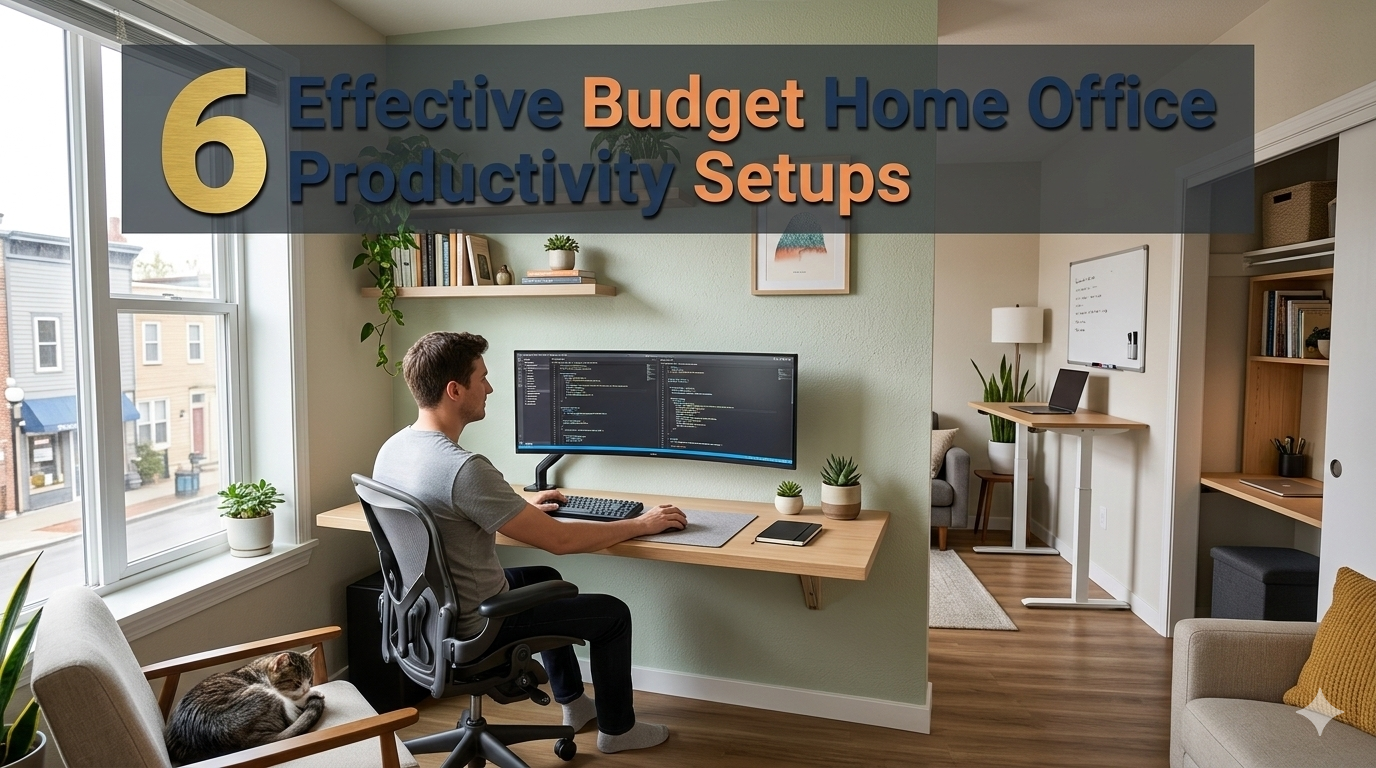
Working from home sounds brilliant — until you find your dining chair is ruining your back, your desk is covered in clutter and you can’t concentrate more than 20 minutes.
The good news? You don’t need to drop thousands into building a home office that’s designed to get you stuff done. Thousands of remote workers, students and freelancers are knocking out goals every day from setups that don’t cost more than a nice dinner.
This guide will detail 6 different budget home office productivity setups that are tried and true, practical with many being simple to setup. Whether your office is a corner in your tiny apartment or a spare bedroom, there’s a setup here that will work for you.
Let’s dive in.
Why Your Home Office Setup Is More Important Than You Think
Before we get into the setups, we want to be clear about one thing: your environment determines your output.
Research in environmental psychology has found that cluttered, uncomfortable or poorly lit workspaces produce a higher level of mental fatigue and less focus. On the other hand, even modest enhancements — an upgraded light source, a designated work zone or just a proper chair — can have a major impact on how much you actually accomplish over the course of the day.
A budget home office productivity setup is more than just saving some cash. It’s about being intentional. It’s about having the right tools and placing them in such an order that takes away any friction and keeps you in the zone.
You don’t need a $1,500 standing desk or a triple-monitor array to get work done. You need the proper basics, configured properly.
What to Seek in Any Budget Home Office Setup
Here are some important considerations to keep in mind when choosing your setup:
| Factor | Why It Matters |
|---|---|
| Ergonomics | Prevents pain, fatigue and long-term injury |
| Lighting | Reduces eye strain and promotes alertness |
| Cable management | Reduces visual clutter and stress |
| Dedicated workspace | Trains your brain to “switch on” during work time |
| Minimal distractions | Keeps your focus focused and quality of work high |
| Comfort | You’ll be spending hours here — it needs to feel nice |
Now let’s get into the real-world setups.
Setup #1 — The $100 Minimalist Corner Desk Build
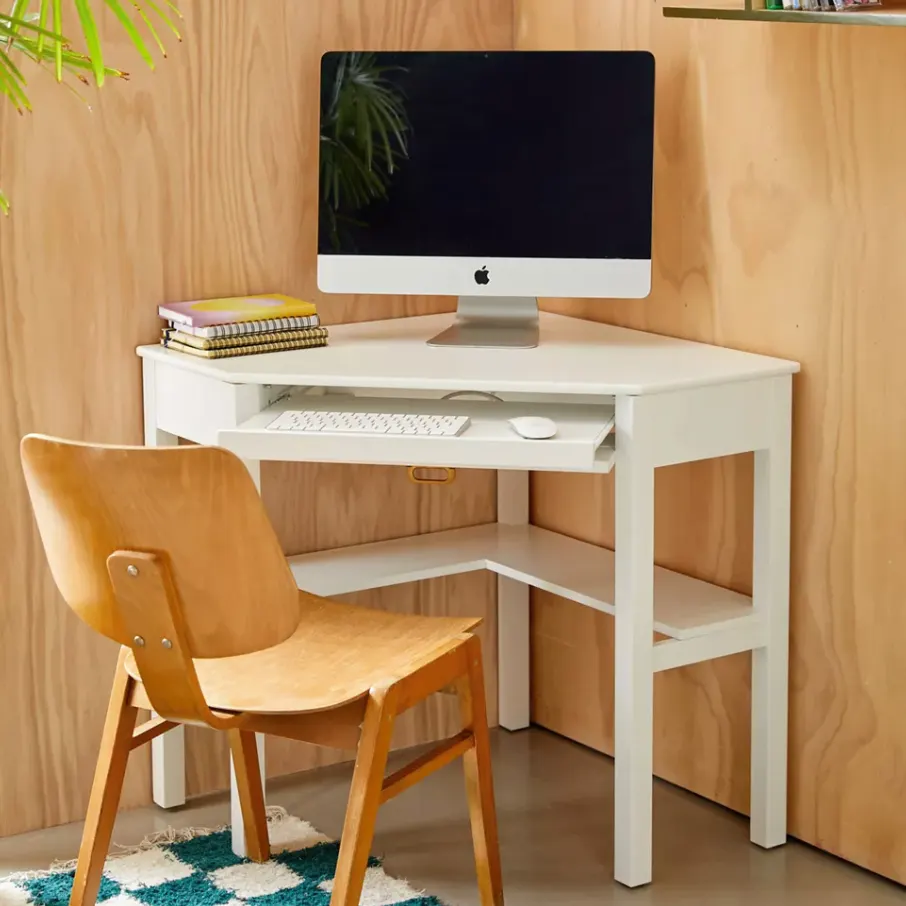
Best for: Students, remote-working novices, micro-apartments
Sometimes less really is more. The minimalist corner setup takes everything back to basics to help you look at only the essentials in your workspace and eliminate distractions.
What You Need
- A basic L-shaped corner desk (IKEA LINNMON + corner bracket combo: ~$40–$60)
- An ergonomic chair or firm cushion to place on an old chair (~$20–$30)
- An adjustable desk lamp (~$15–$20)
- A tiny storage shelf or floating wall shelf (~$10–$15)
- Cord organizers (~$5)
Total estimated cost: $90–$130
How to Set It Up
Try to position your desk in the corner so it feels more open. Only keep your laptop (or monitor), a notebook and one or two pens on the surface. Everything else gets shelved above or dropped in a drawer.
Use your desk lamp to illuminate your workspace from the side (not driving directly into your screen). This one change greatly reduces glare and eye strain.
A minimalist corner setup is effective because it makes you keep your desk clean. Less space means less mess — and less mess means fewer distractions.
Pro Tip
Put a small plant in the corner of your desk. According to research from the University of Exeter, adding plants to a workspace can increase productivity by 15%. A small succulent, which requires virtually no care, costs less than $5.
Setup #2 — The Standing Desk Converter Setup
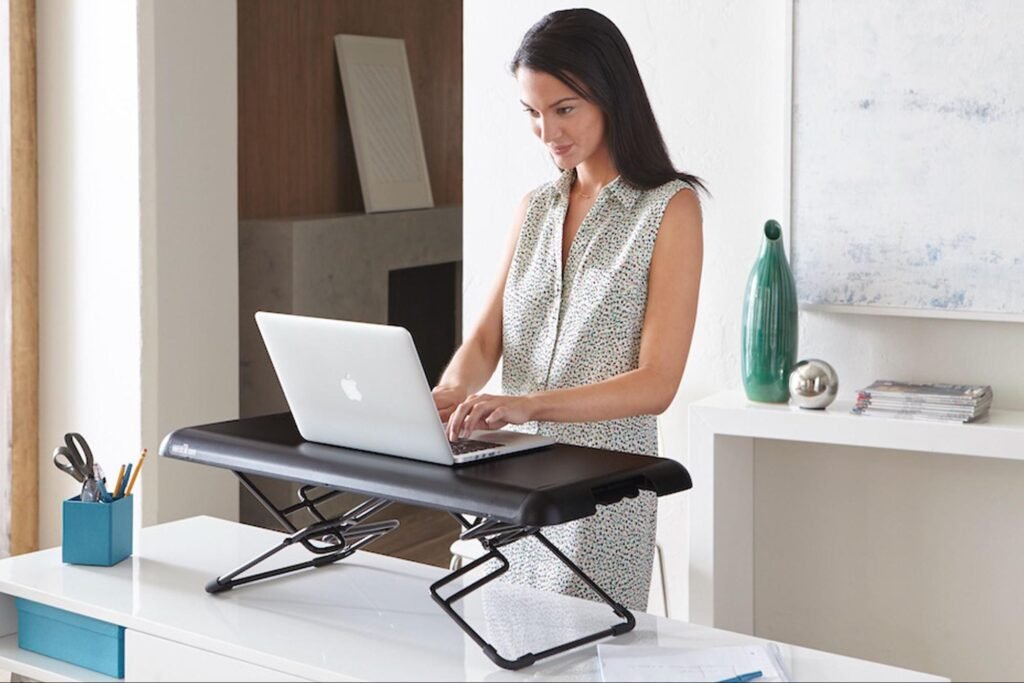
Best for: Back pain sufferers, people who fidget in their seats all day
Just sitting down for over 8 hours a day is really bad for your health. A full standing desk, however, can run $300–$600. That’s not budget-friendly.
Enter the standing desk converter — a contraption that rests on top of your current desk and elevates your monitor and keyboard to standing level.
What You Need
- A standing desk converter (~$40–$70 for a basic model)
- An anti-fatigue mat (~$20–$30)
- Your existing chair and desk
- A monitor arm (not necessary, but useful, ~$20–$25)
Total estimated cost: $60–$125 (if you already have your desk and chair)
Why This Setup Works
The trick to the standing desk converter is not standing all day — it’s mixing sitting with some standing. Research suggests the best ratio: 1 hour standing for every 1–2 hours of sitting.
If you’ll be standing on a regular basis, the anti-fatigue mat is non-negotiable. Standing on a hard floor for prolonged periods causes pain in the legs and lower back every bit as fast as improper sitting does.
The Ideal Daily Schedule
| Time Block | Position |
|---|---|
| 9:00 AM – 10:30 AM | Sitting |
| 10:30 AM – 11:30 AM | Standing |
| 11:30 AM – 1:00 PM | Sitting |
| 1:00 PM – 2:00 PM | Lunch + movement |
| 2:00 PM – 3:30 PM | Sitting |
| 3:30 PM – 4:30 PM | Standing |
| 4:30 PM – 6:00 PM | Sitting |
This uncomplicated routine keeps your body moving without overextending yourself.
Setup #3 — The Bedroom Desk Setup with Two Uses
Best for: Small apartment dwellers, shared living spaces
Not everyone has a spare room available for a home office. If you’re working in your bedroom, the challenge is establishing a distinct mental barrier between “work mode” and “rest mode.”
This configuration addresses that issue and doesn’t need additional space or cost.
What You Need
- A wall-mounted fold-down desk (~$50–$80)
- An inexpensive task chair or bar stool (~$25–$40)
- A room divider or curtain rod + curtain (~$20–$35)
- Blue light blocking glasses (~$15–$20)
- Small USB-powered LED light bar (~$10–$15)
Total estimated cost: $120–$190
The Psychology Behind This Setup
The most critical piece is the room divider. When you hang a curtain up or set up a divider between your sleeping space and your work space, you create a physical signal to your brain.
When the curtain is open and you’re at your desk, your brain recognizes that it’s time to do work. When you shut the curtain and leave the desk, your brain begins to ease.
Sleep experts endorse this boundary-setting technique to keep remote workers from feeling “always at work,” which contributes to burnout.
Fold-Down Desk Advantage
A fold-down desk that mounts to the wall is brilliant for small spots. When you finish working, you fold it up and your bedroom becomes a bedroom again. It’s neat, space-saving and surprisingly robust.
Setup #4 — The High-Focus Noise-Canceling Setup
Best for: Those who live with roommates or family, people with loud homes
Noise is one of the greatest productivity-killers in a home office. Kids, traffic, rowdy roommates, a television in the background — all of these distract you from the work at hand.
You don’t need expensive soundproofing. You need smart noise management.
What You Need
- Budget noise-canceling headphones or earbuds (~$30–$60, brands like Anker Soundcore)
- A white noise machine or free app (apps like MyNoise are free)
- Acoustic foam panels for your desk area (~$15–$20 for a 6-pack)
- A “Do Not Disturb” door sign or simple signal system (~$5 or DIY free)
Total estimated cost: $50–$85
Noise Levels and How They Affect Focus
| Noise Level | Effect on Work Output |
|---|---|
| Under 50 dB (library quiet) | Ideal for focused work |
| 50–70 dB (coffee shop hum) | Okay for creative tasks |
| 70–85 dB (busy restaurant) | Hard to concentrate |
| Over 85 dB (loud street) | Significantly decreases output and increases errors |
A good pair of inexpensive noise-canceling earbuds can reduce ambient noise by 20–30 dB. Paired with a white noise app, you can achieve a near-library-quiet environment virtually anywhere.
What to Play While Working
- White noise or brown noise: Best for deep focus, writing, coding
- Lo-fi music (no lyrics): Good for creative work
- Nature sounds: Best to calm down stress on rough workdays
- Silence: Ideal for reading comprehension tasks
When doing anything involving reading or writing, steer clear of music with lyrics. Your brain, unable to focus on just the lyrics or your work, divides its attention.
Setup #5 — The Budget Dual Monitor Setup
Best for: Multitaskers, content creators, coders, researchers who write as they research
This productivity boost is supported by a study by Jon Peddie Research, which found that the use of two monitors improves productivity by 20–50%. The trouble is a second monitor seems pricey. It doesn’t have to be.
What You Need
- A used or reconditioned 22–24 inch monitor (~$40–$80 on Facebook Marketplace, OfferUp or eBay)
- A dual-monitor stand or arm (~$25–$40)
- An HDMI cable (~$8–$10)
- A USB hub if you require additional ports (~$12–$15)
Total estimated cost: $85–$145 (if you already own one monitor or a laptop)
Setting Up Dual Monitors for High Output
Having monitors is half the battle — their placement matters too.
Option A — Side by Side (equal use): Position both monitors straight in front of you, just at a slight angle. Keep one for your main task and another for reference material.
Option B — Primary + Secondary (one dominant): Keep your primary monitor directly in front of you, and place the secondary monitor slightly to one side. Use the secondary screen for email, Slack or other background apps.
Option B feels more natural to most people because your neck doesn’t keep turning side to side.
Best Software for Dual Monitor Setup
- Microsoft PowerToys (free): Create custom layouts for your open windows on each screen
- DisplayFusion (free basic version): Handles wallpaper and taskbar management across two screens
- Virtual Desktop Manager: Organizes apps across monitors by project
One Important Note
If you use a laptop instead of a PC, just connect your monitor and use the laptop screen as a secondary display. This is one of the cheapest dual-monitor setups you can get — no additional monitor purchase necessary.
Setup #6 — The Entire Productivity Lineup for Under $200
Best for: Those looking for an all-in-one, polished setup that doesn’t require multiple purchases
This is the “let’s get it all done in one shot” setup. It includes ergonomics, focus, lighting, storage and comfort — all under $200.
Full Shopping List
| Item | Estimated Cost |
|---|---|
| IKEA ALEX drawer unit (for desk legs + storage) | $60–$80 |
| IKEA LINNMON tabletop | $15–$20 |
| Budget ergonomic chair (Amazon Basics or similar) | $60–$80 |
| Adjustable LED desk lamp | $15–$20 |
| Cord organizer clips + velcro ties | $5–$8 |
| Small whiteboard or corkboard | $10–$15 |
| Laptop stand or monitor riser | $12–$18 |
| Total | $177–$241 |
You can get this under $200 by shopping sales, buying used furniture or skipping the whiteboard if you favor digital note-taking.
Why This Setup Works Better Long-Term Than the Others
The ALEX drawer unit pulls double duty as a desk leg and storage unit. This is a time-tested classic IKEA hack that’s been a favorite for years because it works. You get a strong and spacious desk with built-in organized storage — no need for additional filing cabinets or bookshelves.
The laptop stand or monitor riser lifts your screen up to eye level, helping you avoid neck strain. You should be looking straight at the top third of your screen. If your screen is too low, you tilt your head down for hours on end, sending tension through the muscles of your neck.
Having a whiteboard next to your desk can significantly help you stay organized. When you sit down, write the top 3 tasks to complete that day. Cross them off when done. This minor habit can help you stay on target without a complicated app or process.
For more inspiration and ideas on building the perfect work-from-home space, check out Remote Work Desk Setup — a dedicated resource for remote workers looking to optimize their home office on any budget.
The 6 Budget Setups Compared Side by Side
| Setup | Best For | Est. Cost | Key Strength |
|---|---|---|---|
| Minimalist Corner | Students, beginners | $90–$130 | Clean, distraction-free |
| Standing Converter | Back pain, restless workers | $60–$125 | Health + energy |
| Bedroom Dual-Purpose | Small spaces | $120–$190 | Work-life separation |
| High-Focus Noise-Canceling | Noisy homes | $50–$85 | Deep focus, fewer interruptions |
| Dual Monitor | Multitaskers, creators | $85–$145 | Speed + efficiency |
| All-in-One Station | Complete setup seekers | $177–$241 | Comprehensive, long-term value |
Minor Upgrades That Matter a Lot
Even if you’re satisfied with your current setup, these little touches can elevate it on the cheap:
A wireless mouse and keyboard (~$20–$30) Going wireless is an instant space saver on your desk. Less cables = less cluttering = clear mind.
A monitor privacy screen (~$15–$25) If you occasionally work in a shared space or coffee shop, a privacy screen limits your work to view only for yourself.
A USB desk fan (~$10–$15) Staying cool and comfortable helps avoid sapping your energy during long hours of work. Overheated rooms cause drowsiness.
A quality mousepad (~$8–$12) A large desk mat or mousepad protects your desk surface, looks clean, and makes mouse movement smoother.
Blue light glasses (~$12–$20) Great for night times when you are working. They also help diminish eye fatigue and can enhance quality of sleep.
Essential Habits to Make Any Setup Work
The truth most people overlook is this: the best setup in the world won’t do you any good if your habits are broken.
These easy everyday habits will go hand-in-hand with your budget home office productivity setup:
Establish a “Work Mode” ritual. Before you sit down, prepare your coffee or tea, put on your headphones and write your top 3 tasks for today. This tells your brain that now it’s time to lock in.
Use the Pomodoro Technique. 25 minutes of focused work and then a 5-minute break. Rest for 20 minutes after 4 rounds. It keeps your brain active without tiring it out.
Keep your desk surface clear. Keep on your desk only what you need for the work that is currently at hand. Everything else goes away. Clutter competes for your attention.
End with a shutdown ritual. At the end of your workday, close your tabs, clean your desk and write down tomorrow’s top 3 tasks. This brief habit helps your brain detach from work when you step away.
Get natural light when possible. If you have the ability, place your desk near a window. Natural light boosts mood, alertness and energy during the day.
FAQs
Q1: How little can I spend to create a productive home office?
If you already have a desk and chair, you can get set up for as little as $50–$80 to be functional and productive. Prioritize lighting and noise management first — both have outsized effects on focus for the tiniest of costs.
Q2: On a budget, is a standing desk really worth it?
Yes — but not a full standing desk. A standing desk converter, for $40–$70, gives you most of the benefits at a fraction of the cost. Sitting and standing alternately throughout the day is the key — not remaining on your feet all day.
Q3: Do I require a second monitor to increase productivity?
Not everyone does. If your work involves multitasking, researching or comparing two documents at the same time, a second monitor will help you get things done much faster. If you primarily do one thing at a time (writing, calls, coding), you might be fine with just one big monitor.
Q4: I live in a small studio apartment with no private room — how do I stay productive?
Use a fold-down wall desk and a room divider or curtain to create a work zone. This physical separation helps your brain draw a line between work time and personal time. At the end of each workday, fold up your desk — this “closing” action indicates the workday is over.
Q5: What is most critical in any home setup?
Ergonomics. You can’t focus if you’re not comfortable. Your chair and your monitor height are where you should start before spending money on anything else. Your back, your neck and your wrists will thank you.
Q6: Is it possible to create a good home office from secondhand goods?
Absolutely. Thanks to Facebook Marketplace, OfferUp, Craigslist and thrift stores, monitors, chairs, desks and accessories are often available for 50–80% off retail price. Many are in near-perfect condition. As always, check chair condition and monitor connections before purchase.
Q7: Can the color of the room boost productivity?
Yes, research suggests it does. Blue hues are associated with calm focus and productivity. Green is associated with creativity and calm. Stay away from red in your workspace — it raises anxiety and a sense of urgency. If you don’t have space to paint, try a desk mat, plant or wall art in a calming color.
Wrapping It All Up
You don’t need a big budget or a perfect room to build a home office that works. It requires intention.
Choose a setup that works for your space, your budget and your work style. Begin with the basics: a clean surface, decent lighting and a place to sit comfortably. Then add layers of improvement as your budget permits.
All 6 budget home office productivity setups included in this guide have been tested, proven and cost-effective. Whether you spend $80 or $240, the end goal is the same — a workspace that enables you to focus and be comfortable so that you can do your best work day in and day out.
Start small. Stay consistent. Your setup will grow with you.
Remember: The best home office is the one you actually work in and like being in — not necessarily the most expensive one.






