

Working from home may sound like a dream — until your kitchen table turns into your desk, your cat turns into your colleague, and you lose your concentration by 10 a.m.
The good news is that you don’t need to shell out thousands of dollars for a workspace that actually works. Cheap home office productivity setups can rival, or even exceed, what corporations spend on corporate-style offices.
This guide runs through 11 budget-friendly home office setups that will enhance your focus, lower stress levels, and save you time every day. Whether you are a student, remote worker, freelancer, or just someone who needs a place to get things done — there’s something here for you.
Let’s create your dream workspace without spending a fortune.
The Importance of Your Workspace Setup — More Than You Realize
Before diving into the setups, it’s good to know why your environment makes such a difference in your work.
Research indicates that messy, dark, or uncomfortable work environments can sap your energy and reduce your productivity by up to 40 percent. On the other hand, a clean, organized, and well-lit area can get you into “work mode” more quickly and keep you there longer.
Your brain reacts to physical cues. When you are in a designated workspace — even a small one — it begins to identify that location with concentration and focus.
The best part? A productive setup doesn’t have to cost a lot. It just requires smart choices.
What Makes a Low-Budget Home Office Setup Work?
Before you spend a single dollar, consider these four fundamentals:
| Element | Why It Matters |
|---|---|
| Lighting | Prevents eye strain and keeps your mind alert |
| Seating | Supports your back and reduces fatigue |
| Organization | Cuts out distractions and saves time |
| Tech | Helps you work efficiently without breaking focus |
Keep these four pillars in mind as you look through each setup below.
Setup #1 — The Minimalist Corner Desk Build
Best for: Small apartments, students, first-time remote workers
Estimated budget: $80–$150
This is an ideal place to get started. All you need is:
- A basic corner desk (the IKEA LINNMON + ALEX combo goes for about $100)
- One monitor or laptop stand
- A basic desk lamp
- A cable management clip strip
The key to this setup is removing everything from the desk that you aren’t actively using. No stacks of paper. No random chargers. Just you, your computer, your lamp, and the task at hand.
How to Make It Even Cheaper
Purchase a used desk off Facebook Marketplace or Craigslist. You should be able to find solid wood desks for $20–$40. Sand it, paint it, and it looks brand new.
A tidy corner setup establishes a physical “boundary” between your work life and home life — even in a small apartment.
Setup #2 — The Standing Desk Converter Setup
Best for: Prolonged sitters, those with back issues, energy-focused workers
Estimated budget: $50–$120
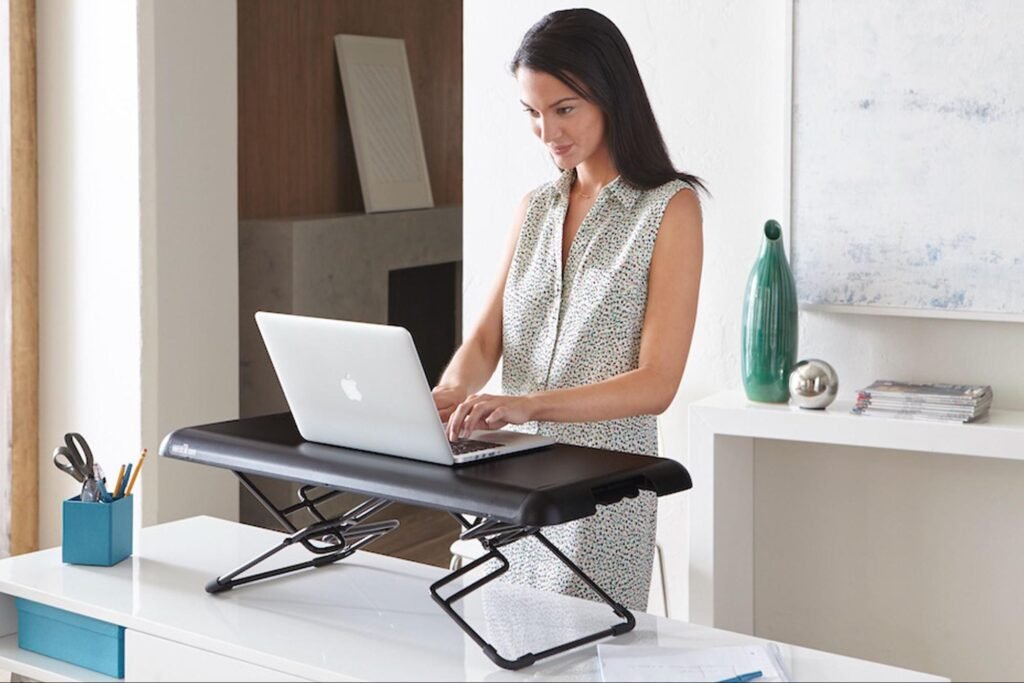
You don’t need a complete standing desk. A standing desk converter lies over your existing surface and allows you to raise or lower your monitor and keyboard easily.
Brands such as VIVO and FlexiSpot make decent converters for less than $100.
Why is standing important for productivity? Research suggests that switching between sitting and standing every 30–60 minutes can:
- Increase energy levels
- Reduce afternoon brain fog
- Improve posture
- Burn slightly more calories (bonus!)
The 30/30 Rule
Stand for 30 minutes, sit for 30 minutes. If you forget, set a timer on your phone. It’s a simple rhythm that keeps blood flowing and your mind sharp all day.
Setup #3 — The Dual Monitor Budget Setup
Best for: Multitaskers, coders, writers, spreadsheet warriors
Estimated budget: $100–$200
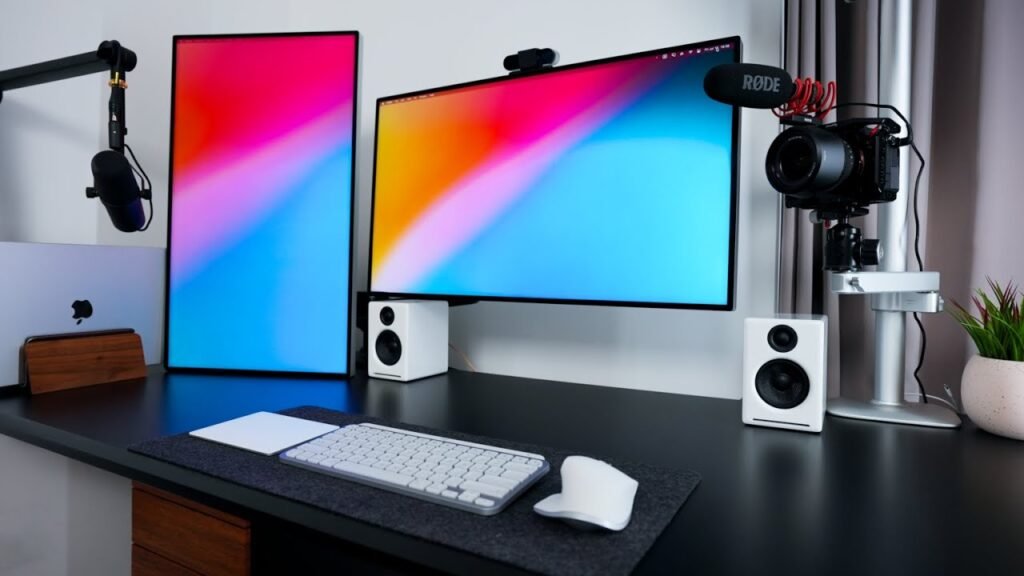
Two screens means double the workspace. And you don’t need two brand-new monitors to make it happen.
Here’s how to do it cheaply:
- Buy one used monitor (24-inch 1080p monitors go for $40–$70 on eBay)
- Use your laptop as the second screen
- Invest in a dual monitor arm (roughly $30–$50) to clear space on your desk
Once you go dual monitor, you can never go back. You can view your email on one screen and your main work on the other. No more tab-switching every two minutes.
The “Focus Screen” Rule
Use one monitor as your focus screen (your active task only) and the other as your reference screen (notes, email, browser). This keeps distractions contained.
Setup #4 — The Cozy Cloffice (Closet + Office)
Best for: Those without extra space, people who want an “off switch” from home life
Estimated budget: $75–$175
A “cloffice” is a closet turned into a home office. This arrangement is surprisingly effective — especially for concentration.
Why? Because you can shut the doors and completely leave work behind at the end of the day.
Here’s what you need:
- Remove the hanging rod and install a floating shelf or small desk
- Use peel-and-stick wallpaper on the back wall ($15–$25 per roll)
- Add LED strip lights or a small clip-on light
- Mount a corkboard or whiteboard on the inside of the door
The Psychological Advantage of a Cloffice
Closing the closet doors tells your brain that work is over. That mental separation is huge for work-life balance — something many remote workers struggle with.
Setup #5 — The Ergonomic Budget Setup
Best for: Anyone who sits 6+ hours a day, people with neck or back problems
Estimated budget: $100–$250
You do not need a $1,200 Herman Miller chair to sit comfortably. Here’s a budget ergonomic setup that will protect your body without emptying your wallet:
| Item | Budget Option | Approximate Cost |
|---|---|---|
| Chair | Hbada or KERDOM ergonomic chair | $80–$130 |
| Monitor riser | Bamboo laptop stand | $20–$30 |
| Keyboard | Logitech MK270 wireless combo | $25–$35 |
| Wrist rest | Memory foam wrist pad | $10–$15 |
| Footrest | Adjustable foam footrest | $15–$25 |
The 90-90-90 Rule for Ergonomics
Adjust your chair height so your hips, knees, and elbows are all at 90-degree angles. Your monitor must be at eye level — not tilting your neck up or down. These small adjustments prevent huge long-term damage.
Setup #6 — The “Wall as a Whiteboard” Productivity Setup
Best for: Visual thinkers, project managers, creatives, students
Estimated budget: $30–$80
If you love brainstorming, mapping ideas, or tracking goals visually, transform your wall into a giant workspace.
Options include:
- Whiteboard paint — Paint your wall with it and the whole surface becomes writable. Costs about $30–$50 per kit.
- Giant whiteboard sheet — Peel-and-stick versions come in at about $20–$35.
- Cork board tiles — Perfect for pinning notes, deadlines, and inspiration. Usually $15–$25 for a set.
Visual workspaces keep your to-do lists and goals constantly in sight. That visibility holds you accountable — which is a huge productivity booster.
Pro Tip: The “Weekly Brain Dump” Wall
Every Monday morning, write your top 3 goals for the week on the wall. Don’t erase them until Friday. It sounds simple, but having those goals physically present all week is a powerful motivator.
Setup #7 — The Noise-Canceling Productivity Setup
Best for: Parents working from home, anyone in a noisy environment, deep-focus workers
Estimated budget: $30–$100
Noise is one of the biggest productivity killers. Even low-level background noise — like traffic, TV, or family conversations — eats into your concentration.
Here’s how to solve it cheaply:
- Budget noise-canceling earbuds: Anker Soundcore Q20 or TaoTronics (~$30–$50)
- White noise machine: LectroFan or a free app on your phone
- Foam acoustic panels: Cheap ones from Amazon run about $15–$25 for a small pack
- Heavy curtains: These muffle outside sound and help with lighting control too
You don’t need all of these. Even just a decent pair of earbuds with a white noise playlist on Spotify can dramatically improve focus.
Setup #8 — The “Phone-Free Zone” Focus Setup
Best for: Anyone addicted to scrolling, those who struggle with distraction
Estimated budget: $0–$20
This one costs almost nothing — and it might be the highest-ROI setup on this entire list.
The idea is simple: your phone does not belong at your desk.
Studies from the University of Texas found that even having your phone face-down on your desk reduces your available brain power. Just its presence is distracting.
Here’s the setup:
- Buy a small charging dock or basket ($10–$20) and place it across the room
- Set your phone to “Do Not Disturb” or “Focus Mode” during work hours
- Use a physical timer (like a simple kitchen timer) at your desk instead
The 25-Minute Phone-Free Sprint
Work in 25-minute blocks with zero phone access. This is the classic Pomodoro Technique — and it works incredibly well when your phone is physically out of reach.
Setup #9 — The Natural Light + Plant Power Setup
Best for: People who feel drained or unmotivated working indoors
Estimated budget: $20–$60
Natural light is one of the most underrated productivity tools. Sitting near a window can improve mood, alertness, and sleep quality — all of which feed directly into how well you work.
If you don’t have great natural light, here’s the fix:
- Daylight LED bulb (5000K color temperature) for $8–$15 — mimics sunlight
- Small desk plant — Snake plants, pothos, or succulents cost $5–$15 and require almost no care
- Sheer curtains — Let in light while reducing glare ($15–$25)
Why Plants Actually Help You Work Better
NASA research has shown that indoor plants reduce stress and improve air quality. A small plant on your desk isn’t just decoration — it’s a productivity tool. For more ideas on how your physical setup affects performance, check out this comprehensive guide to remote work desk setups that covers everything from lighting to layout.
Setup #10 — The Cable-Free Wireless Setup
Best for: People who feel cluttered, those who need a clean visual space
Estimated budget: $50–$120
Nothing kills the feeling of a productive workspace faster than a tangle of cables.
Going wireless eliminates visual noise and makes your desk feel spacious and calm. Here’s the gear:
- Wireless keyboard + mouse combo: Logitech MK295 (~$35)
- Wireless charging pad: Anker 10W pad (~$15)
- Bluetooth speaker or earbuds: JBL Go or Soundcore (~$20–$35)
- Cable management box for your power strip (~$15–$20)
A clean desk is a calm desk. And a calm desk is a productive desk. This one change alone can shift how you feel about sitting down to work.
Setup #11 — The Dual-Purpose Budget Studio Setup
Best for: Content creators, teachers, online tutors, frequent video callers
Estimated budget: $100–$200
If your work involves video calls, recording content, or teaching online — your visual and audio setup matters more than your desk.
Here’s a smart, budget studio-style home office:
- Ring light or key light: Elgato Key Light Air or a cheap ring light (~$30–$60)
- USB microphone: FIFINE K669B (~$30–$40) for dramatically better audio
- Backdrop: A solid-colored curtain or wall (no need to buy a real backdrop)
- Webcam: Logitech C920 (~$60–$80) if your laptop camera isn’t good enough
Why Audio Matters More Than Video
On video calls, bad audio is more distracting than bad video. According to research published by Stanford, poor audio quality is one of the leading causes of video call fatigue. Invest in a decent USB mic before you worry about a fancy camera. People will notice — and appreciate — the difference immediately.
Quick Comparison: All 11 Setups at a Glance
| Setup | Best For | Budget Range |
|---|---|---|
| Minimalist Corner Desk | Small spaces, beginners | $80–$150 |
| Standing Desk Converter | Back pain, low energy | $50–$120 |
| Dual Monitor | Multitaskers, coders | $100–$200 |
| Closet Office (Cloffice) | No spare room | $75–$175 |
| Ergonomic Setup | Long work hours | $100–$250 |
| Wall Whiteboard | Visual thinkers | $30–$80 |
| Noise-Canceling Setup | Noisy environments | $30–$100 |
| Phone-Free Zone | Distraction-prone workers | $0–$20 |
| Natural Light + Plants | Mood and motivation | $20–$60 |
| Wireless/Cable-Free | Clean desk lovers | $50–$120 |
| Dual-Purpose Studio | Creators, video calls | $100–$200 |
How to Pick the Right Setup for You
Not sure which setup to start with? Ask yourself these three questions:
1. What’s my biggest problem right now?
- Distracted? → Setup #8 (Phone-Free Zone)
- Back pain? → Setup #5 (Ergonomic) or Setup #2 (Standing Converter)
- No space? → Setup #4 (Cloffice)
- Video calls? → Setup #11 (Studio)
2. What’s my actual budget? Start with what you can afford. Even the $0–$20 Phone-Free Zone setup can transform your workday.
3. Can I combine setups? Absolutely. Many of these work together. A Minimalist Corner Desk + Wireless Setup + Natural Light combo costs under $200 total and covers almost everything you need.
5 Mistakes to Avoid When Building a Cheap Home Office
Even with a tight budget, some mistakes can actually hurt your productivity. Watch out for these:
- Buying a chair that’s too cheap — A $30 plastic chair will destroy your back in weeks. Spend at least $80 on a proper ergonomic chair.
- Working in a high-traffic area — If people walk by constantly, you’ll never reach deep focus. Find a quieter spot.
- Using harsh overhead fluorescent lighting — This creates glare and headaches. Use a desk lamp instead.
- Skipping cable management — It takes 20 minutes and costs $10. Just do it.
- Copying someone else’s setup exactly — What works for a YouTuber with a huge desk won’t work in a tiny studio apartment. Build for your needs.
Frequently Asked Questions
What is the cheapest home office setup that still boosts productivity?
The cheapest effective setup is the Phone-Free Zone (Setup #8), which costs between $0 and $20. Simply removing your phone from your desk and using a physical timer can dramatically improve your focus and output — no expensive gear required.
How much should I realistically spend on a home office setup?
You can build a solid, productive home office for $100–$250. Prioritize seating and lighting first. These two elements have the biggest impact on how long and how comfortably you can work.
Can I build a productive home office in a small apartment?
Yes, absolutely. The Cloffice (closet office) setup and the Minimalist Corner Desk setup are both designed specifically for small spaces. You don’t need a separate room — just a dedicated corner or converted closet.
Is a standing desk worth it on a budget?
Yes — especially if you sit for long hours. You don’t need a full standing desk. A standing desk converter ($50–$120) placed on top of your existing surface gives you all the benefits at a fraction of the cost.
What’s the single most important item in a home office setup?
Your chair. You’ll spend hours in it every day. A poor chair leads to back pain, discomfort, and a constant urge to get up and stop working. Don’t cut corners on seating — even on a budget, aim for a proper ergonomic option.
Do plants actually help productivity?
Yes, research supports it. Plants have been shown to reduce stress, improve air quality, and create a calmer, more focused atmosphere. A single small plant ($5–$15) on your desk is one of the best cheap investments you can make for your workspace.
How do I reduce noise in my home office without soundproofing?
Start with noise-canceling earbuds or headphones and a white noise app on your phone. These two things together cost under $50 and block out most household noise. For extra help, add foam acoustic panels or heavy curtains to the room.
Wrapping It All Up
Building a productive home office doesn’t have to drain your savings. As you’ve seen, many of the best cheap home office productivity setups cost less than a dinner out — or nothing at all.
The key is to start small, focus on your biggest problem first, and build up over time.
Here’s a simple action plan to get started today:
- Pick your biggest productivity blocker (distraction, discomfort, clutter, noise)
- Choose the setup that solves it from the list above
- Set a budget you’re comfortable with
- Build it this weekend — don’t wait for the “perfect” moment
Your workspace shapes how you think, how you feel, and how much you get done. Even small changes — a new lamp, a phone-free rule, or a secondhand desk — can make a real difference starting on day one.
The best home office isn’t the most expensive one. It’s the one that works for you.
Have a favorite budget home office tip that didn’t make the list? Try combining two or three of these setups — your ideal workspace might just be a creative mix of a few simple ideas.






